
Create: Storage Better Jetpack
Reworked the Create: Storage jetpack upgrade. Highly mobile, highly controllable, and entirely client-side.
截图
介绍
This mod reworks the jetpack flight controls in Create: Storage, which are severely lacking in polish. For example, the strange acceleration design that takes only 4 frames to go from a standstill to full speed, the excessive inertia when slowing down, and the difficult-to-control Elytra flight.
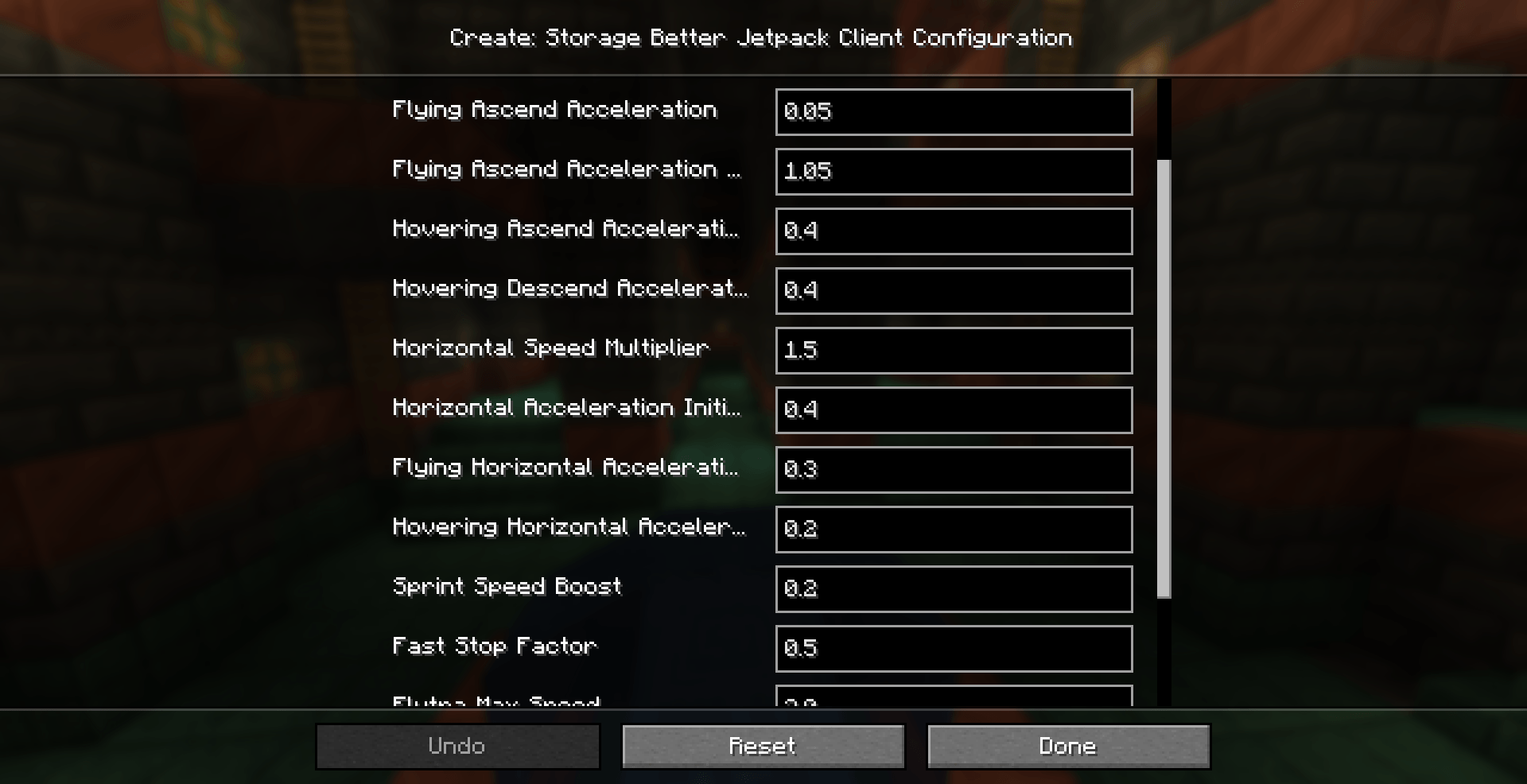
As shown in the image, this mod provides highly configurable flight parameters, allowing players to freely adjust all aspects of flight. With the default settings, acceleration always follows a slow-to-fast curve, allowing players to fine-tune their position with a single tap of the movement keys. The maximum speed is also significantly increased. When no movement input is given, the speed rapidly drops to 0, making the player far more agile at both high and low speeds.
Similar to the ALTERNATE hover mode added in version 1.3.1+ of the original mod, players can freely ascend and descend while hovering without leaving the hovering state. Hover descent can be bound to a dedicated key, with support for single-tap, double-tap, and hold activation modes.
Additionally, this mod changes how flight key inputs are handled, fixing an issue where jetpack flight inputs could not be suppressed while using FreeCam.
It also allows players to exit Elytra flight by sneaking.
This mod was developed against Create: Storage 1.3.0. It has also been tested to work with newer versions(note: provided that the ALTERNATE hover mode introduced in version 1.3.1+ is not enabled).
Warning: Although this is a purely client-side mod, please do not use it on a server without the server administrator’s permission.
常见问题
Create: Storage Better Jetpack 支持哪些 Minecraft 版本?
Create: Storage Better Jetpack 支持 Minecraft Java 版 1.21.1,可用的加载器:NeoForge。下载时注意选择和你游戏版本一致的文件。
Create: Storage Better Jetpack 怎么安装?
先用 PCL2 或 HMCL 启动器安装对应版本的 NeoForge,再把下载的 .jar 文件放进游戏目录的 mods 文件夹,重新启动游戏即可。开启了版本隔离的,mods 文件夹在 versions/版本名 下面。
Apertyotis 的其他作品
查看全部 →
Create: Andesite Abound
为 Create: The Brass Concerto 制作的附属模组,带来玩法改进、漏洞修复和性能优化。

Custom Machinery Refork
热门模组 CustomMachinery 的另一个分支版本

Create Wheels Upon Chairs
为机械动力带来一系列便捷功能、性能优化、漏洞修复和旧版功能移植。

Create: Just Enough Time
Display all recipe processing times from Create and calculate them automatically.
评论
登录后评论和评分