Create: Stock Instant Craft
Adds a Stock Crafter that crafts directly from connected Item Vaults and other storage on your Create stock network using a real, automatically refilling 3×3 grid.
截图
介绍
Create: Instant Stock Crafting
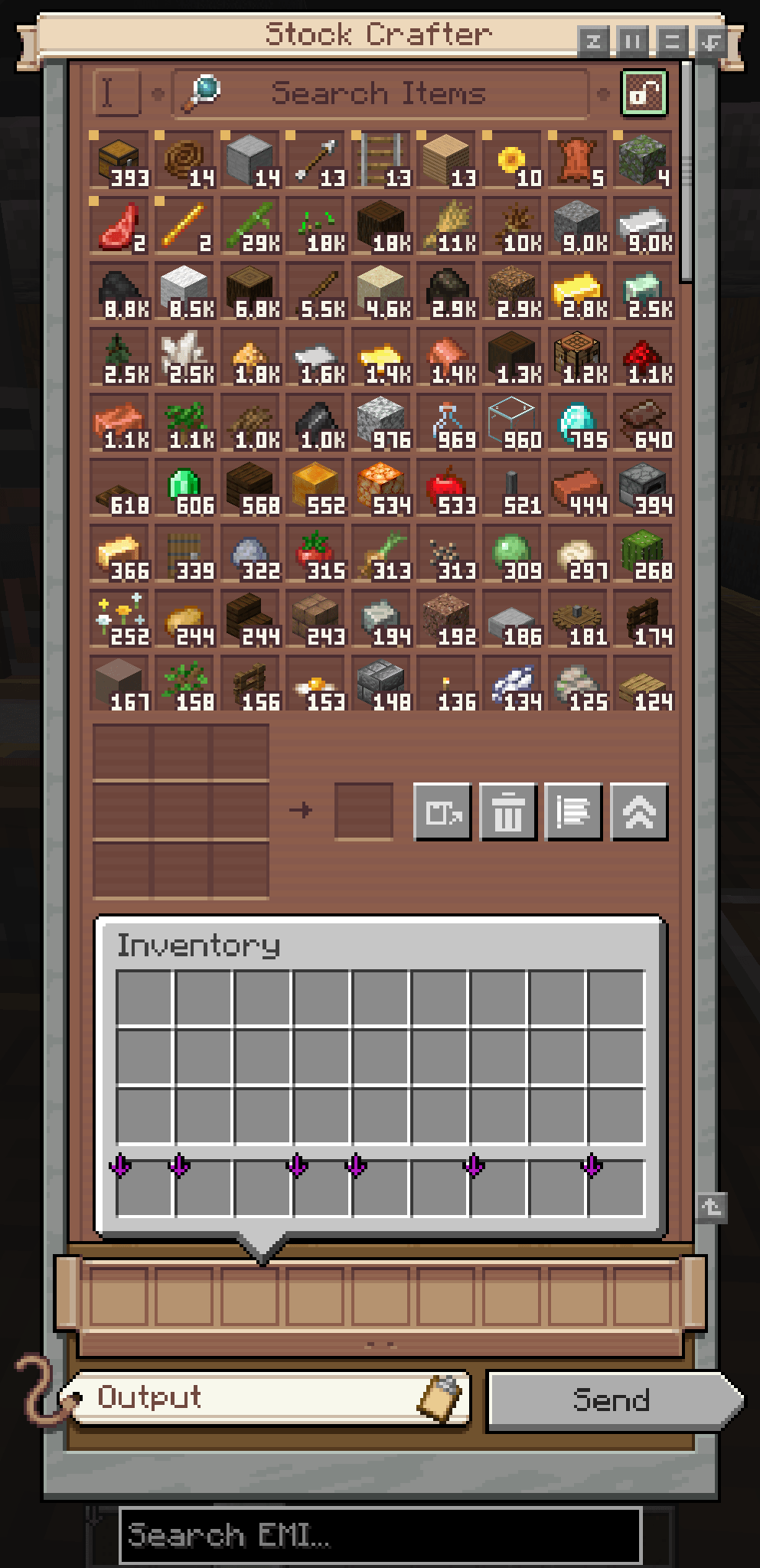
Create: Instant Stock Crafting adds a dedicated Stock Crafter that lets you craft directly from the inventories connected to a Create stock network.
The Stock Crafter combines Create’s stock network with a real 3×3 crafting grid, allowing you to craft directly with items stored in connected inventories such as Item Vaults. After each craft, used ingredients are automatically pulled from the network to refill the grid.
Features✅
- A real 3×3 crafting grid inside Create’s stock interface
- Direct access to Item Vaults and other connected storage inventories
- Automatic item refilling after every craft
- Grid cells turn green when the network can refill them and red when it cannot
- Send crafted items directly into the stock network
- Return unused items to storage, with overflow returned to the player (trash button or the
Ckey) - NEW: Filter categories – split the stock listing into your own sections with filters, just like on a Stock Keeper
- Wireless Stock Crafter – open a bound Stock Crafter from a distance (64 blocks by default, configurable)
- JEI/TMRV and EMI recipe transfer support, showing exactly which ingredients are missing
- Shift-click to move one stack directly into your inventory.
- Scroll over a stored item while holding a stack to store or take one item at a time.
- Middle-click to pin or unpin an item. Pinned items always remain at the Top.
- Use the sort button to switch between quantity (highest item amount first) and name (A–Z).
- Optional integration with Create: Factory Controller Production Orders
How to use⚙️
- Craft the Stock Crafter out from a Stock Ticker, Precision Mechanism, and Crafting Table.
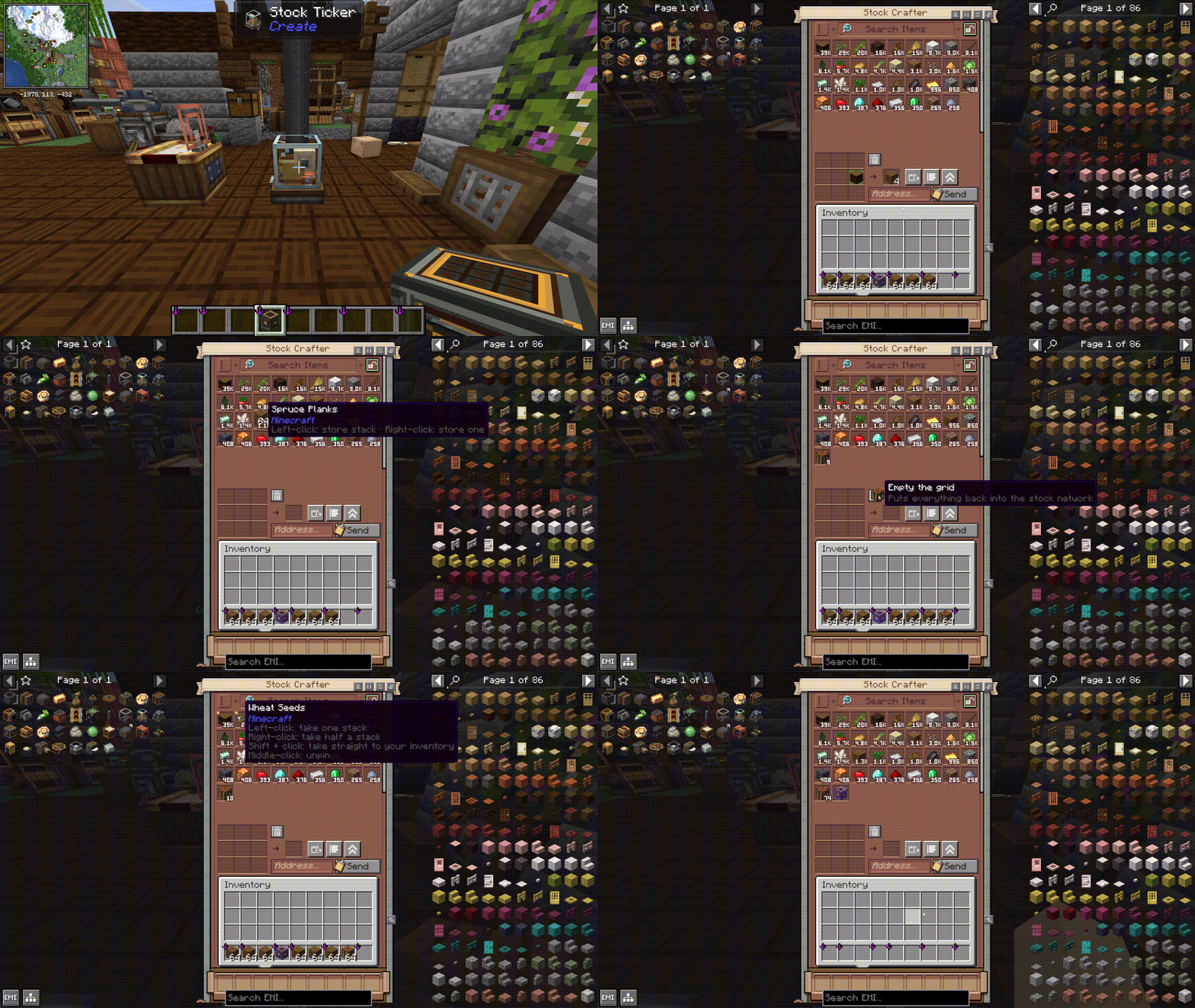
- Hold the Stock Crafter in hand and right-click a block on the Stock network like Stock Ticker to link it.
- Place and open the Stock Crafter.
- Crafting manually or transfer a recipe with JEI/TMRV or EMI.
- Click to craft once, or Shift-click to craft a full stack.*
- Use the network button to Craft items directly into connected storage.*
- Use the trash button (or press
C) to clear the crafting grid. - Use the categories button to add filter sections to the stock listing (stand within 4 blocks of the Stock Crafter).
- Use the view button to switch to Create’s Stock Keeper or compatible Production Orders screen.
Wireless Stock Crafter📡
- Craft it from a Transmitter, Precision Mechanism, and Brass Sheet.
- Sneak + right-click a Stock Crafter to bind it.
- Right-click anywhere to open the bound Stock Crafter from a distance.
- Everything in the crafting grid works remotely. Ordering packages is only available at the block.
Requirements🖥️
- Minecraft 1.21.1
- NeoForge 21.1.229 or newer
- Create 6.0.10 or newer — required
- Java 21
- Install on both client and server
JEI or EMI is not required, but it is recommended. Recipe transfer makes it much faster to fill the crafting grid from items stored across the stock network.
Create: Factory Controller is also optional. When installed, the Stock Crafter can hand its current ingredients directly to the Production Orders screen.
Credits and licensing
Create: Instant Stock Crafting is an independent addon for Create and is not affiliated with or endorsed by the Create Team.
Portions of the Stock Crafter interface are adapted from the MIT-licensed Create codebase:
Optional compatibility is provided for Create: Factory Controller:
No graphical, audio, or other binary assets from Create or Create: Factory Controller are bundled with this addon.
Create: Instant Stock Crafting is licensed under the MIT License.
常见问题
Create: Stock Instant Craft 支持哪些 Minecraft 版本?
Create: Stock Instant Craft 支持 Minecraft Java 版 1.21.1,可用的加载器:NeoForge。下载时注意选择和你游戏版本一致的文件。
Create: Stock Instant Craft 怎么安装?
先用 PCL2 或 HMCL 启动器安装对应版本的 NeoForge,再把下载的 .jar 文件放进游戏目录的 mods 文件夹,重新启动游戏即可。开启了版本隔离的,mods 文件夹在 versions/版本名 下面。
byFLX 的其他作品
查看全部 →
Create: Factory Routing
Route each ingredient in a Create Factory Gauge recipe to its own target address — with native Create behavior and optional Factory Controller compatibility.

Easy Quarry
A powerful, lag-free quarry with a simple GUI, huge range (up to 512x512), ore filters, and Fortune/Silk switchable. Make Mining Easy again
评论
登录后评论和评分