
Create Aeronautics: Stabilized
Create Aeronautics doesn't have enough stabilization mechanisms
截图

介绍
Create: Stabilized
There is no good way to stabilize a part of a simulated contraption in a simple and compact manner. Unless you are using this mod, as it adds one way to do that.
Stabilizer Bearing
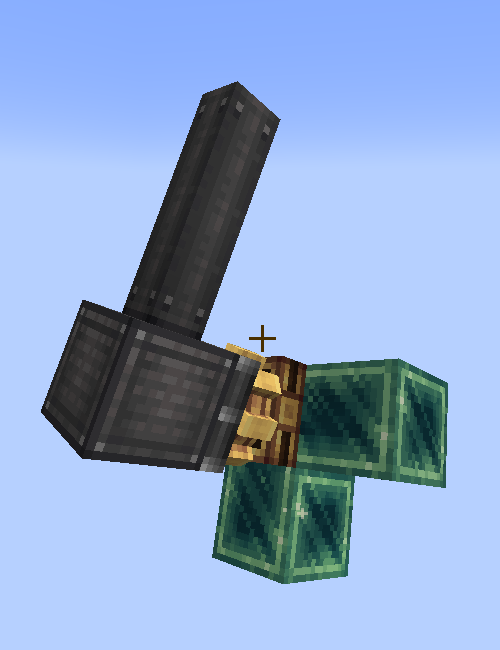
Using this bearing, you will be able to stabilize a sub-contraption. Of course if the Stabilizer bearing is not simulated itself, it will just point the attached contraption upwards (or straight forward depending on the placement).
If you use it on a simulated contraption though, the attached contraption will be rotated to point up relative to the axis, no matter the rotation.
When you rotate the cogwheel of the bearing, it will change the offset angle (if the offset angle is 180°, the attached contraption will point down instead of up)
More content is planned, be patient.
常见问题
Create Aeronautics: Stabilized 支持哪些 Minecraft 版本?
Create Aeronautics: Stabilized 支持 Minecraft Java 版 1.21–1.21.11,共 12 个版本,可用的加载器:NeoForge。下载时注意选择和你游戏版本一致的文件。
Create Aeronautics: Stabilized 怎么安装?
先用 PCL2 或 HMCL 启动器安装对应版本的 NeoForge,再把下载的 .jar 文件放进游戏目录的 mods 文件夹,重新启动游戏即可。开启了版本隔离的,mods 文件夹在 versions/版本名 下面。运行环境:客户端和服务端都要装。
ARMURIII 的其他作品
查看全部 →
Beta Jappa Textures
Re-adds Jappa's Beta textures!

Goated with a sauce
re-adds the copper horns from bedrock preview, and adds more features for Goat horns

Beaconated
A Machinery Mod based around Beacons!

Connected Observer
Connect all the sides of the observer!
评论
登录后评论和评分