
Create: Molten Vents
Adds a renewable source of the orestones found in the Create mod, and by extension, many resources.
截图
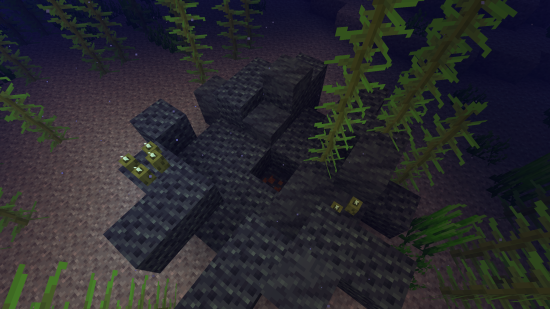
介绍
Molten Vents is a mod which adds a renewable source of the orestones found in the Create mod, and by extension the many resources that can be processed from them.
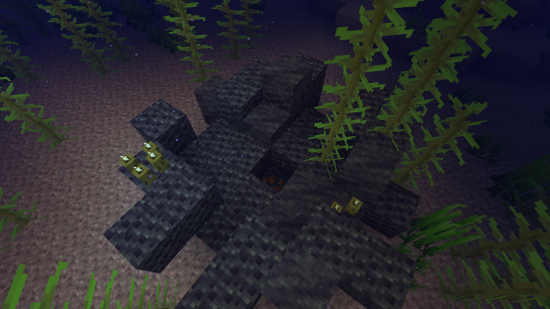
How to use:
- Locate a vent; Vents are found anywhere on the surface, but are more easily found underwater. (Configurable)
- Dig out the blocks inside of the vent until you find a block that looks like the orestones the vent is made of except with magma on it, that is the dormant orestone.
- Explode the dormant orestone by any means.
- Notice that the dormant molten vent is now an active molten vent by seeing the magma in it become brighter.
- Dump lava (preferrably via an automated method) on the active molten vent and watch as the lava turns into the corresponding orestone.
- Process the orestones into resources, or use them for building.
Default Vents:
- Veridium Vent
- Asurine Vent
- Crimsite Vent
- Ochrum Vent
- Scorchia Vent
- Scoria Vent
How to add a custom molten block
Just add the name of the block to this list (a .json file that generates in the config folder)
{"values":["asurine","veridium","crimsite","ochrum","scorchia","scoria","exampleblock"]}And then depending on your modloader:
Neoforge
- Copy paste any other file in the config/molten_vents/conductive & config/molten_vents/convertible folders.
- Rename the files to the name of the custom block.
- Change values inside the files (Conductive is a list of blocks the molten vent can convert blocks through, it must contain the active molten vent at minimum. Convertible is a list of blocks the molten vent can convert into the new block. (ex. lava -> asurine))
Forge
Make a datapack that adds these two jsons:
data/molten_vents/molten_vents/blocks/conductive/exampleblock.json (You can add whatever blocks you want here but definitely include these three)
{
  "replace": false,
  "values": [
    "examplemodthataddsblock:exampleblock",
    "molten_vents:dormant_molten_exampleblock",
    "molten_vents:active_molten_exampleblock"
  ]
}
data/molten_vents/molten_vents/blocks/convertible/exampleblock.json (The lava can be changed to any other block and other blocks can be additionally added)
{
  "replace": false,
  "values": [
    "minecraft:lava"
  ]
}
Example datapack can be found in the #datapacks channel in the discord (https://discord.gg/HHqKa8vTAN))
Then make a resourcepack that adds the name translations, blockstates, models, and textures for “molten_vents.active_molten_exampleblock” and “molten_vents.dormant_molten_exampleblock” (optional)
How to make a custom molten vent feature
Just recreate your own copy of the placed and configured feature jsons available in the base mod in the respective directories within your own datapack:
data/yourdatapackname/worldgen/configured_feature/examplevent.json
data/yourdatapackname/worldgen/placed_feature/examplevent.json
Then add your placed feature to the forge biome modifiers:
data/yourdatapackname/forge/biome_modifier/add_vents.json
Examples are here:
Discord: https://discord.gg/HHqKa8vTAN
This mod may be used in any modpack.

常见问题
Create: Molten Vents 支持哪些 Minecraft 版本?
Create: Molten Vents 支持 Minecraft Java 版 1.18.2–1.21.8,共 18 个版本,可用的加载器:Forge / NeoForge。下载时注意选择和你游戏版本一致的文件。
Create: Molten Vents 怎么安装?
先用 PCL2 或 HMCL 启动器安装对应版本的 Forge / NeoForge,再把下载的 .jar 文件放进游戏目录的 mods 文件夹,重新启动游戏即可。开启了版本隔离的,mods 文件夹在 versions/版本名 下面。运行环境:客户端和服务端都要装。
Apothicon 的其他作品
查看全部 →
Astrological (End Terrain & Biomes)
Overhauling the end with new terrain generation and blocks.

Ecospherical Expansion
Overhauled generation to the biomes of the Overworld.

Stratospherical Expansion
The floating island world type reimagined.

Glore
Glowing ores & armor trims.
评论
登录后评论和评分