
介绍
Improve your Iron & Steel equipment with Zinc! Galvanization adds much more durability and a bit more enchantability to tools and armor.
Getting Started
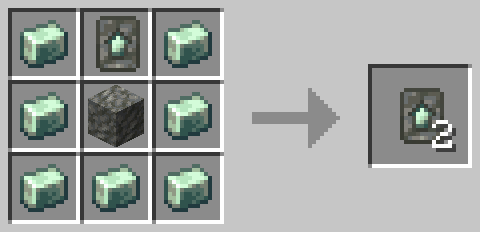
First you’ll need to get a Galvanized Upgrade Smithing Template, which can be obtained from mineshafts, village blacksmith or pillager outpost chests. Once you have it, it can easily be duplicated with Zinc Ingots and Tuff.
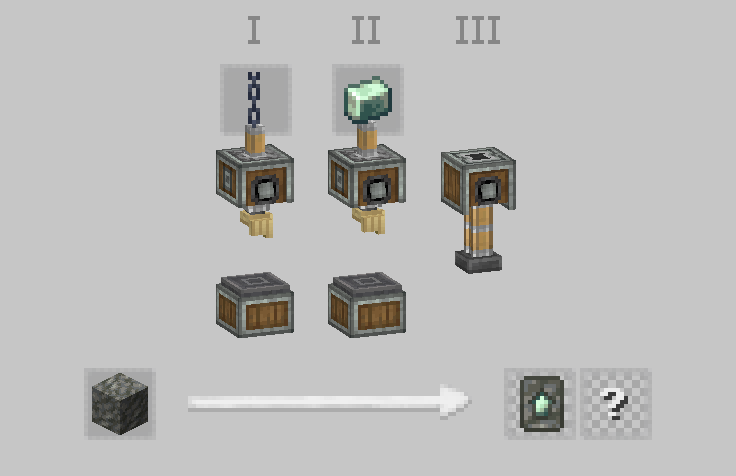
It can also be created from scratch using a sequenced assembly recipe.
To upgrade your equipment, simply put it in a Smithing Table along with the template and a Zinc Ingot.
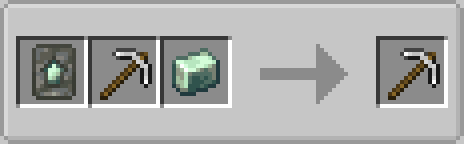
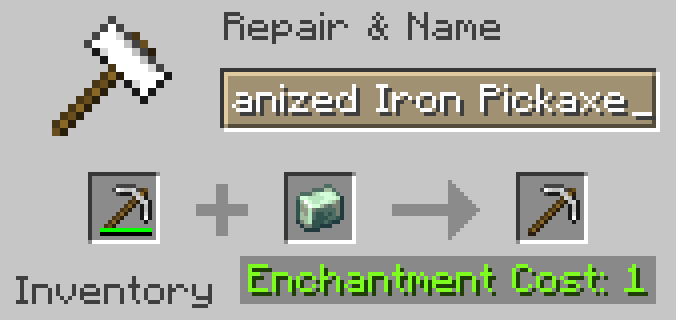
Galvanized equipment can also be repaired with Zinc Ingots alongside their default repair material (configurable via tag).
Galvanization is generally more effective on tools than armor. While galvanized tools have 60% more durability, galvanized armor only has about 33% more, however it does have a slightly higher enchantability bonus.
Requirements:
Create (required). For galvanized Steel equipment, you will need Create: Alloyed (optional).
常见问题
Create: Galvanized 支持哪些 Minecraft 版本?
Create: Galvanized 支持 Minecraft Java 版 1.20.1,可用的加载器:Forge。下载时注意选择和你游戏版本一致的文件。
Create: Galvanized 怎么安装?
先用 PCL2 或 HMCL 启动器安装对应版本的 Forge,再把下载的 .jar 文件放进游戏目录的 mods 文件夹,重新启动游戏即可。开启了版本隔离的,mods 文件夹在 versions/版本名 下面。运行环境:客户端和服务端都要装。
SkellaTex 的其他作品
查看全部 →
Create: Alex’s Caves Compat
添加机械动力与Alex's Caves之间的兼容性

Create Dough Compat (CDC) [MOD ver.]
Simply replaces Create's dough with Farmer's Delight dough

Woodworks Quark Compat
Adds Sawmill recipes for Quark's wood types and resolves recipe overlap.
Endelurgy
Adds new ores, resources and improves upon the End
评论
登录后评论和评分