Create: Employees
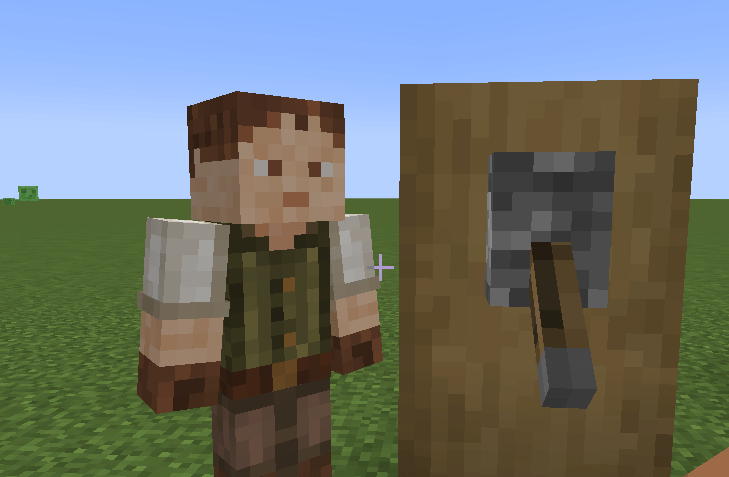
Create Employees adds new humanoid NPCs that can patrol 2 positions, guard a position, travel to distant coordinates, flip levers and buttons or even move items for you with optional item filters.
截图
介绍
Create Employees — little helpers for your world
**If you’re an experienced modder and want to collaborate together and flesh this mod out into its full potential please contact me within the comments section of this mod!**
Create Employees adds simple, friendly “Runners” you can hire to patrol, guard, and haul items between inventories. No complicated setup, no required dependencies — just hand them their orders and watch them work.
This is my first mod. I originally built it around the Create ecosystem, but I scrapped the hard dependency so anyone can use it, even on lightweight modpacks or vanilla-plus servers. If you do have Create, Runners play nicely with most inventories thanks to standard Forge item handler support.
What they can do
-
Patrol between two points.
-
Guard a single point.
-
Travel to specific coordinates
-
Work (haul items) from a Source inventory to a Destination, honoring a filter you control (whitelist/blacklist or disabled).
-
Fight while patrolling or guarding. They spot nearby hostile mobs and switch to a faster combat pace.
How to give orders
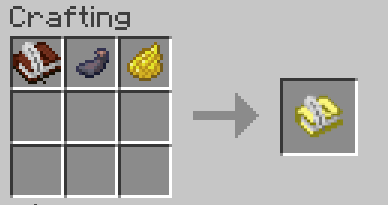
Craft Order Papers: 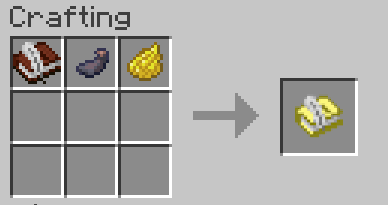
All direction comes from the Orders Paper:
-
Shift + Right-click a block → set Source.
-
Right-click a block → set Destination.
-
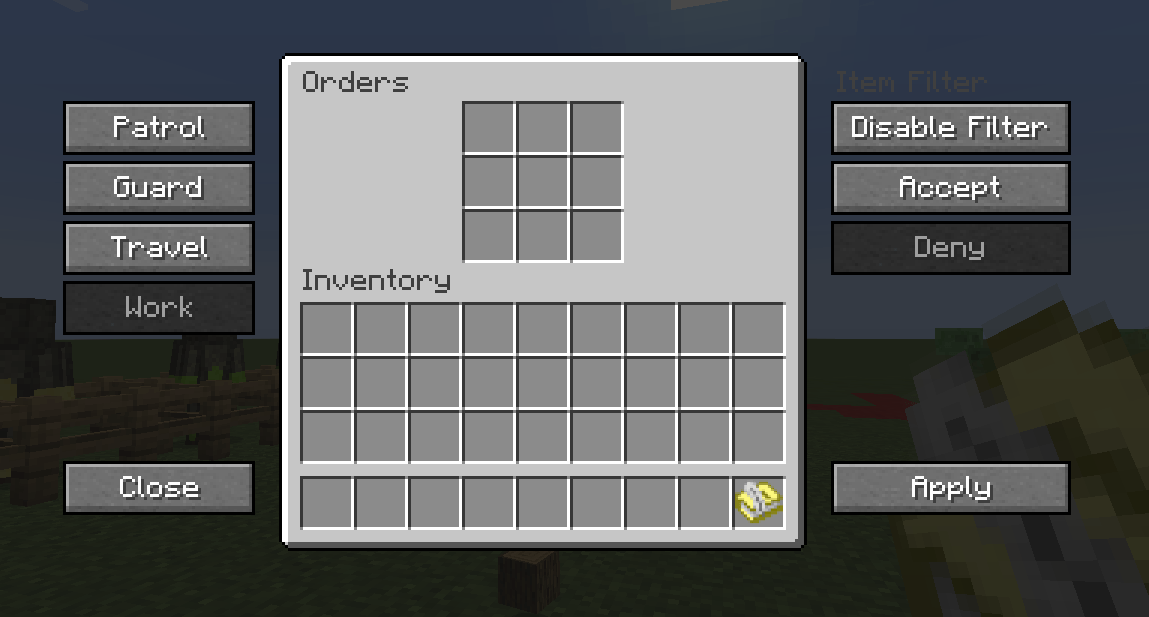
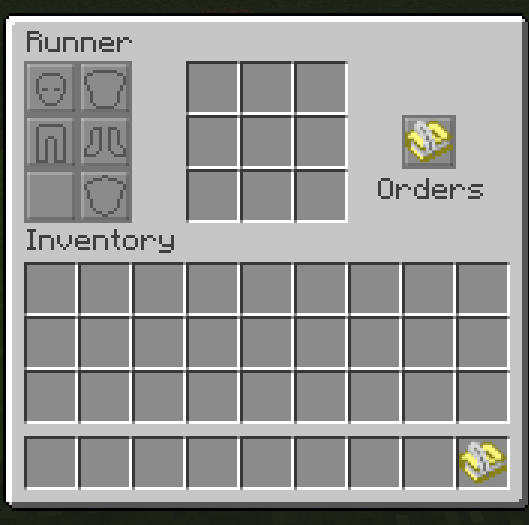
Shift + Right-click air (not pointing at a block) → open the Orders GUI.
Apply your source and destination, as well as your order type.
Drop the Orders Paper into a Runner’s orders slot. They’ll poll it and update behavior on the fly.
Orders GUI highlights
-
Modes: Patrol, Guard, Travel, Work.
-
Travel: enter X/Y/Z for a one-time move.
-
Item Filter: toggle Enabled/Disabled; pick Accept (whitelist) or Deny (blacklist) and drop example items to define the rule.
Hiring options
Recruitment Horn (cooldown ~10 minutes)
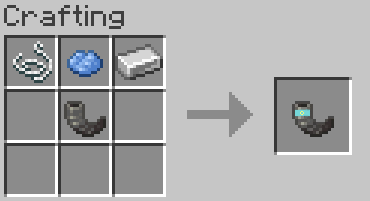
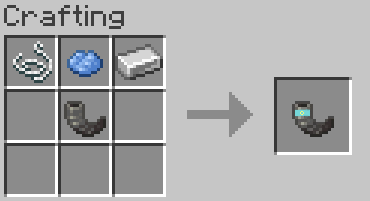
Craft the Recruitment Horn, blow it like a goat horn (uses the “Sing” call), and a fresh Runner answers.
Runner Robot Kit (craftable, place like a spawn egg)
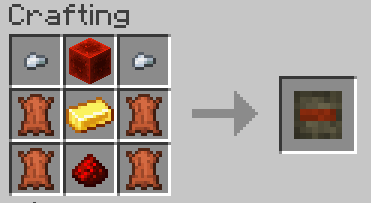
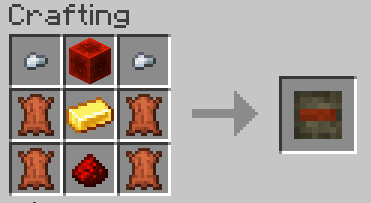
Want automation? Craft a Runner Robot Kit to place a Runner Robot. Perfect for factories, warehouses, and mass employment deployment.
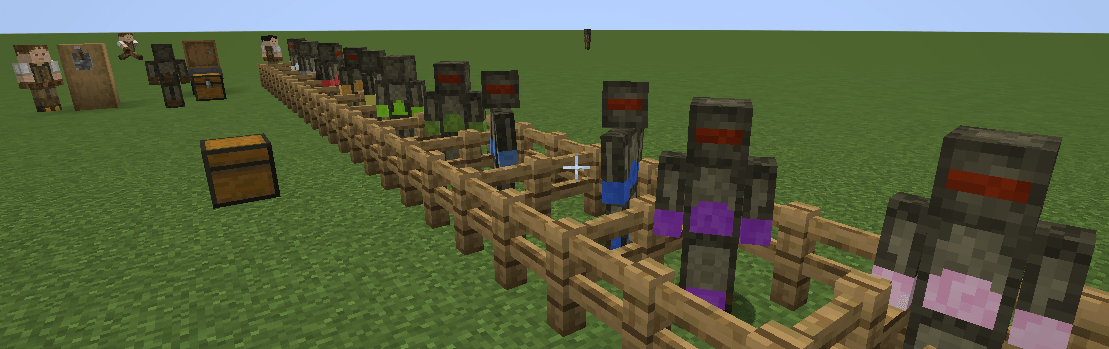
Customization: right-click a placed robot with a dye to recolor its skin. Available variants (matching dye items):
black, blue, green, lime, white, light blue, red, purple, pink, orange, yellow, gray.
Use cases
-
Town guards: Drop a Guard order on gates, villager squares, or portals.
-
Wall patrols: Set perimeter patrol points; they’ll roam and respond to threats.
-
Warehouse runners: Move filtered items from farm output to storage bins.
-
Waypoint travel: Zip a Runner to a jobsite, then switch them back to Work.
Under the hood, Runners interact with blocks using a safe “fake player” where needed and standard Forge capabilities for inventory transfers, so they’re broadly compatible.
Recipes (quick list)
-
Orders Paper (shapeless): Book & Quill + Ink Sac + Yellow Dye.
-
Recruitment Horn (shaped): Goat Horn + String + Light Blue Dye + Iron Ingot (see layout above).
-
Runner Robot Kit (shaped): Iron Nugget/Redstone Block/Iron Nugget | Leather/Gold Ingot/Leather | Leather/Redstone/Leather.
Why no hard dependency on Create? Why doesn’t this look like a true-to-create add-on?
I love Create, and the first prototypes hooked directly into it. I struggled as a first time modmaker trying to get it to pull from create files, and I wanted this to be a small, focused helper mod that fits anywhere that i could actually make— So the final result doesn’t require Create. If Create is present, great — but it’s entirely optional.
常见问题
Create: Employees 支持哪些 Minecraft 版本?
Create: Employees 支持 Minecraft Java 版 1.20.1,可用的加载器:Forge。下载时注意选择和你游戏版本一致的文件。
Create: Employees 怎么安装?
先用 PCL2 或 HMCL 启动器安装对应版本的 Forge,再把下载的 .jar 文件放进游戏目录的 mods 文件夹,重新启动游戏即可。开启了版本隔离的,mods 文件夹在 versions/版本名 下面。
评论
登录后评论和评分