Create Easy Belt Placement
两步放置机械动力传送带!缺少的轴会自动从背包中取出。放置前可用粒子预览路径。支持 Minecraft 1.21.1 NeoForge 和 1.20.1 Forge。需要机械动力。
截图
介绍
 Easy Belt Placement
Version: 1.0.0
Create: Easy Belt Placement is a quality-of-life addon that lets you place Create belts by selecting two endpoints.
There is no need to place shafts first. Missing endpoint shafts are automatically placed using shafts from your inventory when the belt is built.
⚙ Features
• Automatically consumes two shafts if both endpoints need them, or one if only one endpoint needs a shaft.
• Reuses existing shafts. Connecting two existing shafts consumes no additional shafts.
• Consumes one Create belt item per successful connection.
• Consumes no belts or shafts in Creative mode.
• Respects Create’s connection limits for distance, slope, shaft axis, and rotation direction.
• Consumes no items if materials are insufficient, the path is obstructed, or the connection is invalid.
• Includes English and Japanese in-game messages.
🛠 How to Use
1. Have a belt and enough shafts in your inventory.
2. Hold the belt and right-click to select the starting point.
3. Right-click the endpoint to place the belt and any missing shafts.
4. Sneak-right-click to cancel the selection. Selecting the starting point again also cancels it.
Click existing shafts directly.
To select a position without a shaft, click the face of a supporting block. The adjacent position becomes the endpoint.
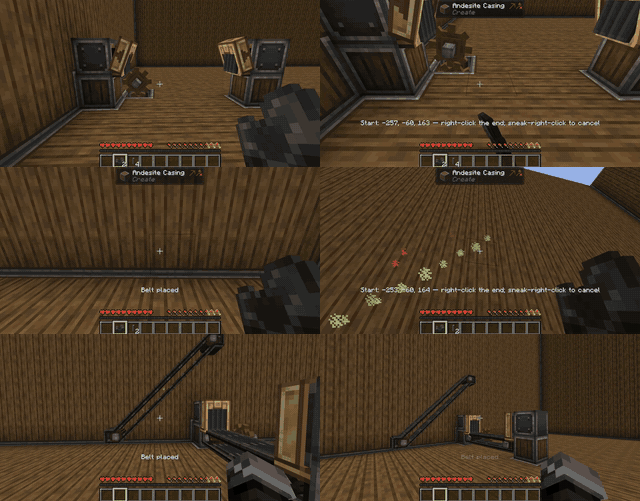
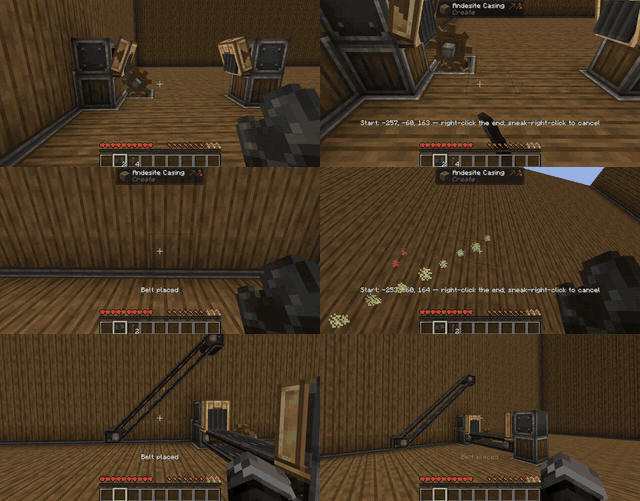
Green dust marks the starting point. While holding a belt, aim at another block or shaft to see the planned path. Green dots show a possible connection. Red dots indicate a problem, such as a blocked path or missing shafts. The final placement check runs when you click. Only you can see your preview.
The starting coordinates also appear on screen. Your selection expires after 60 seconds and clears when you change dimensions or log out.
If neither endpoint has a shaft, the shaft axis is determined automatically from the connection direction. For vertical connections, it is based on the direction you were facing when you selected the starting point.
📦 Requirements and Installation
• Minecraft 1.21.1 / NeoForge 21.1.219 or later for 1.21.1 / Create 6.0.10 / Java 21
• Minecraft 1.20.1 / Forge 47.4.10 or later for 1.20.1 / Create 6.0.8 / Java 17
Install Create and the dependencies required by your Create version separately.
Place only the matching addon JAR in your mods folder. For multiplayer, install the addon on both the server and all participating clients.
Notes
• There is no Minecraft 1.21.1 Forge build: the supported Create version for 1.21.1 uses NeoForge.
• Aim at a block face or an existing shaft to select an endpoint.
• Sneak-right-click is reserved for canceling the selection.
• Placement checks building permissions along the belt path and respects cancellation through the loader’s placement event. Compatibility with every protection mod is not guaranteed.
• This addon handles normal belt interactions through its own two-endpoint selection system.
Create Downloads:
https://www.curseforge.com/minecraft/mc-mods/create/files/all
常见问题
Create Easy Belt Placement 支持哪些 Minecraft 版本?
Create Easy Belt Placement 支持 Minecraft Java 版 1.20.1–1.21.1,共 2 个版本,可用的加载器:Forge / NeoForge。下载时注意选择和你游戏版本一致的文件。
Create Easy Belt Placement 怎么安装?
先用 PCL2 或 HMCL 启动器安装对应版本的 Forge / NeoForge,再把下载的 .jar 文件放进游戏目录的 mods 文件夹,重新启动游戏即可。开启了版本隔离的,mods 文件夹在 versions/版本名 下面。
happycookies 的其他作品
查看全部 →
Create Iron’s Spells Recipe
为 Iron’s Spellbooks 的墨水制作搅拌配方,涵盖普通到传奇品质。加热搅拌:500→250 毫桶;不加热:1000→250 毫桶。还包括通过磨石/粉碎轮将 Divine Pearl 转化为 Arcane Essence。
Create: Apotheosis Automation
一个使用机械动力机器自动推进 Apotheosis 材料进度的模组,新增 gem_dust 制作流程,以及从普通到神话级的升级路线。
Ruined book recipe(Iron’s Spells)
为 Iron’s Spells n’ Spellbooks 中的 Ruined Book 添加合成配方。

ink tier upgrade(Iron’s Spells)
Upgrade Ink 是 Iron's Spellbooks 的附属模组,让你绕过炼金坩埚。
评论
登录后评论和评分