
截图
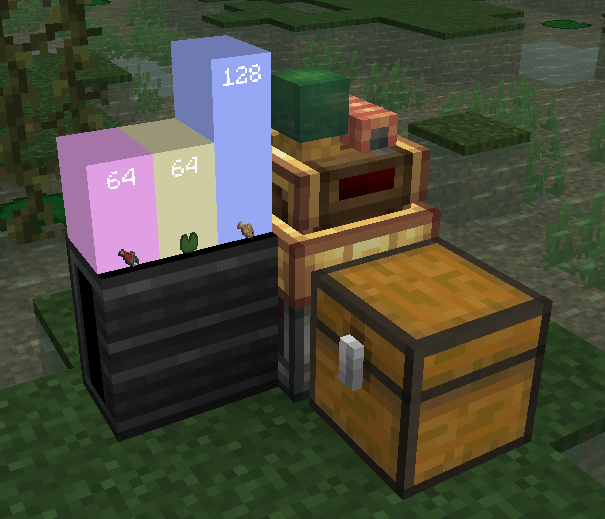

介绍
中文介绍正在准备中,下面暂时显示原文。

Plotting in Create.



Addon Info
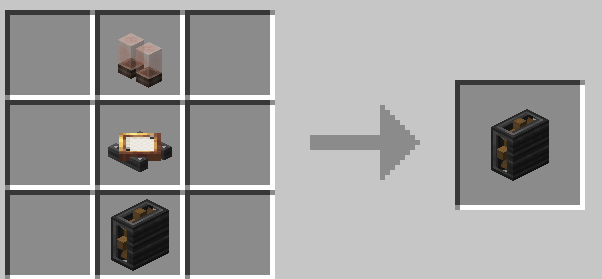
Dashboard block recipe:
How to use:
- Place dashboard block somewhere.
- Place smart-observer next to container (for example, chest).
- Place display link, that targets to dashboard, on the observer.
- Select “List matching items” type in display link.
- Done! ✅
| ⚠ Create: Data and Plots is indev. It may have a lot of changes. |
|———————————————————————-|
| Join discord for more information about updates. |
常见问题
Create: Data and Plots 支持哪些 Minecraft 版本?
Create: Data and Plots 支持 Minecraft Java 版 1.20.1,可用的加载器:Fabric。下载时注意选择和你游戏版本一致的文件。
Create: Data and Plots 怎么安装?
先用 PCL2 或 HMCL 启动器安装对应版本的 Fabric,再把下载的 .jar 文件放进游戏目录的 mods 文件夹,重新启动游戏即可。开启了版本隔离的,mods 文件夹在 versions/版本名 下面。运行环境:客户端和服务端都要装。
timaaos 的其他作品
查看全部 →
Loot Pigs
by timaaos
Basically rich pigs
1,050
3 年前
Modrinth

Gambled
by timaaos
Adds a bit of gamble to your world!
988
1 年前
Modrinth

Angry Chickens
by timaaos
Chickens can eat your farm and become fat and angry!
207
3 年前
Modrinth

egg’o’villager
by timaaos
a submission to Smithed 1st April Jam
108
3 年前
Modrinth
评论
登录后评论和评分