
Create: Custom Discs
This mod adds custom music discs so you can upload .ogg files and use them in game.
截图

介绍
中文介绍正在准备中,下面暂时显示原文。

🎵 Custom Discs
Make your own music discs from any OGG audio file — and play them in a jukebox with true 3D proximity audio.
No resource packs. No server restarts. Just drop in a file and press play.
✨ Features
- Craft custom music discs from any
.oggaudio file on your computer - 3D proximity audio — sound gets quieter the further you walk from the jukebox, just like vanilla discs (requires Simple Voice Chat)
- Per-disc volume control — set the volume when making the disc, shown in the item tooltip
- Browse button — native Windows file picker so you don’t have to type file paths
🛠️ How to Use
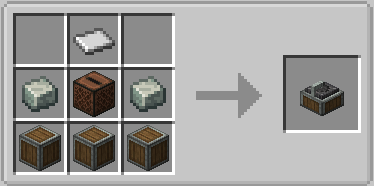
- Craft a Disc Recorder (Create mod recipe)
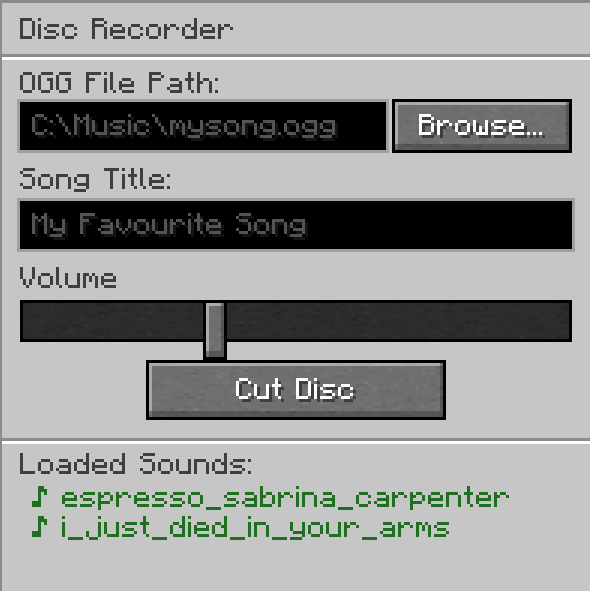
- Right-click the recorder
- Click Browse… and pick your
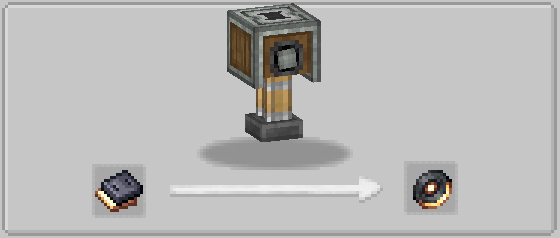
.oggfile - Enter a title, set the volume, and click Cut Disc
- Put the disc in any jukebox
📦 Dependencies
- Create (for the crafting recipe)
- Simple Voice Chat (for 3D proximity audio)
🐜 Bugs
- When inserting a disc, you may sometimes briefly hear the start of C418 – 13
- Not compatible with the Sophisticated Backpacks built-in jukebox (planned support coming soon)
- Version 1.0.0 – 1.2.0 has no support for servers.
常见问题
Create: Custom Discs 支持哪些 Minecraft 版本?
Create: Custom Discs 支持 Minecraft Java 版 1.20.1,可用的加载器:Forge。下载时注意选择和你游戏版本一致的文件。
Create: Custom Discs 怎么安装?
先用 PCL2 或 HMCL 启动器安装对应版本的 Forge,再把下载的 .jar 文件放进游戏目录的 mods 文件夹,重新启动游戏即可。开启了版本隔离的,mods 文件夹在 versions/版本名 下面。运行环境:客户端和服务端都要装。
评论
登录后评论和评分