
Create: Commerce
A physical village-based wholesale logistics trade economy mod, built with Create automation in mind.
截图


介绍

📦 Create: Commerce
A physical village-based wholesale logistics trade economy mod, built with Create automation in mind.
✨ Overview
Create: Commerce adds a fully physical, logistics-based economy to Minecraft.
Produce, pack, dispatch, and deliver goods to get paid.
Villages become real economic endpoints, and your Create factory becomes part of a living supply network.
Create: Commerce is designed first for modpack devs to configure values of bulk trade items, ie. _an incentive to mass produce items in Create_. You can configure all values of all items to fit your specific needs, but as time goes on I will try to ensure the default values are accurate enough for plug-and-play.
⚙️ Key Features
🏪 Village Trade System
- Every village has a unique commerce profile
- Villages accept specific goods based on their village type
- Fixed, configurable pricing using the Create: Numismatics _Spur_ currency (if installed, otherwise Emeralds are used)
- Configurable daily/weekly/whenever caps ensure anti-cheese and natural competition (or alliance) between players
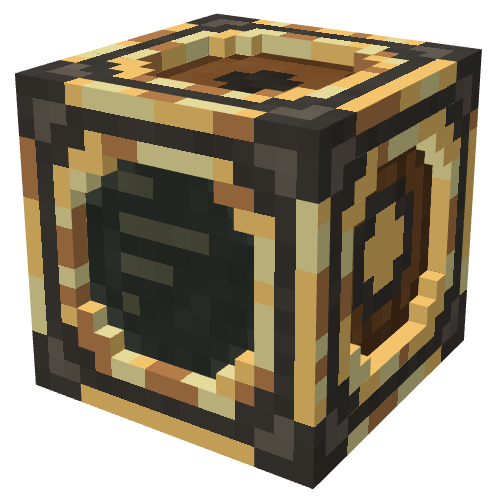
📊 Block 1: Trade Terminal
- View all linked villages
- See eligible items, caps, and payouts
- Village details and coordinates
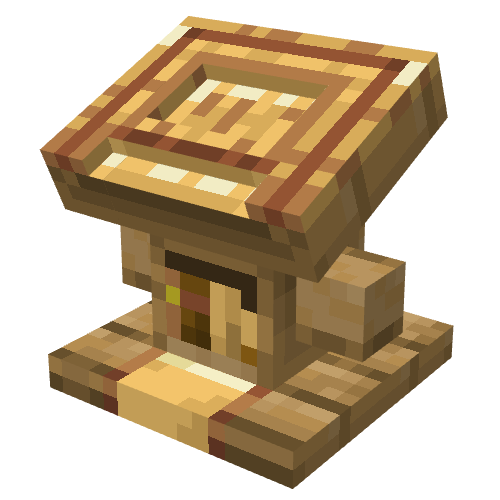
📚 Block 2: Depot Lectern
- Accepts items from the block UI, hoppers on the sides, or dropped into the top face
- Converts goods into Spur instantly
- Fully automatable
📋 Dependencies
Required:
- Neoforge _21.1.187_ or higher
- Create _6.0.6_ or higher
– Create: Numismatics _1.0.18_ or higher
Recommended:
- Areas / Random Village Names for automatic village naming
🗺️ Roadmap
- Village orders/contracts (specific item requests for higher payouts)
- Plan delivery routes in the Trade Terminal
- Advanced compatibility with Create: Aeronautics and other addons
- Option to require the Trade Terminal be powered by SU from the bottom (enabled by default)
❔ FAQ
Can I…?
- Do whatever you want with the mod, as long as it remains free & open source (GPLv3 License)
How do I adjust trades, values, village types, etc?
- Configs will generate in the ‘_Create_Commerce_‘ folder upon world load.
- Easiest way is to open the _create_commerce-items.json_ in Notepad++, select ‘_View_‘ > ‘_Fold All_‘, then open up the “_item_overrides_” tab. You will see all auto-detected eligible items sectioned by mod. You can edit values, and add or remove items from the list.
- Village types can be fully configured in _create_commerce-villages.json_. You can add your own types, remove default ones, or edit any parameter.
Will you port to…?
- My objective is to polish 1.21.1 NeoForge before considering other versions.
Mod compatibility?
- This mod automatically detects eligible items from other mods, adds a section into the config file, and assigns values to those items based on criteria. You can then configure those items or add new ones.
What if I update a mod and new items are added?
- The config will automatically add any eligible items.
常见问题
Create: Commerce 支持哪些 Minecraft 版本?
Create: Commerce 支持 Minecraft Java 版 1.21.1,可用的加载器:NeoForge。下载时注意选择和你游戏版本一致的文件。
Create: Commerce 怎么安装?
先用 PCL2 或 HMCL 启动器安装对应版本的 NeoForge,再把下载的 .jar 文件放进游戏目录的 mods 文件夹,重新启动游戏即可。开启了版本隔离的,mods 文件夹在 versions/版本名 下面。运行环境:客户端和服务端都要装。
评论
登录后评论和评分