截图

介绍
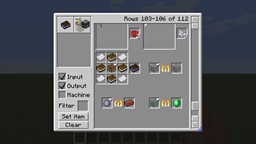
CraftGuide is a fairly simple in-game recipe viewer for Minecraft with the goal of being able to display a lot of information at once, and have some fairly simple ways to quickly navigate it.
Its main focus has been through the use of a scrollbar, using the common behaviour where recipes added by any given mod tend to be grouped together to allow users to rapidly navigate to mod-themed sections of the list. More recent changes include making the GUI resizable, to fill as much of the screen as users are comfortable with (accomplished by dragging the small blue triangular button in the lower right corner), and a system where clicking on an item filters the list to only show recipes that use that item, either as input or output.
CraftGuide has an API, allowing other mods to provide additional recipes among other things, as well as built-in support for displaying some mods’ recipes. Additional built-in mod support or assistance using the API will generally be provided upon request from the current author of the mod in question. User-requested mod support is occasionally implemented after consulting with that mod’s author(s).
Updates are often sparse, although there is generally at least one for every major Minecraft version.
At the moment (starting in version 1.6.8.1), CraftGuide requires either Forge or LiteLoader. (LiteLoader versions are currently available from the minecraftforum.net thread)
Source code is available on GitHub.
Further information and downloads for older Minecraft versions can be found in the minecraftforum.net thread.
常见问题
CraftGuide 支持哪些 Minecraft 版本?
CraftGuide 支持 Minecraft Java 版 1.6.4–1.10.2,共 6 个版本,可用的加载器:Forge。下载时注意选择和你游戏版本一致的文件。
CraftGuide 怎么安装?
先用 PCL2 或 HMCL 启动器安装对应版本的 Forge,再把下载的 .jar 文件放进游戏目录的 mods 文件夹,重新启动游戏即可。开启了版本隔离的,mods 文件夹在 versions/版本名 下面。
评论
登录后评论和评分