
Craftable Mushrooms
Simple Mod/Datack That Adds Recipes For Mushrooms and Mushroom blocks.
截图


介绍
🍄About
Simple Mushroom Crafting is a lightweight Quality of Life (QoL) mod/datapack that makes mushroom building blocks fully craftable and reversible. Whether you need compact storage for your mushroom farms or easy access to mushroom blocks for building, this pack has you covered.
📋 Recipes
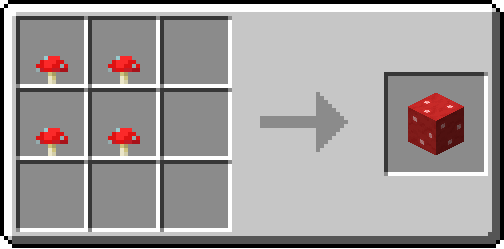
🟥-> Red Mushroom Block, 🟫-> Brown Mushroom Block
| Result | Ingredients | Recipe Pattern |
|—|—|—|
| Red Mushroom Block | 4x Red Mushroom | 🍄🍄
🍄🍄 |
| Brown Mushroom Block | 4x Brown Mushroom | 🍄🟫🍄🟫
🍄🟫🍄🟫 |
| 4x Red Mushroom | Red Mushroom Block | 🟥 |
| 4x Brown Mushroom | Brown Mushroom Block | 🟫 |
| 1x Mushroom Stem | 2x Red Mushroom
2x Brown Mushroom | 🍄🟫🍄
🍄🍄🟫 |
| 4x Mushroom Stem | 2x Red Mushroom Block
2x Brown Mushroom Block | 🟥🟫
🟫🟥 |
<img src="
https://cdn.modrinth.com/data/cached_images/154d4d3ecf6225f8295b456fe889d940f66409e1.png
” alt=”Create: Redstone Recipe” width=”275″> <img src="
https://cdn.modrinth.com/data/cached_images/96c76be2d5ee69baf8208659adcbb57796d2da26.png
” alt=”Create: Redstone Recipe” width=”275″> <img src="
https://cdn.modrinth.com/data/cached_images/039070f50a8e97305037790585e1b045e985e96b.png
” alt=”Create: Redstone Recipe” width=”275″> <img src="
https://cdn.modrinth.com/data/cached_images/ff5bf9529097fef949de0205b9912a1a0c998b55.png
” alt=”Create: Redstone Recipe” width=”275″> <img src="
https://cdn.modrinth.com/data/cached_images/fd2f70d34a7aa5a6ee367dba4acdf03b7bc40906.png
” alt=”Create: Redstone Recipe” width=”275″> <img src="
https://cdn.modrinth.com/data/cached_images/b6c68e58b538d6caea988b4402679e184e983db6.png
” alt=”Create: Redstone Recipe” width=”275″>
Tip: Use Just Enough Items(JEI) To View The Recipe In-Game
🧩 Installation Guide
How to Install the Mod (.jar)
- Download the Mod: Get the .jar file for Create: Veridium Recipe.
- Drop the File: Drag the downloaded .jar.
How to Install the Datapack (.zip)
- Download: Get the .zip file for the Datapack version.
- Open Your World Folder:
- Install: Open the datapacks folder and drag the downloaded .zip file inside.
⚙️ Supported Version
|Version|Loader|Support|
|—|—|—|
|1.21.1+|Forge/Neoforge/Fabric/Quilt|soon|
|1.21.1 -> 1.13|Forge/Neoforge/Fabric/Quilt|✅|
📦 Other Recipes
https://cdn.modrinth.com/data/CYSgjm6s/28fafc2c731387f3de9c9783fad3857329ef0ee5_96.webp
” alt=”Create: Redstone Recipe” width=”96″>
https://cdn.modrinth.com/data/W8VGEPty/17a7b516430009f7ef00fe7e1e816493cc58d1a1_96.webp
” alt=”Create: Glowstone Recipe” width=”96″>
https://cdn.modrinth.com/data/AO6B352P/91ec7e1a5aafb40d71919d645d3f4f0485939f56_96.webp
” alt=”Create: Netherrack Recipe” width=”96″> 


👀 Play with friends
Want to run a flawless modded server? Check out Godlike Host! Setting up a server through them is the absolute best way to support us right now.
Don’t just take our word for it—read the community reviews here: Best Minecraft Server Hosting.
👉 Click the image below or use this link: Godlike Host to get 50% off your first month!

常见问题
Craftable Mushrooms 支持哪些 Minecraft 版本?
Craftable Mushrooms 支持 Minecraft Java 版 1.13–1.21.1,共 36 个版本,可用的加载器:Fabric / Forge / NeoForge / Quilt。下载时注意选择和你游戏版本一致的文件。
Craftable Mushrooms 怎么安装?
先用 PCL2 或 HMCL 启动器安装对应版本的 Fabric / Forge / NeoForge / Quilt,再把下载的 .jar 文件放进游戏目录的 mods 文件夹,重新启动游戏即可。开启了版本隔离的,mods 文件夹在 versions/版本名 下面。运行环境:客户端 / 服务端。
itzdragoncze 的其他作品
查看全部 →
Spore&Underground Bunker Spawner Compat
replaces underground bunker's spawner's mob with evolved spores

Guns&Fun
军事主题整合包——真实枪械、载具、防弹衣、飞机、战斗!

Voxyris
即插即用的 Voxy 与 Iris 光影。流畅无卡顿体验。预装光影。修复水面缝隙。渲染距离最高可达 2048。

Shaders – Working
Plug & play experience with Shaders, Controller Support, Free Multiplayer and Great Performance!
评论
登录后评论和评分