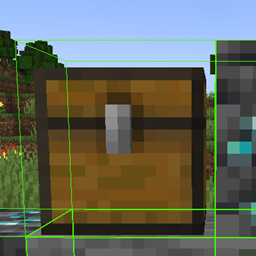
CoolXray
Highlight selected ores through walls, switch to cave mode, customize block list, adjust detection radius, and toggle everything with a single hotkey.
介绍
⚡ X-Ray Mod — Press [Z] to Open Menu ⚡
📖 About
A lightweight, powerful, and fully customizable X-Ray mod designed for efficient mining and exploration. Open the menu with a single key and take full control of your underground experience.
🎮 Key Features
🔘 Open Menu Key
Press [Z] to open menu.
⚠️ Important: The keybind is fixed and can only be changed in the mod files — not in-game.
💎 Ore Highlighting
See all valuable ores through walls with a bright, glowing outline. Never miss diamonds, netherite, or emeralds again!
🕳️ Cave Mode
Reveal every cave, ravine, and tunnel around you in an instant. Perfect for finding open spaces and avoiding mobs.
📋 Custom Block List
Choose exactly which ores and blocks you want to highlight. Add or remove any block from the list — full control is yours.
📏 Radius Control
Adjust the detection range to match your playstyle. Go short for precision or long for full overview.
🌍 Language Support
🇬🇧 English — Full interface localization
🇷🇺 Русский — Полная поддержка русского языка
🛠️ How to Use
-
Press [Z] to open menu
-
Customize your block list in the config file
-
Adjust radius to your preference
-
Enjoy effortless mining!
常见问题
CoolXray 支持哪些 Minecraft 版本?
CoolXray 支持 Minecraft Java 版 1.21.1–1.21.4,共 2 个版本,可用的加载器:Fabric。下载时注意选择和你游戏版本一致的文件。
CoolXray 怎么安装?
先用 PCL2 或 HMCL 启动器安装对应版本的 Fabric,再把下载的 .jar 文件放进游戏目录的 mods 文件夹,重新启动游戏即可。开启了版本隔离的,mods 文件夹在 versions/版本名 下面。
NN_user 的其他作品
查看全部 →
CoolClient
BlockOutline, Custom Hitbox, Hit Damage Color, Custom Crosshair & PvP Utilities

CoolCrosshair
CoolCrosshair adds a fully customizable crosshair to Minecraft. Open the settings menu with the H key (English) to adjust its appearance. Make your HUD more personalized and comfortable!
评论
登录后评论和评分