
Connection Doctor
Clear explanations for multiplayer errors, connection stages and local support reports. Fully client-side.
截图
介绍
Connection Doctor
Stop deciphering Minecraft’s confusing multiplayer errors.
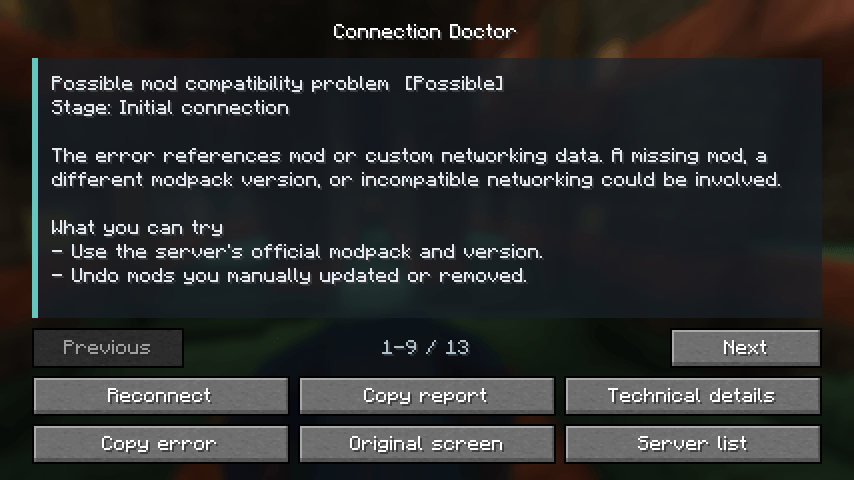
Connection Doctor turns technical multiplayer errors into clear explanations and practical next steps. It helps identify version problems, authentication failures, timeouts, registry mismatches and possible mod networking issues, while keeping the original message available.
Client-side only. Servers do not need Connection Doctor installed.
Features
- See what happened and which connection stage failed.
- Get confidence levels that distinguish explicit messages from possible causes.
- Reconnect, copy a support report or open the original Minecraft screen.
- Review recent failures locally and control privacy settings.
- Keep server addresses and full mod inventories out of reports by default.
Installation
Download the file for your exact Minecraft version and loader, then put it in your client’s mods folder. Install only one Connection Doctor file.
- Fabric and NeoForge: Minecraft 1.21, every 1.21.x release through 1.21.11, 26.1, 26.1.1, 26.1.2, 26.2 and 26.3.
- Each Minecraft version and loader has a separate file. Choose the exact match for your client.
- Fabric API is not required.
- Minecraft 1.21.x uses Java 21; Minecraft 26.x uses Java 25.
Use the Connection Doctor button in the multiplayer menu to view recent failures and settings. Connection Doctor also opens when a multiplayer connection fails.
Privacy and limits
Reports and history stay on your computer. Nothing is uploaded automatically, and there is no analytics or telemetry. Review any report before sharing it.
Connection Doctor uses errors visible to your client. It does not inspect server files, discover hidden server mod lists, automatically fix your installation or bypass server restrictions. When an error has several possible causes, the explanation says so.
Initial release
Version 1.0.0 includes connection-stage tracking, readable diagnostics, local history, privacy controls, support reports and access to the original error screen.
常见问题
Connection Doctor 支持哪些 Minecraft 版本?
Connection Doctor 支持 Minecraft Java 版 1.21–26.3,共 17 个版本,可用的加载器:Fabric / NeoForge。下载时注意选择和你游戏版本一致的文件。
Connection Doctor 怎么安装?
先用 PCL2 或 HMCL 启动器安装对应版本的 Fabric / NeoForge,再把下载的 .jar 文件放进游戏目录的 mods 文件夹,重新启动游戏即可。开启了版本隔离的,mods 文件夹在 versions/版本名 下面。
评论
登录后评论和评分