
Config-Cloud-Backuper
A simple Minecraft mod for backing up game configuration files, with configurable backup paths and WebDAV cloud backup support for both client and server usage.
截图
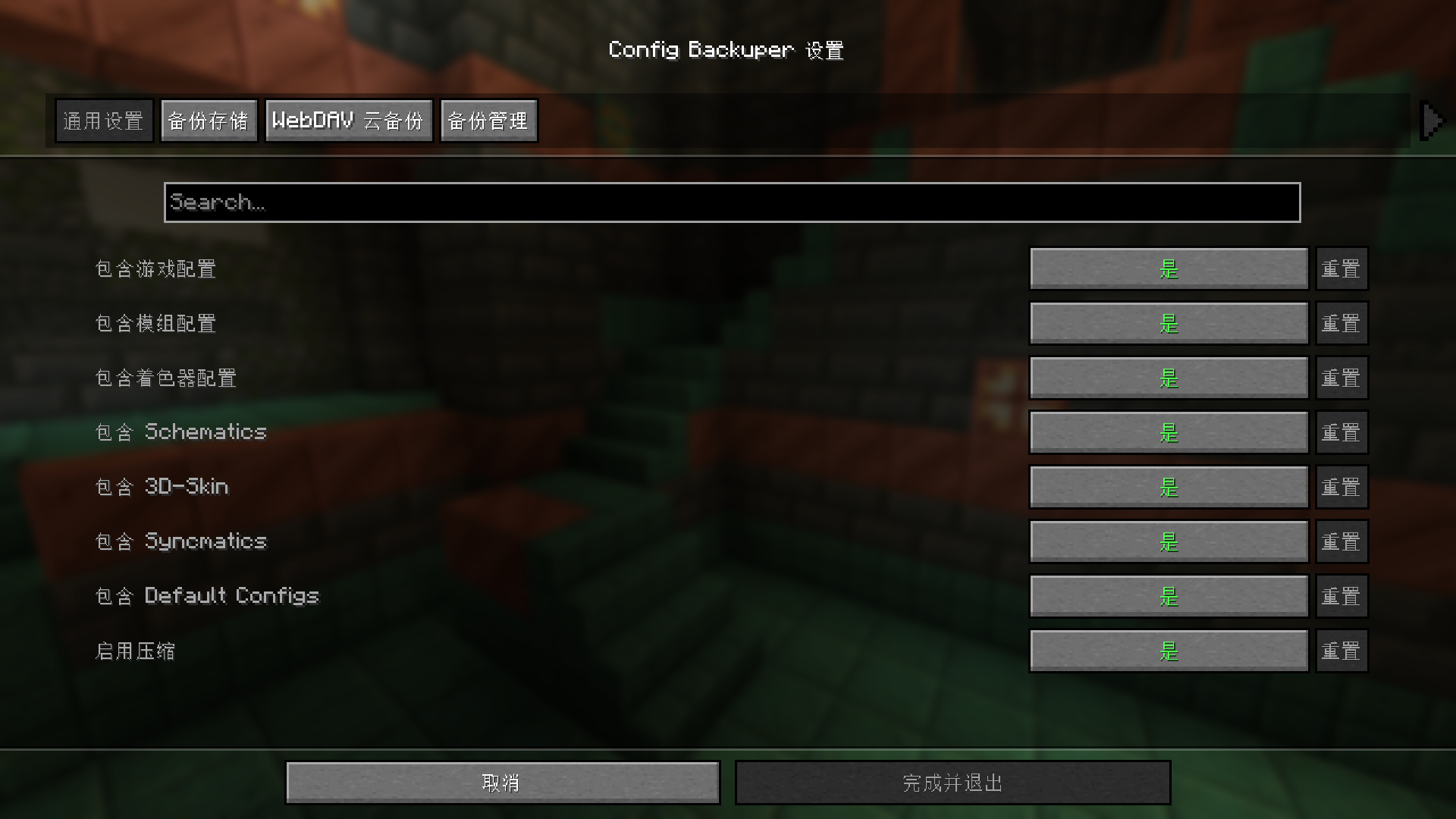
介绍
Config Cloud Backuper
A simple Minecraft mod for backing up game configuration files, with configurable backup paths and WebDAV cloud backup support for both client and server usage.
Features
- Client + server command support — both sides can use commands; server also supports
/server_config_backuper ...(requires Fabric API) - Client-to-server upload — clients can upload local backups to server storage; files are saved per player and retention is configurable
- Optional GUI — install ModMenu and Cloth Config API, then open settings from ModMenu
- Backup game configs, mod configs, shader configs, and more folders (see
config/config-cloud-backuper.json) - Backup compression and automatic old-backup cleanup
- WebDAV — auto upload after backup (if enabled), plus manual list/upload/download commands
- Security checks — client upload only accepts
.zipwith size limit and filename sanitization; server validates SHA-256 and writes audit logs
Requirements
- Minecraft 1.21.1
- Fabric Loader >=0.16.0
- Java 21+
- Fabric API (required for command registration)
- ModMenu (optional)
- Cloth Config API (optional, needed only for ModMenu GUI)
Commands (Client/Server)
Commands are grouped under: remote cloud / remote server.
Root command prefixes (kept for compatibility):
- Client:
/config_backuper - Server:
/config_backuperor/server_config_backuper(same functionality)
Note: The command prefix is intentionally kept for backward compatibility with existing scripts and habits. A cloud-style prefix can be introduced later in a major release with alias transition.
| Subcommand | Description |
|—|—|
| backup | Run local backup and clean old files exceeding maxBackups; if WebDAV auto-upload is enabled, upload the latest backup afterward |
| list | List local backup files matching configured prefix/suffix |
| config reload | Reload config-cloud-backuper.json from disk and refresh runtime instances |
| config show | Show current main config values |
| config set <key> <value> | Update and save main config (true/false etc. are supported for booleans) |
| remote cloud status | Show WebDAV config (password masked) |
| remote cloud list | List files in remote WebDAV directory |
| remote cloud upload [file] | Force upload local backup file (latest by default) to WebDAV; credentials are still required |
| remote cloud download [file] | Download remote file into local backup directory (latest by name by default) |
| remote cloud set <field> <value> | Write fields in config-cloud-backuper_webdav.json: enabled, serverUrl, username, password, remotePath |
| remote server status | (Client) Query server-side client-upload config |
| remote server list | (Client) Query current player’s uploaded backups on server |
| remote server upload [file] | (Client) Upload local backup to server (latest by default) |
Running root command without subcommand prints brief help.
Server Examples
/server_config_backuper backup: run server backup/server_config_backuper list: list server local backups/server_config_backuper config show: show current server config/server_config_backuper remote server status: show client-upload config/server_config_backuper remote server list: show your uploaded backups (requires OP level > 2)/server_config_backuper remote server set folder ./configcloudbackuper-backups/client-uploads: set upload root folder/server_config_backuper remote server set maxPerPlayer 20: set max backups per player
Configuration
Main config: config/config-cloud-backuper.json
WebDAV config: config/config-cloud-backuper_webdav.json
You can also edit values with config / remote cloud / remote server commands above.
General and Backup Storage
Main fields include: includeGameConfigs, includeModConfigs, includeShaderPackConfigs, includeSchematics, include3dSkin, includeSyncmatics, includeDefaultConfigs, compressionEnabled, maxBackups, backupFolder, backupFilePrefix, backupFileSuffix.
Client Upload to Server (main config fields)
clientUploadToServerEnabled: allow client uploads to server (defaulttrue)clientUploadFolder: server storage root for uploaded backups (default./configcloudbackuper-backups/client-uploads)clientUploadMaxBackupsPerPlayer: max backups per player (-1means unlimited, default10)
Server storage structure:
<clientUploadFolder>/<playerName>/<backupFile>
WebDAV (config-cloud-backuper_webdav.json)
enabled— auto upload latest backup after local backup flowserverUrl,username,password,remotePath— server and path settings
WebDAV security behavior:
- Upload also writes checksum file:
<filename>.sha256 - Download reads
.sha256first, then verifies SHA-256 after download; mismatch deletes the file and returns error
Modpack Usage
You may freely include this mod in modpacks without requesting permission.
Development
Build
cd fabric
./gradlew build
For local client testing with ModMenu + Cloth GUI, this repo already includes Cloth via modLocalRuntime. You still need to add ModMenu in your run profile (or modRuntimeOnly).
常见问题
Config-Cloud-Backuper 支持哪些 Minecraft 版本?
Config-Cloud-Backuper 支持 Minecraft Java 版 1.21.1,可用的加载器:Fabric。下载时注意选择和你游戏版本一致的文件。
Config-Cloud-Backuper 怎么安装?
先用 PCL2 或 HMCL 启动器安装对应版本的 Fabric,再把下载的 .jar 文件放进游戏目录的 mods 文件夹,重新启动游戏即可。开启了版本隔离的,mods 文件夹在 versions/版本名 下面。运行环境:客户端 / 服务端。
评论
登录后评论和评分