
Compact F3
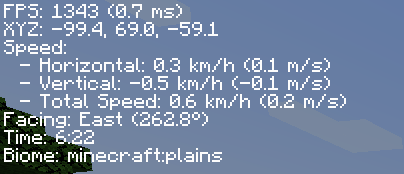
A mod that reduces the useless information from F3, can be toggalable with F8.
截图

介绍
Description
This mod, as it’s name suggests, will make the F3 menu go to shame, you can toggle the menu as you wish by toggling the F8 key to open/close the menu. It shows things such as FPS, XYZ Coordinates, Speed, Time, Biome, and more, while not causing any FPS drops since the GUI is rendered at the refresh rate of the monitor, instead of refreshing it as much as the game does. This GUI is not made to condone any malicious intent towards the player or the game servers, it only does one thing, perform.
Compability
As of Minecraft 1.21.1, this mod is developed exclusively for the Fabric and NeoForge mod loaders, as they provide a more streamlined development experience. Forge is no longer supported for Minecraft 1.21.1 and newer, as the vast majority of the modding community has transitioned to these two platforms.
Keybinds
[, As of Minecraft 26.1, you will now be able to use[to open a settings menu allowing you to change the position of the GUI, you could set it to the Top Left, Top Right, Bottom Left, or Bottom Right, and you could also change the Rate of Change, GUI Opacity, and also GUI Padding, although this is completely optional and you are not required to set these up yourself.F8, On all versions, you can use this keybind to toggle the menu.
Minecraft versions prior to 1.21.1 will continue to receive Forge support.


This mod is created using IntelliJ IDEA Community Edition 2024.3.5 by Jetbrains
常见问题
Compact F3 支持哪些 Minecraft 版本?
Compact F3 支持 Minecraft Java 版 1.19.2–26.3,共 25 个版本,可用的加载器:Fabric / Forge / NeoForge。下载时注意选择和你游戏版本一致的文件。
Compact F3 怎么安装?
先用 PCL2 或 HMCL 启动器安装对应版本的 Fabric / Forge / NeoForge,再把下载的 .jar 文件放进游戏目录的 mods 文件夹,重新启动游戏即可。开启了版本隔离的,mods 文件夹在 versions/版本名 下面。运行环境:仅客户端。


评论
登录后评论和评分