
CommandTokens
Configurable 'token' items that run commands when held and right clicked. Useful for servers.
介绍
NOTE: If you are looking for a server-side alternative to this mod (that clients dont also have to install to connect to your server) – CommandTokens has been included in my server-side essentials mod:
Henny Essentials
Overview
CommandTokens gives the user the ability to create custom items that execute commands when a player uses them.
This mod is aimed toward server owners, modpack creators and map makers but has a wide range of uses in many scenarios.
Commands
You can use the command /commandtokens give to give a token to a player.
Alternatively, you can use the Minecraft give command to give a player a token as follows:
/give commandtokens:token[custom_data={“commandtoken”:”tokenAlias”}]
How to create a Token
To create a token, place this mod in your mods folder and load up a world in creative mode. If you navigate to the CommandTokens creative tab you will see 3 tokens that are created by default.
Now save and quit your world and navigate to the config directory, you will see a file called: CommandTokens.json
This is the file where you can create your custom tokens. Below is a breakdown of a “token” object:
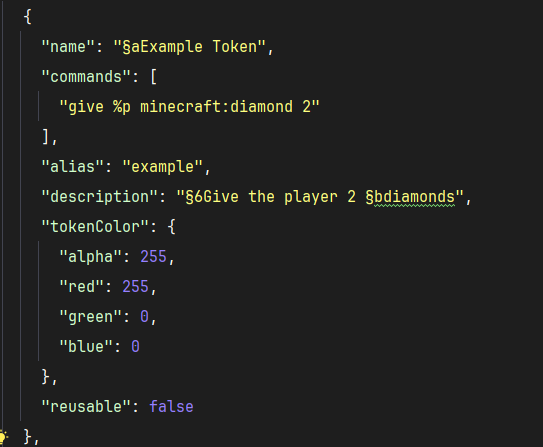
NOTE: as of V1.0.4 you can add a permission: “some.permission.node” option to tokens and it will use LuckPerms to check if player has permission to use the token. If LuckPerms is not installed, or the permission string is blank, the token will not check permissions.
Create as many of those objects as you want and place them within the “tokens”: [] array in the config and the next time you load your world you will have access to these tokens.
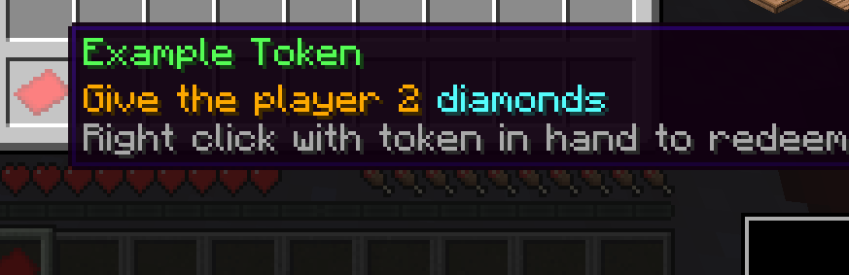
For example, the config token defined above will create this token in game:
常见问题
CommandTokens 支持哪些 Minecraft 版本?
CommandTokens 支持 Minecraft Java 版 1.21.1,可用的加载器:NeoForge。下载时注意选择和你游戏版本一致的文件。
CommandTokens 怎么安装?
先用 PCL2 或 HMCL 启动器安装对应版本的 NeoForge,再把下载的 .jar 文件放进游戏目录的 mods 文件夹,重新启动游戏即可。开启了版本隔离的,mods 文件夹在 versions/版本名 下面。运行环境:客户端和服务端都要装。
hennyhex 的其他作品
查看全部 →
Henny Fullbright
Client side mod that gives toggleable fullbright / night vision to the player
Henny Fullbright
Client side mod that gives toggleable fullbright / night vision to the player

Henny Essentials
Server Essentials - Warps , Permissions , Kits , Command Tokens , Serverside , All In One

Server Vote
Server-side mod that allows online players to vote for certain actions, eg: change the weather.
评论
登录后评论和评分