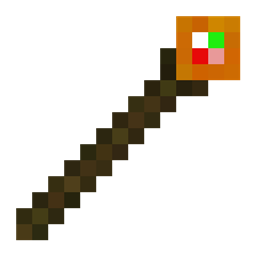
Command Sticks
A simple mod which adds command block functionality to items that can be ran with a right click.
介绍
Welcome to Command Sticks! This is a very simple Creative Utility mod. The main focus is the Command Stick. A command stick just executes the command that you enter into the GUI.
Steps:
- Run “/give @s command_sticks:command_stick” in chat, or “/give @p command_sticks:command_stick” from a command block. The command stick is also availible in the Operator Items tab of the creative inventory.
- Hold Sneak + Right Click on the Command Stick to open up the Command Stick GUI.
- Enter whatever command you want to run into the text box, then click “OK”.
- Now, just right-click your Command Stick to execute the command!
I hope this mod helps make your Minecrafting a little more fun and less tedious. Have fun!
FYI: Holding down a Command Stick does not run the command multiple times. you will need to click each time to run the command. I plan on adding Repeating Command Sticks in the future.
FYI 2: As of version 1.0.0, all command sticks share a universal command to run. I plan on adding individual commands for each item in the future.
Please keep in mind that this mod is a work in progress. Current version support:
– 1.21.1 NeoForge
Create a Minecraft server with Bisect Hosting with my Command Stick Mod! From using this link, you’ll get 25% off your first purchase, and support future development!
https://url-shortener.curseforge.com/vDufm
Note: This is not an ad-shortener.
Thanks for downloading Command Sticks!
常见问题
Command Sticks 支持哪些 Minecraft 版本?
Command Sticks 支持 Minecraft Java 版 1.21.1,可用的加载器:NeoForge。下载时注意选择和你游戏版本一致的文件。
Command Sticks 怎么安装?
先用 PCL2 或 HMCL 启动器安装对应版本的 NeoForge,再把下载的 .jar 文件放进游戏目录的 mods 文件夹,重新启动游戏即可。开启了版本隔离的,mods 文件夹在 versions/版本名 下面。
Cactusblade511 的其他作品
查看全部 →
CactusBlade511’s Medicines
为 Minecraft 添加半写实风格药物与疾病的模组!

Some Cool Auto Farms
A working and efficient Kelp Farm, Bamboo Farm, and a Sugarcane farm using observers and pistons.

Long-Range TNT Cannon
A Long-Range TNT cannon that shoots over 100 blocks
Summonable Steve
A summonable Steve boss with complex AI and behaviors
评论
登录后评论和评分