
Command Show Skin
Command Show Skin — Hides armor visuals via commands while fully preserving protection, stats, and compatibility with player model mods.
截图


介绍
🛡️ Command Show Skin
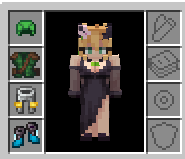
Ever wanted to show off your unique skin without sacrificing the protection of your diamond chestplate? Command Show Skin allows you to hide any piece of armor with a simple command while keeping all its stats, enchantments, and bonuses.
✨ Key Features
- Total Invisibility: Hide/Show your helmet, chestplate, leggings, or boots individually—or all at once.
- Keep Your Stats: Armor stays equipped and provides full protection even when visually hidden/shown.
- Global Sync: Your Hide/Show settings are instantly synced with other players—they see your skin, not your armor.
- Smart Compatibility: Featuring a “Render Guard” system, the mod correctly hides/shows armor even when using player model mods (like Female Gender Mod).
🎮 Commands
Manage your armor’s visibility directly from the chat:
| Command | Description |
| :— | :— |
| /showskin all off/on | Hide/Show all armor |
| /showskin head off/on | Hide/Show helmet |
| /showskin chest off/on | Hide/Show chestplate |
| /showskin legs off/on | Hide/Show leggings |
| /showskin feet off/on | Hide/Show boots |
常见问题
Command Show Skin 支持哪些 Minecraft 版本?
Command Show Skin 支持 Minecraft Java 版 1.21.1,可用的加载器:Fabric。下载时注意选择和你游戏版本一致的文件。
Command Show Skin 怎么安装?
先用 PCL2 或 HMCL 启动器安装对应版本的 Fabric,再把下载的 .jar 文件放进游戏目录的 mods 文件夹,重新启动游戏即可。开启了版本隔离的,mods 文件夹在 versions/版本名 下面。运行环境:客户端和服务端都要装。

评论
登录后评论和评分