Command Safety
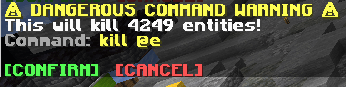
Warns the player when running potentially dangerous commands ('/kill @e' etc).
截图
介绍
Command Safety Mod
Have you ever accidentally killed all entities in your world with a single command? Or maybe you’ve cleared all the scores of a player when you didn’t mean to?
This mod helps you avoid such mishaps, by requiring the player to confirm commands that have the potential to break a lot of things.
Very useful when working on large projects, especially when multiple people (that potentially have less experience with commands) are involved.
The commands & the conditions of when they require confirmation:
/fill,/clone- When selecting an area of more than 10 000 blocks.
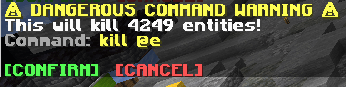
/execute,/kill,/effect,/tp,/teleport,/give,/clear,/gamemode- When affecting more than 50 entities (players, ravagers, item frames).
- When affecting more than 25 living entities (players, ravagers, …).
- When affecting more than 1 player.
/scoreboard- When affecting more than 50 score holders (players / entities).
- When using the
/scoreboard players reset ..command without selecting an objective.
Config:
You can use the /confimcmd config command to change the limits of when commands require confirmation, or you can also modify the config files themselves (./config/confirmcommand.properties).
/confirmcmd
/confirmcmd config <name>– Gets the value of a config./confirmcmd config <name> <value>– Sets the value of a config.
Possible values for <name> are: max_blocks, max_players, max_living_entities, max_entities, max_score_holders
常见问题
Command Safety 支持哪些 Minecraft 版本?
Command Safety 支持 Minecraft Java 版 1.14–26.3,共 47 个版本,可用的加载器:Fabric / Forge / NeoForge / Quilt。下载时注意选择和你游戏版本一致的文件。
Command Safety 怎么安装?
先用 PCL2 或 HMCL 启动器安装对应版本的 Fabric / Forge / NeoForge / Quilt,再把下载的 .jar 文件放进游戏目录的 mods 文件夹,重新启动游戏即可。开启了版本隔离的,mods 文件夹在 versions/版本名 下面。运行环境:仅服务端。
Mat0u5 的其他作品
查看全部 →
Iceberg
一个模组开发库,包含全新的事件、辅助工具和实用功能,让模组开发更加轻松。

Prism
一个专注于色彩的前置库!为依赖它的模组提供丰富的色彩相关功能。

Advancement Plaques
用更炫酷的效果替换那些无聊的进度弹窗。

Item Highlighter
高亮新拾取的物品。简单又方便。
评论
登录后评论和评分