截图
介绍
Command GUI Buttons
Fabric mod to create custom command buttons to use in-game.
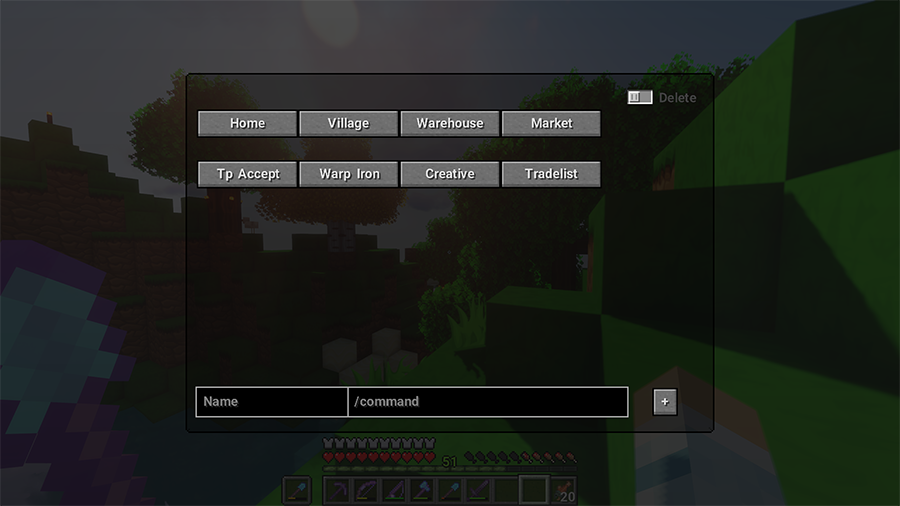
Buttons will work for preset chat messages, commands like “/warp home”, or anything else that goes in the chat box.
How to Create Buttons:
• Bring up the menu in-game with the G key
• Type in the Name and Command you want to save into a button
• Press the + button
Your button will now show up on the menu for you to use whenever you’d like! Press the button, and it will automatically type and execute the command you saved.
Up to 20 buttons are currently supported. More are planned.
How to Delete Buttons:
• Toggle the “Delete” button on
• Press the button(s) you want to delete
• Toggle the “Delete” button off
Note: The buttons may seem out of order after deleting some, just close & re-open the menu and it will fix itself.
Fabric API required!
常见问题
Command GUI Buttons 支持哪些 Minecraft 版本?
Command GUI Buttons 支持 Minecraft Java 版 1.16.4–1.17.1,共 3 个版本,可用的加载器:Fabric。下载时注意选择和你游戏版本一致的文件。
Command GUI Buttons 怎么安装?
先用 PCL2 或 HMCL 启动器安装对应版本的 Fabric,再把下载的 .jar 文件放进游戏目录的 mods 文件夹,重新启动游戏即可。开启了版本隔离的,mods 文件夹在 versions/版本名 下面。
评论
登录后评论和评分