介绍
ColouredChat




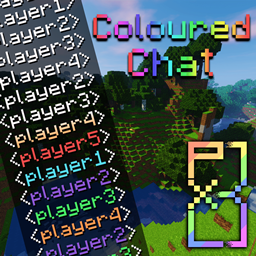
Chat on vanilla servers can get hard to read with many people chatting at the same time. This mod simply assigns a random colour to a users name when they join the server.
Works server-side without requiring anything on the client (However auto tab completions will not show if the client does not have the mod).
Feel free to include this mod in any servers or modpacks.
Configs allow you to change the delimiter around a players name (By default “<username> “), setup which colours will be randomly assigned, and enable/disable commands.
The mod adds the following commands:
/colouredchat clear|set colour
/colouredchat random
/colouredchat list
Known Bugs:
Currently chat will not go through if FTBUtils is installed and the config option ranks:override_chat is set to true. For now a simple workaround is to just disable that one config option
Version Changes
Version 1.14.4-0.4.0 implements a brand new quasi-random colour assignment system:
– Players are now randomly assigned colours from a reverse-bag system
– This system ensures all colours are assigned before using any repeated colours
– The system also attempts to maintain an equal distribution of all colours when repeated colours are needed
– This system is independent of any randomly assigned or set colours (using the commands)
– If you only want to use this system you can simply disable the random/set commands from the config
Version 1.14.4-1.4.2 added the option to auto assign a player to a placeholder team set to the colour of their name:
– This allows for others to see a players colour in the player tab list and in the hovering name above a player
– This option is disabled by default and can be enabled in the experimental section of the configs
This mod was made for a private server, idea adapted from the SKCraft server, released in case anyone else wants this
常见问题
ColouredChat 支持哪些 Minecraft 版本?
ColouredChat 支持 Minecraft Java 版 1.12–1.15.2,共 11 个版本,可用的加载器:Forge。下载时注意选择和你游戏版本一致的文件。
ColouredChat 怎么安装?
先用 PCL2 或 HMCL 启动器安装对应版本的 Forge,再把下载的 .jar 文件放进游戏目录的 mods 文件夹,重新启动游戏即可。开启了版本隔离的,mods 文件夹在 versions/版本名 下面。

评论
登录后评论和评分