
Colorful Water
A Minecraft mod that allows for custom water colors. With Included Bedrock Water Colors
截图

介绍
Colorful Water
Supports 26.2 Experimental Vulkan Mode.
| Type | Name / Description |
| — | — |
| Feature | Per-Biome water colors |
| Feature | Per-Biome water fog colors |
| Feature | Per-Biome fog distance |
| Feature | Water Blending uses Biome Blend |
| Built-in Resource Pack | Bedrock Water – to enable: Options > Resource Packs > Select “Bedrock Water” |
| Pack Format | Place assets/colorfulwater/water_colors.json in your resource pack |
Example Screenshot using the bundled Bedrock Water Resource Pack:
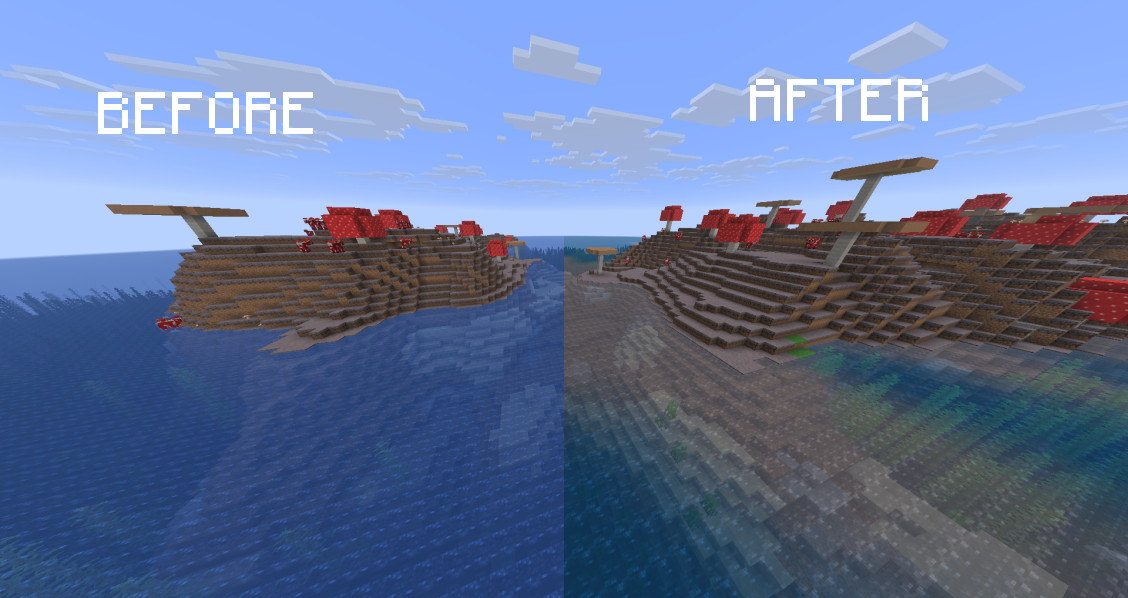
Built-in Resource Pack
This mod now includes the Bedrock Water resource pack as a built-in pack.
To enable it:
- Open Options
- Resource Packs
- Select “Bedrock Water”
- Done!

Pack Format
Place assets/colorfulwater/water_colors.json in your resource pack.
Here is an example water_colors.json file:
{
 "plains": {
   "water": [97, 123, 100],
   "fog": [35, 35, 35],
   "fog_distance": 30.0
 },
 "minecraft:swamp": {
   "water": [255, 255, 0],
 },
 "mycoolmod:custombiome": {
   "water": [20, 156, 25],
   "fog_distance": 3
 }
}
The syntax is: [<RED>, <GREEN>, <BLUE>].
The RGB colors are in range 0-255.
Compatibility
Since v1.2 ColorfulWater no longer crashes with Voxy. but Water Fog will not work if Voxy is enabled. Same thing with Water Colors on Voxy Terrain.
常见问题
Colorful Water 支持哪些 Minecraft 版本?
Colorful Water 支持 Minecraft Java 版 26.1.2–26.2,共 2 个版本,可用的加载器:Fabric。下载时注意选择和你游戏版本一致的文件。
Colorful Water 怎么安装?
先用 PCL2 或 HMCL 启动器安装对应版本的 Fabric,再把下载的 .jar 文件放进游戏目录的 mods 文件夹,重新启动游戏即可。开启了版本隔离的,mods 文件夹在 versions/版本名 下面。运行环境:仅客户端。
Korin 的其他作品
查看全部 → Colorful Water
A Minecraft mod that allows for custom water colors. With Included Bedrock Water Colors

Aperture
Camera Effects ("Quake" Tilt, Dynamic FOV)

Bedrock Flight
Enhanced creative flight with adjustable settings. Initially inspired by Bedrock Edition Creative Flying mechanics, but improved.

Bedrock Coordinates Display
This project adds the bedrock coordinates display to Java.
评论
登录后评论和评分