
截图
介绍
中文介绍正在准备中,下面暂时显示原文。
This is a server only mod that adds colored chat to your game.
There are only bukkit plugins that do this. But i’ve worked on a way that does this with forge.
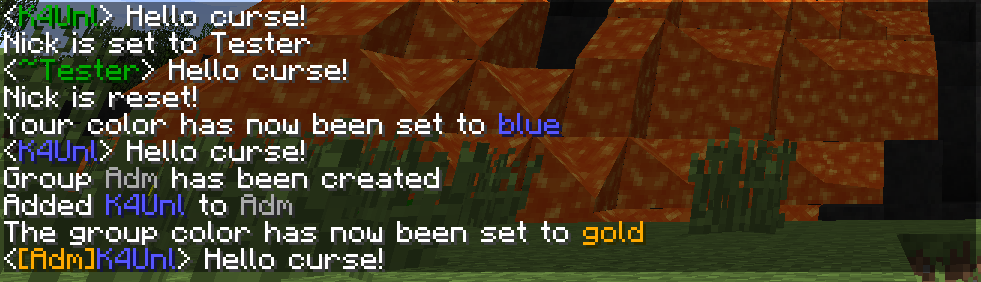
Screenshot:
Commands:
- /nick <nick> – Sets a nickname for yourself. Leave nick empty to reset
- /color <color> – Sets a color for yourself. Leave color empty to get a list of colors, or enter “random” to get a random color
- /realname <nick> – See who is behind a nickname.
- /coords – Shout out your coördinates in chat.
- /group – OP Only command. Can take these subcommands:
- create <Name>- Creates a group with Name
- remove <Name> – Removes group Name
- addUser <Group> <Name>- Adds user Name to Group
- delUser <Group> <Name> – Removes user Name from Group
- color <Group> <color> – Sets a color for the group.
- save – Saves the groups to a file in the world root
- load – Loads the groups from a file in the world root
- /colorchat – OP Only command. Can take these subcommands:
- version – Displays version of colorchat
- save users – Saves users to a file in the world root
- load users – Loads users from a file in the world root
- save groups – Saves groups to a file in the world root
- load groups – Loads groups from a file in the world root
Required mods:
For ColorChat (and all my other mods) K4Lib is required!
Modpacks:
You’re allowed to use this mod in any pack you want, as long as it’s not behind a paywall.

常见问题
ColorChat 支持哪些 Minecraft 版本?
ColorChat 支持 Minecraft Java 版 1.7.2–1.12.1,共 10 个版本,可用的加载器:Forge。下载时注意选择和你游戏版本一致的文件。
ColorChat 怎么安装?
先用 PCL2 或 HMCL 启动器安装对应版本的 Forge,再把下载的 .jar 文件放进游戏目录的 mods 文件夹,重新启动游戏即可。开启了版本隔离的,mods 文件夹在 versions/版本名 下面。
K4Unl 的其他作品
查看全部 →
Blue Power
by Quetzi, MoreThanHidden 等
Blue Power 为游戏添加了多种操控和运输方块、传输红石信号的方式。
374.7万
2 年前
CurseForge

QmunityLib
by Quetzi, K4Unl 等
多个 Qmunity 模组所需的前置库
105.7万
11 年前
CurseForge

K4Lib
by K4Unl
K4 的前置库
55.4万
8 年前
CurseForge

Hydraulicraft
by K4Unl, CallMeFoxie
A mod about Hydraulics
19.8万
10 年前
CurseForge
评论
登录后评论和评分