CollectionMaster
Turn gathered resources into rewards through configurable item collections and milestones.
截图
介绍
CollectionMaster
CollectionMaster adds collectible item collections to Minecraft. Discover a collection by finding its target item, contribute items to complete progressively larger milestones, and claim item rewards as you advance.
✅ Features
- Ready-to-play collections for common vanilla items. (Work in progress, more collections will be added)
- Twenty-three default milestones, from 10 items up to 500,000, with configurable shared fallback rewards.
- The included collections have their own themed reward tables. Custom collections can inherit the global milestones and rewards or define their own.
- Progress and pending rewards are stored per player in the world save and validated by the server.
📖 Opening the catalog
Open the catalog with K by default. The key can be changed in Minecraft’s Controls settings. You can also use either command:
/collectionmaster/cmaster
In multiplayer, install the mod on both the server and each connecting client.
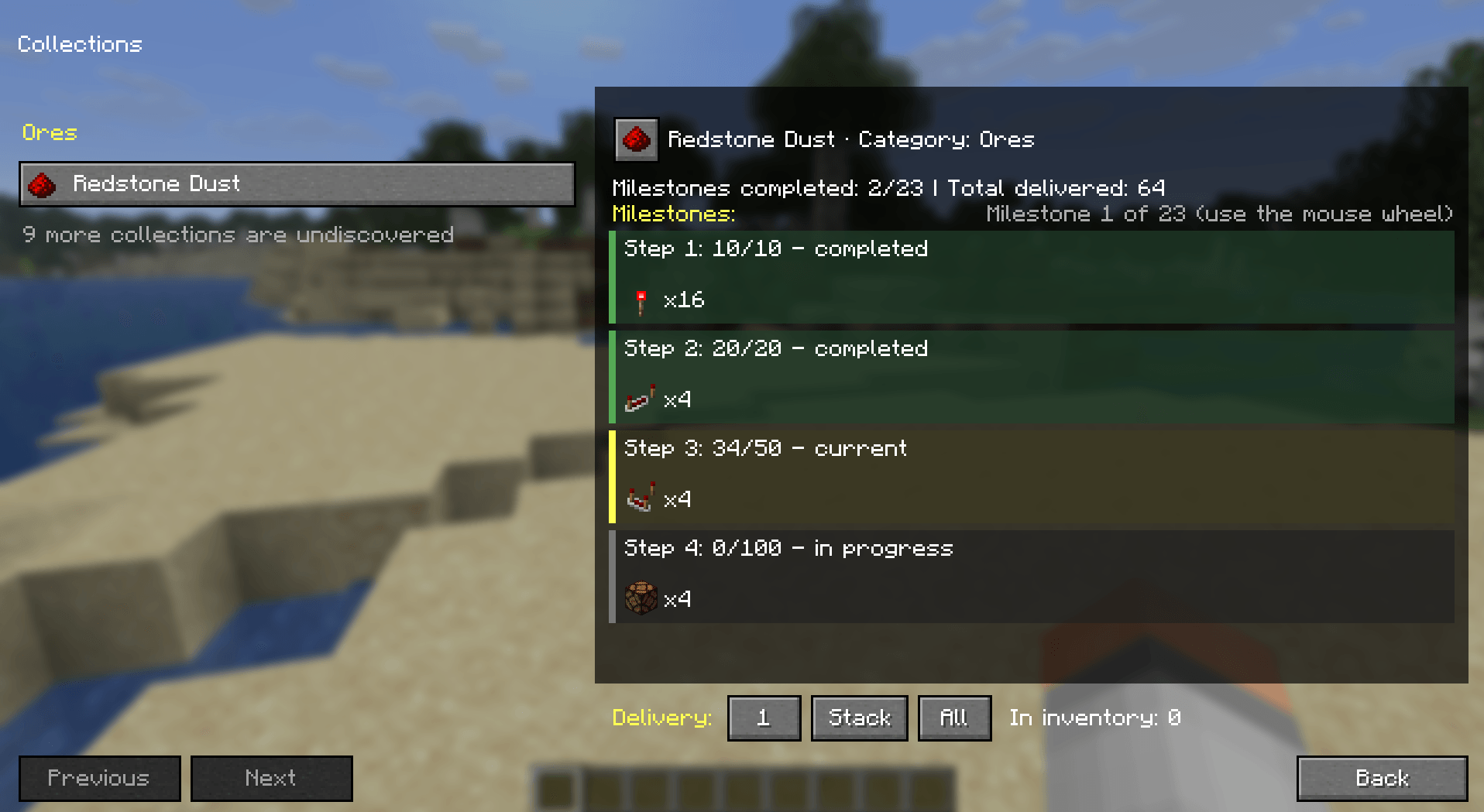
The catalog groups discovered collections by category. It shows each collection’s target item, current progress, milestone requirements, and rewards. Undiscovered collections are not listed individually; the catalog can show an aggregate count of how many remain. Use the mouse wheel over the milestone area to browse milestones.
Choose 1, Stack, or All to deliver items from your inventory. A delivery is limited to the amount needed by the remaining milestones. Completed milestone rewards appear on their cards and can be claimed there. If the inventory cannot fit a reward, it remains pending.
⚙️ Collection definitions
Collection definitions are JSON files in:
config/collectionmaster/collections/The directory is scanned recursively, so you can organize definitions in subfolders. On first launch, the mod installs ten example collection files. Existing files are preserved.
A minimal custom collection can omit both milestone fields and inherit the global milestone amounts and rewards:
{
  "id": "collectionmaster:amethyst",
  "name": "Amethyst",
  "category": "Ores",
  "target_item_ids": ["minecraft:amethyst_shard"],
  "enabled": true
}
Every definition requires a unique collection id, a name, a category, and exactly one target item in target_item_ids. Item IDs use Minecraft’s namespace:path format. The enabled field is optional and defaults to true.
Using the global defaults
The global options file is config/collectionmaster.json. It contains:
default_milestone_amounts: 23 positive, strictly increasing item requirements. The built-in sequence is10, 20, 50, 100, 250, 500, 1000, 2500, 5000, 10000, 20000, 30000, 40000, 50000, 60000, 70000, 80000, 90000, 100000, 200000, 300000, 400000, 500000.default_milestone_rewards: 23 reward groups, one for each default milestone. Each reward has anitem_idand a positivecount. A group may contain more than one reward.show_locked_collections: controls whether the catalog displays the aggregate count of undiscovered collections; defaults totrue.
The global reward table is shared by collections that do not provide their own reward definition. Edit the options file to change the defaults for newly defined collections that inherit them.
Overriding rewards for a collection
Use milestone_rewards when a collection should keep the global milestone amounts but use a different reward table. It replaces the entire global reward table and must contain exactly 23 reward groups, in milestone order:
"milestone_rewards": [
  [{"item_id": "minecraft:amethyst_block", "count": 2}],
  [{"item_id": "minecraft:experience_bottle", "count": 4}]
]
The snippet shows the shape only: a complete collection definition must provide all 23 groups. Each group is a list so a milestone can grant multiple item types.
Defining custom milestones
Use milestones to define a collection’s milestone numbers, requirements, and rewards directly:
"milestones": [
  {
    "number": 1,
    "required_amount": 32,
    "rewards": [{"item_id": "minecraft:amethyst_block", "count": 2}]
  },
  {
    "number": 2,
    "required_amount": 128,
    "rewards": [
      {"item_id": "minecraft:amethyst_block", "count": 4},
      {"item_id": "minecraft:experience_bottle", "count": 8}
    ]
  }
]
Milestone numbers must start at 1 and be consecutive; requirements must be positive and increase from one milestone to the next. Each milestone needs at least one reward. Use either milestones or milestone_rewards in a collection file, not both.

常见问题
CollectionMaster 支持哪些 Minecraft 版本?
CollectionMaster 支持 Minecraft Java 版 26.1.2–26.3,共 3 个版本,可用的加载器:Fabric / NeoForge。下载时注意选择和你游戏版本一致的文件。
CollectionMaster 怎么安装?
先用 PCL2 或 HMCL 启动器安装对应版本的 Fabric / NeoForge,再把下载的 .jar 文件放进游戏目录的 mods 文件夹,重新启动游戏即可。开启了版本隔离的,mods 文件夹在 versions/版本名 下面。
PedriJoe 的其他作品
查看全部 →
Friendly or Not
《Friendly or Not》会改变生物被攻击时的反应方式。

Ultra Easy Menu
UltraEasyMenu 是一款适用于 Fabric 和 NeoForge 最新版本的模组,专注于简洁的主菜单自定义。

DropVersion – Odyssey [FA]
为 Minecraft 最新版本带来终极 RPG 与冒险体验的整合包【FABRIC】。
Omenwake
Discover, track, and master encounters that are triggered by your everyday gameplay actions.
评论
登录后评论和评分