
Cobblemon: Expanded Configs
Advanced Cobblemon configuration without digging through config files. Change gameplay in-game, save profiles and target rules to specific worlds, species or players.
截图

介绍
Cobblemon: Expanded Configs turns hardcoded Cobblemon gameplay rules into safe, editable server settings.
Tune experience, captures, battles, Pokémon stats, resources, storage, progression and administration from a native in-game editor. Minecraft 1.21.1 builds also include controls for spawning, encounters and Cobblemon’s native Pokémon riding system.
It adds no Pokémon, items, blocks or recipes. Every gameplay-changing feature is disabled by default, so simply installing the mod does not alter a world.
| Requires | Cobblemon; Fabric API on Fabric |
| Minecraft | 1.20.1: Fabric and Forge · 1.21.1: Fabric and NeoForge |
| Sides | Client and server — both are required |
| New content | None |
| License | All Rights Reserved |
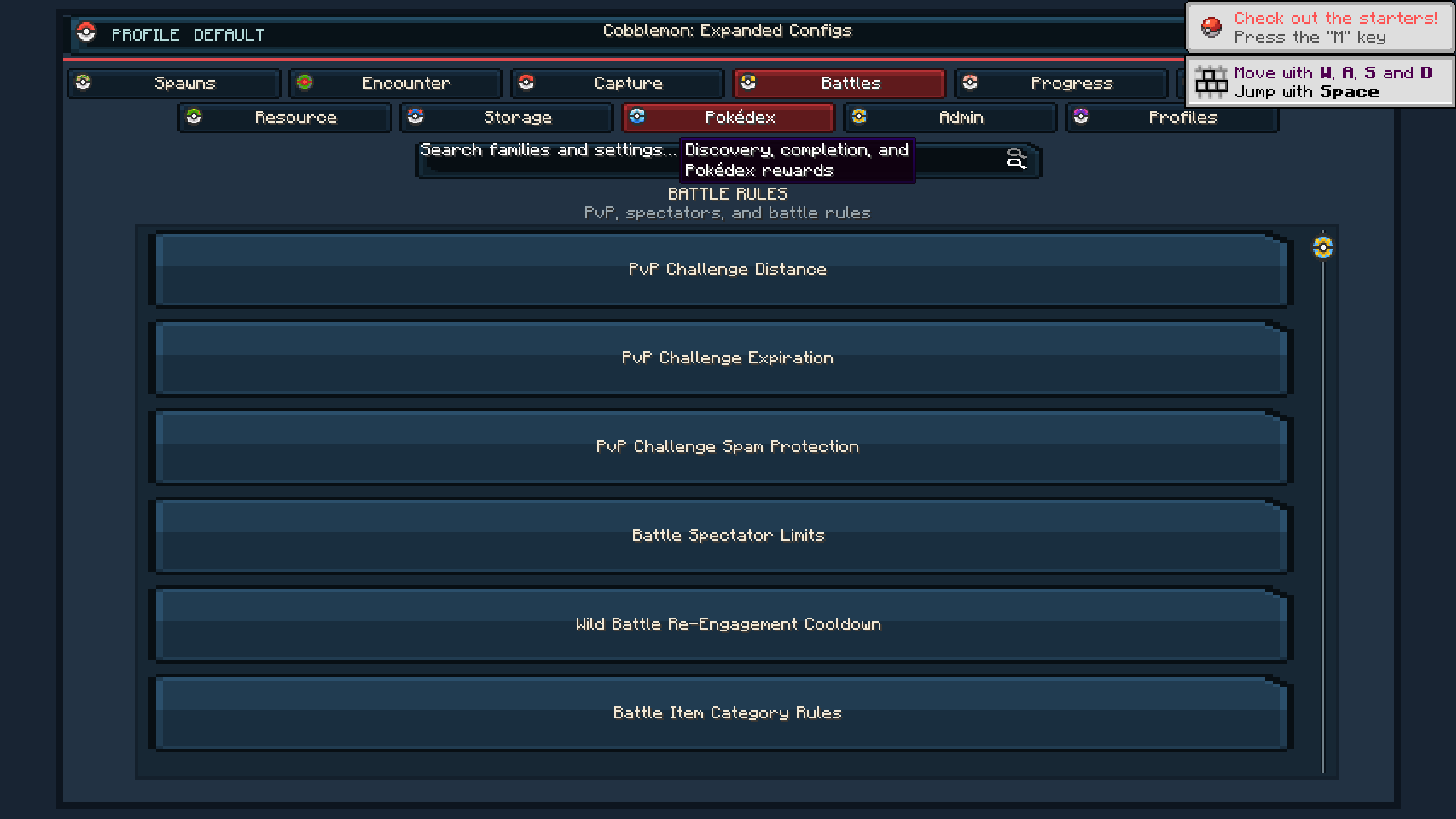
The in-game editor
Run /cec or /cec open to open the configuration screen. No configuration item is required.
The editor includes:
- Categories and searchable setting cards
- Fuzzy search across names, IDs and descriptions
- Tooltips explaining settings, units and valid ranges
- Typed controls for numbers, percentages, multipliers and enums
- Immediate validation for incomplete or out-of-range values
- Staged changes with Apply, Discard and Reset controls
- Clear indicators for modified settings and their effective source
- Profile creation and activation
- Read-only access for players without editing permission
Changes remain client-side until Apply is pressed. The server then checks the player’s permissions and validates the entire update before replacing any configuration file.
What can be configured?
Runtime-backed settings include:
- Experience multipliers by source and Pokémon species
- Species growth-rate scaling
- Wild Pokémon IV limits
- Capture cooldowns and restrictions
- First-catch and repeat-capture modifiers
- Berry harvest yields
- Friendship loss after fainting
- Protected Pokémon release confirmation
- Release rate limits
- PvP party-size, species and held-item rules
- Captured-Pokémon metadata
- Population and encounter controls on supported versions
- Pokémon riding eligibility, speed, sprinting, stamina and safety on 1.21.1
- And much more
Expanded Configs does not duplicate settings that Cobblemon already provides. Its configuration catalog is audited separately for each supported Cobblemon version, and settings remain hidden until they have a working version-specific implementation.
Profiles
Named profiles let servers maintain different rulesets without rewriting every setting.
Profiles can be:
- Created and activated
- Duplicated or renamed
- Inherited from a parent profile
- Compared with one another
- Exported and imported
- Switched through commands
New profiles begin empty and do not activate automatically.
Layered overrides
A single ruleset does not have to apply everywhere.
Settings can be overridden for:
- Worlds
- Dimensions
- Biome tags
- Individual biomes
- Pokémon types
- Species
- Forms
- Permission groups
- Individual players
More-specific layers take priority while unchanged settings continue using their global, profile or default values.
For example, a server could increase wild IVs in one dimension, adjust experience for a particular species or apply different rules to a permission group without maintaining separate installations.
Safe by default
Every gameplay-changing family starts disabled. The built-in default profile contains no overrides, so installing Expanded Configs does not silently remove, restrict or rebalance Cobblemon features.
Configuration files are validated before use. Invalid values fall back to safe effective values, writes are atomic, and migrations preserve backups of older schemas.
The server remains authoritative in multiplayer. Clients cannot bypass permissions or force unvalidated values through the editor.
Version-specific features
Minecraft 1.20.1
- Cobblemon 1.5.2
- Fabric and Forge
- No riding settings, because this Cobblemon version has no native controllable riding system
Minecraft 1.21.1
- Cobblemon 1.7.3
- Fabric and NeoForge
- Adds population, encounter and native riding controls
- Riding settings cover eligibility, passengers, movement modes, speed, sprinting, stamina, exhaustion, duration and cooldowns
Commands
The main command is /cec.
Administrative commands cover:
- Opening the editor
- Auditing available settings
- Reloading configuration
- Reading, changing and resetting values
- Creating and managing profiles
- Importing, exporting and comparing profiles
Command access follows server permissions. Players without editing permission can still receive a read-only view of the current configuration.
What it does not do
- It does not add Pokémon, items, blocks or recipes.
- It does not replace Cobblemon’s own configuration.
- It does not change gameplay at its generated defaults.
- It does not expose settings without a tested runtime implementation.
- It does not trust configuration changes sent by a client.
- It does not use invasive hooks where stable public Cobblemon events are available.
License and modpacks
Cobblemon: Expanded Configs is licensed under the MIT License. Modpacks may include it; credit with a link is appreciated but not required.
NOTE: Cobblemon: Expanded Configs is an independent addon and is not affiliated with, endorsed by or supported by the Cobblemon developers.
Want updates, sneak peeks, and to contribute? Join the Discord.
I post updates, sneak peeks, reveals, and a lot of stuff in there. You can meet new people, suggest things, and be a part of the community. DISCORD LINK HERE!
常见问题
Cobblemon: Expanded Configs 支持哪些 Minecraft 版本?
Cobblemon: Expanded Configs 支持 Minecraft Java 版 1.20.1–1.21.1,共 2 个版本,可用的加载器:Fabric / Forge / NeoForge。下载时注意选择和你游戏版本一致的文件。
Cobblemon: Expanded Configs 怎么安装?
先用 PCL2 或 HMCL 启动器安装对应版本的 Fabric / Forge / NeoForge,再把下载的 .jar 文件放进游戏目录的 mods 文件夹,重新启动游戏即可。开启了版本隔离的,mods 文件夹在 versions/版本名 下面。
XircTwerk 的其他作品
查看全部 →
Farmer’s Delight: Meal Mastery
为农夫乐事添加逐个食谱的熟练度、食谱发现和烹饪日志。烹饪更快,为食物摆盘并获得星级评价,不添加新物品。

Demon Slayer: Breath of Nichirin
A mod that adds a lot of content from the popular series Demon Slayer!

Xirc’s Jcraft Journeys
Xirc’s JCraft Journeys is a JoJo's Bizarre adventure-inspired RPG modpack built entirely around the mod JCraft: Eyes of Ender.

Crash Doctor
Diagnose Minecraft crashes and mod conflicts in plain English, with suspect mod ranking and privacy-redacted support reports.
评论
登录后评论和评分