跳到正文

Cobblemon: Catch Ball Rules

Cobblemon Catch Ball Rules is a Fabric mod for Minecraft 1.21.1 that lets server owners decide which Pokemon species can only be caught with specific Poke Balls.

收藏

截图

介绍

中文介绍正在准备中,下面暂时显示原文。
# Cobblemon Catch Ball Rules

Cobblemon Catch Ball Rules is a Fabric mod for Minecraft 1.21.1 that lets server owners decide which Pokemon species can only be caught with specific Poke Balls.

If a species is restricted and the player throws the wrong ball, the capture fails immediately.
If the ball is allowed, Cobblemon handles the rest with its normal catch logic.

## Features

– Restrict specific Pokemon to specific Poke Balls
– Keep rules in a simple JSON config file
– Support Cobblemon balls and custom balls from add-ons or modpacks
– Preserve Cobblemon’s normal capture formulas for valid balls
– Reload the config with a command instead of restarting the server
– Optionally refund blocked balls
– Optionally show a custom player message when a catch is blocked

## Requirements

– Minecraft `1.21.1`
– Fabric Loader
– Cobblemon `>=1.7.3 <1.8.0`

## Server And Client Support

– Gameplay enforcement is server-side
– The mod can also be installed on the client and loads cleanly there
– In practice, this is mainly a server-side rules mod

## Installation

1. Install Fabric Loader for Minecraft `1.21.1`
2. Install Cobblemon for the same Minecraft version
3. Put this mod in your `mods` folder
4. Start the game or server once to generate the config file

## Config File

Path:

config/cobblemon_catch_ball_rules.json
 

Example:


{
"consumeBlockedBall": false,
"showPlayerMessage": true,
"rules": [
{
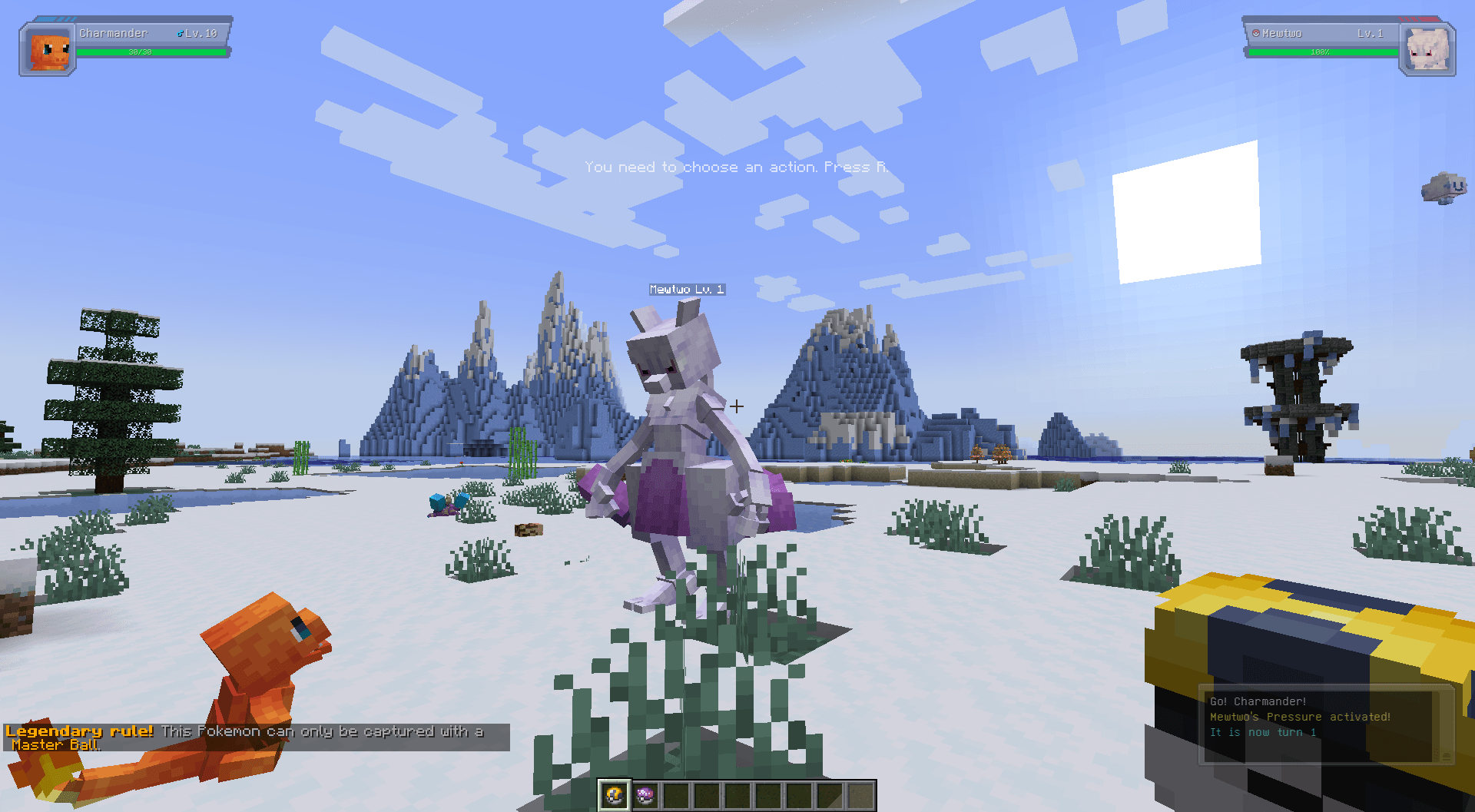
"pokemon": ["mew", "mewtwo", "lugia"],
"allowedBalls": ["cobblemon:master_ball"],
"message": "&6&lLegendary rule! &r&7This Pokemon can only be captured with a &6Master Ball&7."
}
]
}

 
## Config Options

– `consumeBlockedBall`
When `false`, the mod refunds the blocked ball. When `true`, the blocked ball is still consumed.
– `showPlayerMessage`
When `true`, the player sees the rule message after a blocked catch. When `false`, the catch is blocked silently.
– `rules`
A list of species-specific catch restrictions.

Each rule contains:

– `pokemon`: a list of species names or species IDs
– `allowedBalls`: a list of allowed Poke Ball item IDs
– `message`: the message shown when a catch is blocked

## Writing Rules

Pokemon values can use either short names or full IDs:

– `”mew”`
– `”cobblemon:mew”`

Ball values should use full item IDs:

– `”cobblemon:poke_ball”`
– `”cobblemon:ultra_ball”`
– `”cobblemon:master_ball”`

Custom balls from other mods or add-ons also work as long as you use the correct item ID.

The `message` field supports Minecraft legacy formatting codes with either `&` codes or section-sign codes.

## Example Rules

Legendary Pokemon that only allow Master Balls:

{
  "pokemon": ["mewtwo"],
  "allowedBalls": ["cobblemon:master_ball"],
  "message": "&4&lBlocked! &r&7This Pokemon can only be captured with a &6Master Ball&7."
}

Ultra Beasts that only allow Beast Balls:

{
  "pokemon": ["nihilego", "buzzwole", "pheromosa"],
  "allowedBalls": ["cobblemon:beast_ball"],
  "message": "This Pokemon reacts only to a Beast Ball."
}

Pokemon that allow more than one ball:

{
  "pokemon": ["articuno"],
  "allowedBalls": ["cobblemon:ultra_ball", "cobblemon:master_ball"],
  "message": "Articuno can only be captured with an Ultra Ball or Master Ball."
}

## Commands

Reload the config without restarting:
/ccbr reload
/cobblemoncatchballrules reload

This command requires operator permission.

## Troubleshooting

– If the config file is missing, the mod creates a default one automatically
– If the config file is invalid JSON, the mod regenerates it with defaults and logs the error
– If a rule seems ignored, check the species ID, ball ID, and whether the species matches one of your configured rules

常见问题

Cobblemon: Catch Ball Rules 支持哪些 Minecraft 版本?

Cobblemon: Catch Ball Rules 支持 Minecraft Java 版 1.21.1,可用的加载器:Fabric。下载时注意选择和你游戏版本一致的文件。

Cobblemon: Catch Ball Rules 怎么安装?

先用 PCL2 或 HMCL 启动器安装对应版本的 Fabric,再把下载的 .jar 文件放进游戏目录的 mods 文件夹,重新启动游戏即可。开启了版本隔离的,mods 文件夹在 versions/版本名 下面。

评论

登录后评论和评分

MoustachStudio 的其他作品

查看全部 →