
CobbleDollars Notes
Cobbledollars Notes is an addon for the CobbleDollars mod, designed to expand the in-game economy in your Cobblemon world.
介绍
CobbleDollar Notes
Based on CobbleDollars Ticket – the original mod on Modrinth.
Overview / 概要
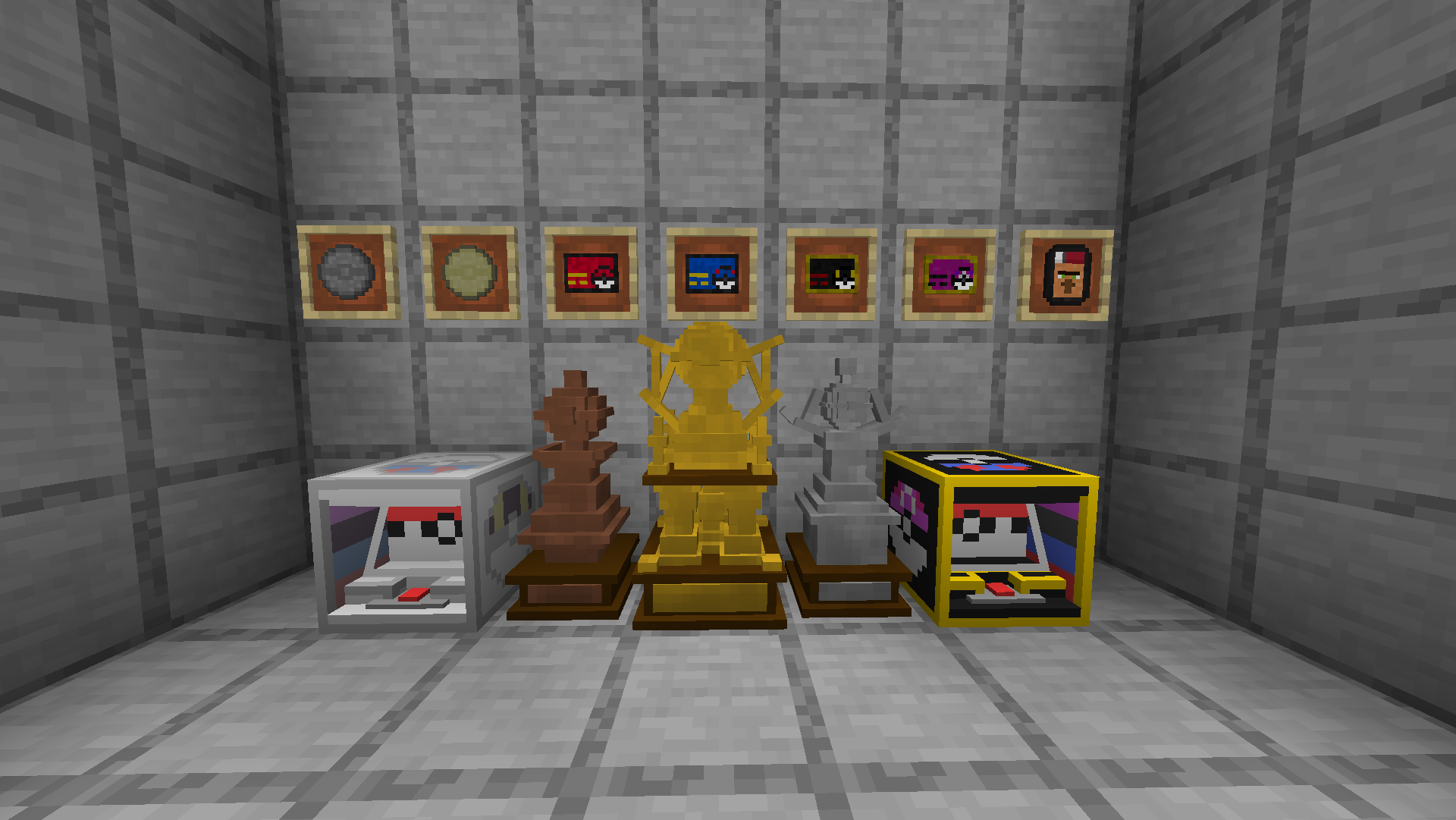
CobbleDollar Notes adds physical currency to CobbleDollars: coins (€10, €100) and notes (€1,000, €10,000, €100,000, €1,000,000) you can trade or use at slot machines. With CobbleDollars installed you can exchange balance at the CobbleDollar Shop Villager once configured and pay for spins with notes or balance. Buy Golden, Silver, and Bronze Wealth Trophies to show off. Slot odds are configurable via JSON.
Features / 主な機能
Pokézon 🛒 – Right-click to open the CobbleDollar Shop from anywhere (once configured).
Physical currency 💵 – Coins: €10, €100. Notes: €1,000, €10,000, €100,000, €1,000,000. Right-click to add to balance; Sneak + Right-click to redeem a full stack. To get notes/coins from your balance, configure the CobbleDollar Shop (see below).
Slot machines 🎰 – Normal: €1,000/play, jackpot €120,000. Premium: €10,000/play, jackpot €1,500,000. Pay with notes or balance. Level system and configurable odds in config/CobbleDollarNotes/config.json.
Wealth trophies 🏆 – Gold €100,000,000, Silver €10,000,000, Bronze €1,000,000. Shop purchase needs CobbleDollars + Shop config.
Advancements – For slots, trophies, jackpot, and Pokézon.
How to use / 使い方
- Pokézon – Hold it, Right-click to open the CobbleDollar Shop.
- Notes/coins – Right-click to add one to your balance; Sneak + Right-click to redeem the whole stack.
- Slots – Use a machine, put €1,000 or €10,000 notes in inventory (or have enough balance), and press SPIN REELS!.
- Trophies – Buy from the Shop (if configured) or obtain in-game; place the block to display.
Dependencies / 依存MOD
Required: CobbleDollars (balance, redemption, shop). With CobbleDollars, slots accept notes or balance; redemption and getting notes/coins from the shop need CobbleDollars + shop config.
Configuration Guide / 設定ガイド
Slot odds – config/CobbleDollarNotes/config.json. Auto-created on first run. Two arrays: normalProbabilities and premiumProbabilities, each 4 levels × 4 outcomes (Jackpot, Big Win, Small Win, Cherry Match; order [0]-[3], values 0-1, remainder = Miss).
CobbleDollar Shop – Players get notes/coins from their balance via the CobbleDollar Shop (villager). In config/cobbledollars/default_shop.json, add sections for Tickets, Coins, and Trophies so the shop sells them. Merge with existing JSON as needed.
Example default_shop.json sections (Tickets, Coins, Trophies):
{ "Tickets": [
  { "item": "cobbledollars_ticket:1000cobbledollar", "price": 1000 },
  { "item": "cobbledollars_ticket:10000cobbledollar", "price": 10000 },
  { "item": "cobbledollars_ticket:100000cobbledollar", "price": 100000 },
  { "item": "cobbledollars_ticket:1000000cobbledollar", "price": 1000000 }
]},
{ "Coins": [
  { "item": "cobbledollars_ticket:10cobbledollar", "price": 10 },
  { "item": "cobbledollars_ticket:100cobbledollar", "price": 100 }
]},
{ "Trophies": [
  { "item": "cobbledollars_ticket:gold_trophy", "price": 100000000 },
  { "item": "cobbledollars_ticket:silver_trophy", "price": 10000000 },
  { "item": "cobbledollars_ticket:bronze_trophy", "price": 1000000 }
]}
常见问题
CobbleDollars Notes 支持哪些 Minecraft 版本?
CobbleDollars Notes 支持 Minecraft Java 版 1.21.1,可用的加载器:Fabric。下载时注意选择和你游戏版本一致的文件。
CobbleDollars Notes 怎么安装?
先用 PCL2 或 HMCL 启动器安装对应版本的 Fabric,再把下载的 .jar 文件放进游戏目录的 mods 文件夹,重新启动游戏即可。开启了版本隔离的,mods 文件夹在 versions/版本名 下面。运行环境:客户端和服务端都要装。
Elyygee 的其他作品
查看全部 →
Cobblemon Journeys End
Cobblemon for our Free2Play server created by Elyygee, Tadiz and HoloShugga

Cobblemon PokeNews
Cobblemon clear pokemon on timer. It will do /pokekill on a set timer. /pokenews - To see the time left until next pokekill wipe. /pokenews reload - to reload the config.
评论
登录后评论和评分