
Clouser settings locker
This mod allows to lock precise settings to prevent breaking Clouser's Minecraft maps.
截图


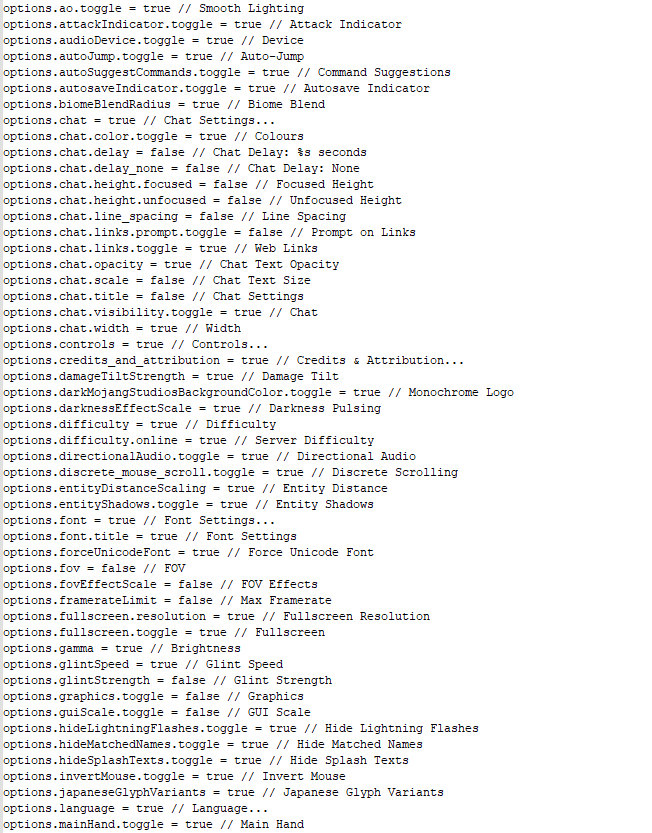
介绍
This mod allows to lock precise settings to prevent breaking Clouser‘s Minecraft maps.
It generates a file in the main Minecraft folder, named settingsLock.txt. Editing this file allows to enable and disable options. You don’t need to restart the game, the changes are loaded in runtime and you just have to reopen the menu to apply the modifications.
Below is an example line from the file:
options.fov = true // FOV
Let’s break this line down, shall we?
| options.fov | = | true | // | FOV |
|——————————————|—–|———————————————————————————|——|——————————————————————–|
| A code for the targeted option or button | | If this value is true, the option is enabled. If it’s false, it’s disabled. | | The in-game english name of the option. Here, it’s the FOV slider. |
More information on GitHub.
常见问题
Clouser settings locker 支持哪些 Minecraft 版本?
Clouser settings locker 支持 Minecraft Java 版 1.20.1–1.21.1,共 3 个版本,可用的加载器:Fabric。下载时注意选择和你游戏版本一致的文件。
Clouser settings locker 怎么安装?
先用 PCL2 或 HMCL 启动器安装对应版本的 Fabric,再把下载的 .jar 文件放进游戏目录的 mods 文件夹,重新启动游戏即可。开启了版本隔离的,mods 文件夹在 versions/版本名 下面。运行环境:客户端和服务端都要装。
Clouser 的其他作品
查看全部 →
Plants vs. Zombies
Clousers《植物大战僵尸》项目

Undertale
我的世界完整传说之下地图体验(第1-2部分)
Clouser settings locker
This mod allows to lock precise settings to prevent breaking Clouser's Minecraft maps.

Hollow Knight
Hollow Knight Minecraft Fully Playable Map
评论
登录后评论和评分