截图

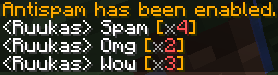
介绍
Features:
Clientside – the features are entirely clientside, and will work on any server. Does nothing, if installed on a server.
Toggleable – with built in commands, you can easily turn it on and off as needed. (.clearspam help)
Removes Spam – by looking through previously sent messages, the mod determines if the message is a duplicate, and makes sure that only one of each message is visible at a given time, cleaning up the chat.
Commands:
.clearspam toggle – toggles the features of the mod on or off. It is turned on by default, each time you start the game.
.clearspam on/off – toggles the features either on or off.
.clearspam reset – resets the spam counters.
.clearspam help – displays this list of commands.
Notes:
If you find any bugs or have a suggestion, please do let me know about them.
The mod was requested by user marcocorriero. It is inspired by an AntiSpam feature in the Wurst client, which I didn’t know of, but marcocorriero explained it to me. I coded the mod from scratch, and the mod does not use any code from the Wurst client.
Feel free to showcase the mod in a YouTube video. I will select my favorite and highlight in on this page and other pages where I’ve posted the mod.
常见问题
ClearSpam 支持哪些 Minecraft 版本?
ClearSpam 支持 Minecraft Java 版 1.11–1.12.2,共 6 个版本,可用的加载器:Forge。下载时注意选择和你游戏版本一致的文件。
ClearSpam 怎么安装?
先用 PCL2 或 HMCL 启动器安装对应版本的 Forge,再把下载的 .jar 文件放进游戏目录的 mods 文件夹,重新启动游戏即可。开启了版本隔离的,mods 文件夹在 versions/版本名 下面。
Ruukas 的其他作品
查看全部 →
Infinity Item Editor
Customized GUIs for nearly all items. Usable on any Creative Server!

Monsters and Dungeons
Venture to the far ends of the world. From the misty mountains to the stormy deserts. A quest for loot and glory.

Infinity Item Editor
Custom UIs to edit nearly all vanilla nbt tags. Usable on any Creative Server!
Quality Order (Clientside only)
Revolutionizing Creative! Will allow you to get almost any item or block through creative (Skulls, banners etc.)
评论
登录后评论和评分