
Clearing Block Mod
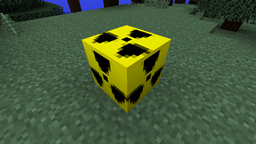
The Clearing Block Mod lets you craft a block that cleans up the space around it
截图

介绍
Clearing Block Mod
General Information
With this mod you can craft two special new blocks:
The Clearing Block – This block can be used to (surprise!) clear the space around it.
-The Water Replacing Block – That one placed in water changes the water into dirt so you can build something there where two seconds ago was water.
There are four types of each of these blocks, but that later on.
Examples of use:
Example 1:
You are in the jungle and want to build something, but dont have the mood to flat the terrain. Then you use the clearing block.
Example 2:
You want to build your house by the ocean but there is no place. But you can craft the water Replacing block that can make space for you, without digging for ever and placing lots of dirt blocks.
Example 3:
You are under the ground and quickly want to build a shelter. No problem, because you have your clearing block that can make it for you in a sec.
Crafting
The crafting is very easy. For the clearing block you only need three tools made of the same material (wood, stone, iron, diamond). In a crafting table you put a pickaxe in the top middle, a axe in the middle left, and a shovel in the middle right like so:
Posted Image
The weakest is made out of wooden tools and clears a area of 8 by 8 by 7
The next is the Stone Clearing Block and it cleans a cube of 16 by 16 by 12
Then comes the Iron one. That one clean a block 24 by 24 by 16
The best one (and very expensive) is the diamond clearing Block. That one clears a massive area of 40 by 40 by 30!
To craft a Water Replacing Block you need one normal clearing block (wood, stone, iron, diamond), a bucket and some dirt blocks. You have to put them in a crafting table like so:
Posted Image
In the middle the clearing block and at the bottom a bucket. Around that dirt and you get a water clearing block. Thats it!
How to use it?
Simple as nothing.
You just place the block and click it with the right mouse button!
After that it destroys itself or changes into dirt.
You can destroy it if you dont want to use it, it wont vanish. Posted Image
In addition in the /config folder you have a config file where you can set the IDs of the blocks! Edit it with notepad or anything else!
Instalation
Just put the zip file in your mods folder in appdata/.minecraft!
Dependencies:
-Minecraft Forge
Other
This is my first mod so please comment. If you have any notes than go on.
So if you have any ideas! And the most important: If you have any problem than dont wait!
If you like the mod than share it with your friends!
Yeah.. and sorry for my (good bad) English. As you see its not my native language Posted Image
Thank you,
Alexander
The default blocks IDs are:
Wooden Clearing Block – 3141
Stone Clearing Block – 3142
Iron Clearing Block – 3143
Diamond Clearing Block – 3144
Wooden Water Replacing Block – 3145
Stone Water Replacing Block – 3146
Iron Water Replacing Block – 3147
Diamond Water Replacing Block – 3148
常见问题
Clearing Block Mod 支持哪些 Minecraft 版本?
Clearing Block Mod 支持 Minecraft Java 版 1.7.2–1.7.10,共 5 个版本,可用的加载器:Forge。下载时注意选择和你游戏版本一致的文件。
Clearing Block Mod 怎么安装?
先用 PCL2 或 HMCL 启动器安装对应版本的 Forge,再把下载的 .jar 文件放进游戏目录的 mods 文件夹,重新启动游戏即可。开启了版本隔离的,mods 文件夹在 versions/版本名 下面。
评论
登录后评论和评分