
截图

介绍
What is this?
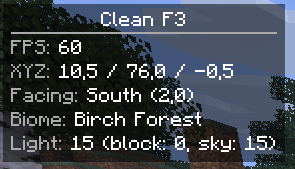
If you’re tired of opening F3 every two seconds just to check your coords or FPS, this mod is for you. Clean F3 puts a small, clean HUD on your screen with only the info you actually care about.
What it shows
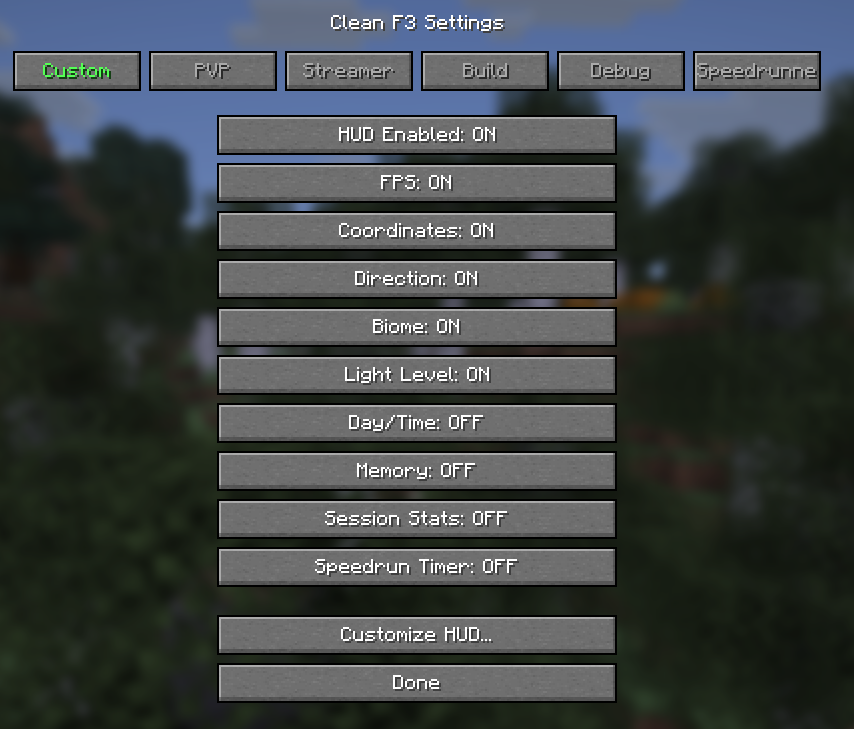
Everything is toggleable. Pick what you want, hide what you don’t.
- FPS – current framerate
- Coordinates – X / Y / Z
- Direction – facing direction + yaw
- Biome – current biome
- Light Level – block and sky light
- Day/Time – in-game time (HH:MM)
- Memory – RAM usage
- Session Stats – distance traveled, blocks mined (resets when you join a world)
- Speedrun Timer – starts on first movement, stops when you leave the End
Profiles
One-click presets so you don’t have to toggle everything manually:
- Custom – whatever you set up yourself
- PVP – FPS, Coords, Direction
- Streamer – FPS only (hides coords so nobody stream-snipes you)
- Build – Coords, Direction, Biome, Light Level
- Debug – everything + session stats
- Speedrunner – FPS, Coords, Direction, Speedrun Timer
Changing any individual toggle switches you back to Custom automatically.
HUD Customization
New in v1.2.0. Hit “Customize HUD…” in the config screen to change how the overlay looks:
- Position – pick a corner (top-left, top-right, bottom-left, bottom-right)
- Scale – 0.5x to 2.0x
- Background opacity – transparent to solid
- Padding – spacing inside the box
- Line spacing – gap between lines
- Header – show or hide the “Clean F3” title bar
- Text color – 8 color presets
- Label color – same 8 presets, for the label part of each line
Controls
| Key | What it does |
|—–|————-|
| F4 | Toggle HUD on/off |
| Right Shift | Open config screen |
Settings save automatically to config/cleanf3.json.
The HUD hides itself when the vanilla F3 screen is open, so they don’t overlap.
Supported Versions
- 1.20.1 (Java 17+, Fabric Loader >= 0.15.0)
- 1.20.4 (Java 17+, Fabric Loader >= 0.16.0)
- 1.21.1 (Java 21+, Fabric Loader >= 0.16.0)
- 1.21.4 (Java 21+, Fabric Loader >= 0.16.0)
- 1.21.6 (Java 21+, Fabric Loader >= 0.16.14)
- 1.21.8 (Java 21+, Fabric Loader >= 0.16.14)
- 1.21.9 (Java 21+, Fabric Loader >= 0.16.14)
- 1.21.10 (Java 21+, Fabric Loader >= 0.18.1)
- 1.21.11 (Java 21+, Fabric Loader >= 0.18.1)
- 26.1 (Java 25+, Fabric Loader >= 0.19.1)
- 26.1.1 (Java 25+, Fabric Loader >= 0.18.5)
- 26.1.2 (Java 25+, Fabric Loader >= 0.19.1)
Fabric API required. Client-side only, no server install needed.
常见问题
Clean F3 支持哪些 Minecraft 版本?
Clean F3 支持 Minecraft Java 版 1.20.1–26.2,共 13 个版本,可用的加载器:Fabric。下载时注意选择和你游戏版本一致的文件。
Clean F3 怎么安装?
先用 PCL2 或 HMCL 启动器安装对应版本的 Fabric,再把下载的 .jar 文件放进游戏目录的 mods 文件夹,重新启动游戏即可。开启了版本隔离的,mods 文件夹在 versions/版本名 下面。运行环境:仅客户端。
Sqersters 的其他作品
查看全部 →
Stellar Depths
Drift through cosmic emptiness. A space exploration mod built around scale, silence, and the unknown.

Beta+
A Minecraft Beta 1.7.3 mod that expands and improves the beta experience.

Orbital Strikes
Call down explosive strikes from above. Aim, right-click, and boom. The Orbital Cannon fires explosions at anything you can see, up to 100 blocks away. 5-second cooldown.

All In MC: Multiminer
Advanced mining and tree-chopping mechanics for faster and smoother gameplay.
评论
登录后评论和评分