介绍
CleanView – The Ultimate Visual Clarity Mod
Tired of Particles Blocking Your Vision?
CleanView gives you complete control over Minecraft’s visual clutter. Whether you’re in intense PvP combat, making PvP videos, or just want a cleaner gameplay experience, CleanView has you covered.
If you’d like to support me you can do so at Ko-Fi

Features
⚔️ Held Item Scaling
- Mainhand Scale — Resize items in your main hand (0x – 2x)
- Change the position and rotation of the items
- Offhand Scale — Resize items in your off hand (0x – 2x)
- Change the position and rotation of the items
- Perfect for smaller weapon models during combat or larger tools for visibility
✨ Particle Control
- Particle Scale — Scale ALL particles in the game (0x – 2x)
- Status Effect Particles — Control potion swirl visibility (0% – 100%)
- Reduce visual noise while maintaining essential feedback
 Totem Effects
- Totem Pop Scale — Adjust totem of undying particle size (0x – 2x)
- Totem Particle Scale — Adjust the size of Totem Particles seperately (0x – 2x)
- Essential for PvP — clear vision immediately after popping
🍪 Eating Effects
- Eating Crumbs Scale — Control food crumb particle size (0x – 2x)
- Reduce clutter while eating without losing all feedback
Beautiful Configuration Screen

CleanView features a stunning custom configuration screen built with Yet Another Config Lib (YACL):
- Intuitive sliders for precise control
- Dark theme that matches Minecraft’s aesthetic
- Organized categories: Held Items, Particles, Totem Effects, Eating
- Auto-save — your settings persist between sessions
Screenshots
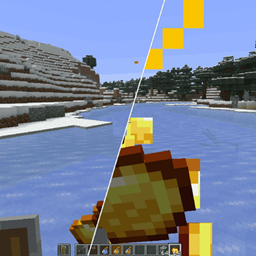
Before CleanView

After CleanView

Installation
- Install Fabric Loader (0.15.11+) — Get Fabric
- Install Fabric API — Get Fabric API
- Install Mod Menu — Get Mod Menu
- Download CleanView — Get CleanView
- Drop into mods folder — Launch and enjoy! 🎉
📜 License
Copyright (c) 2025 Nebula
All rights reserved.
A clean view leads to clean plays. 🎯
常见问题
Clean View 支持哪些 Minecraft 版本?
Clean View 支持 Minecraft Java 版 1.20.5–26.3,共 19 个版本,可用的加载器:Fabric。下载时注意选择和你游戏版本一致的文件。
Clean View 怎么安装?
先用 PCL2 或 HMCL 启动器安装对应版本的 Fabric,再把下载的 .jar 文件放进游戏目录的 mods 文件夹,重新启动游戏即可。开启了版本隔离的,mods 文件夹在 versions/版本名 下面。
NebulaJinxed 的其他作品
查看全部 →
NebsConfigLib
部分模组会用到的配置前置库

Visible Suspicious Stew
Ever wanted to know what you're eating? This mod tells you exactly which effect suspicious stews grant and for how long!

Simple CPS
A very simple mod to display how much cps you're getting!

Nbt Editor Port
Edit items, blocks, and entities in-game.
评论
登录后评论和评分