
截图

介绍
# CheapAway
You may have encountered this situation: a bunch of coal lies on the ground with a single diamond among them, but you can’t quickly pick up just the rarest diamond — very frustrating and uncomfortable. Or when there’s too much loot and you want to discard the worthless items, you have to check each one individually? Very frustrating and uncomfortable.
Thus, the CheapAway mod was born! With the support of RarityCore, you can now choose to refuse pickup for items below a specified rarity, or quickly discard items below a specified rarity from your inventory.
# Usage
You can define default values for each feature in the config file.
In-game, you can perform specific operations in several ways:
- Toggle pickup filter: hotkey or command
- Set the pickup filter rarity: command
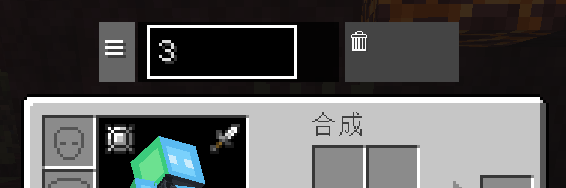
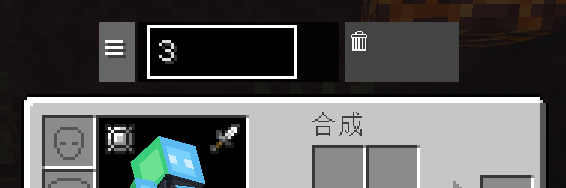
- One-click item discard and parameter adjustment: floating panel in the GUI
# Floating Panel Description
The floating panel is only displayed in the survival inventory.
- The three lines on the far left can be dragged to reposition the floating window
- The input box in the middle sets the target rarity
- Click the trash can button on the right twice to discard all items below the specified rarity
# Screenshots
常见问题
CheapAway 支持哪些 Minecraft 版本?
CheapAway 支持 Minecraft Java 版 1.20.1–26.1.2,共 5 个版本,可用的加载器:Forge / NeoForge。下载时注意选择和你游戏版本一致的文件。
CheapAway 怎么安装?
先用 PCL2 或 HMCL 启动器安装对应版本的 Forge / NeoForge,再把下载的 .jar 文件放进游戏目录的 mods 文件夹,重新启动游戏即可。开启了版本隔离的,mods 文件夹在 versions/版本名 下面。运行环境:客户端和服务端都要装。
Yanbwe 的其他作品
查看全部 →
RarityCore
The Rarity Core is an all-encompassing rarity enhancement mod that establishes a new rarity system

RarityCore
The Rarity Core is an all-encompassing rarity enhancement mod that establishes a new rarity system
RarityCore
The Rarity Core is an all-encompassing rarity enhancement mod that establishes a new rarity system

Search Carefully
SearchCarefully is a Minecraft mod that adds a tactical search system similar to Tarkov, allowing players to progressively uncover items in containers.
评论
登录后评论和评分