
ChatFlex
Enhance your server's communication with flexible chat channels and user-defined settings.
截图
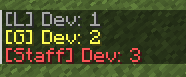
介绍
ChatFlex
========
Overview
This mod introduces a customizable chat system, allowing server owners to create and manage multiple chat channels with specific settings. The mod can operate with or without the LuckPerms mod, providing flexibility in permissions management.
Key Features
- Custom Chat Channels: Define multiple chat channels with unique settings, including:
- ID: Unique identifier for each channel.
- Name: Display name of the channel.
- Format: Customizable message format for the channel.
- Prefix: Character(s) used to identify the channel when sending messages.
- Range: The distance (in blocks) that the channel is active. Use
-1for global channels. - Permissions: Control access to channels using LuckPerms or OP-level checks.
- Cooldown: Time in seconds that players must wait before sending another message in the channel.
- Default Channel: Specify a default channel for messages that do not match any prefix.
- LuckPerms Integration:
- If LuckPerms is available, the mod will use it to manage permissions for each channel.
- If LuckPerms is not found, the mod defaults to OP-level permission checks.
Configuration
Channels are configured in a JSON file located at config/chatflex/channels.json. The mod will create a default configuration if the file does not exist.
Example Channel Configuration
[
{
“id”: “global”,
“name”: “Global”,
“format”: “§e[G] ${prefix}${player}: ${message}”,
“prefix”: “!”,
“range”: -1,
“permission”: “”,
“write_permission”: “”,
“read_permission”: “”,
“priority”: 0,
“cooldown”: 0,
“enabled”: true,
“default_channel”: true,
“worlds”: []
},
{
“id”: “local”,
“name”: “Local”,
“format”: “§7[L] ${prefix}${player}: ${message}”,
“prefix”: “”,
“range”: 100,
“permission”: “”,
“write_permission”: “”,
“read_permission”: “”,
“priority”: 0,
“cooldown”: 0,
“enabled”: true,
“default_channel”: true,
“worlds”: []
}
]
Usage
- To use a specific channel, simply type the prefix followed by your message. For example:
!Hello everyone!for the global chat.Hello local players!for the local chat (if no prefix is specified, it defaults to local).

常见问题
ChatFlex 支持哪些 Minecraft 版本?
ChatFlex 支持 Minecraft Java 版 1.21–1.21.4,共 5 个版本,可用的加载器:NeoForge。下载时注意选择和你游戏版本一致的文件。
ChatFlex 怎么安装?
先用 PCL2 或 HMCL 启动器安装对应版本的 NeoForge,再把下载的 .jar 文件放进游戏目录的 mods 文件夹,重新启动游戏即可。开启了版本隔离的,mods 文件夹在 versions/版本名 下面。运行环境:仅服务端。
评论
登录后评论和评分