
Chat Tools
Timestamp, translators, notifier, macros, chat bubbles, chat filter; everything you need is here!
介绍
🔖Help Needed🔖
- New Translations
- New Web Machine Translators
Feel free to make a PR on Github.
📋 Overview
Chat Tools is a highly customizable Minecraft client mod that supports various features, allowing them to interoperate through commands and more.
📖 Glossary and Technical Details
- Session Identifier (Chat Tools-specific term) is a string that, in single-player mode, corresponds to the current save name, and in multiplayer mode, corresponds to the server address. Related Regular Expressions use the
matches()method for matching. - Pattern (General term) refers to the Regular Expression pattern. Chat Tools uses the MULTILINE mode for Regular Expressions and matches them using the
find()method. - Chat Tools maintains multi versions by using macro replacement. The same version of Chat Tools may exhibit slight differences between Minecraft versions.
- When processing player messages, Chat Tools removes color codes (§.).
- By enabling Advanced Tooltips (F3+H), you can hover over configuration items on the configuration page to view their keys, default values, and other details.
🛠️ Commands
/chattools on– Enable the mod./chattools off– Disable the mod./chattools opengui– Open the configuration page./chattools download– Download addons./chattools regex_checker <pattern> [<test_content>]– Without test content: check if the pattern is a valid regex. With test content: validate the pattern and test if it matches the content./chattools send_to_client text <text_JSON_component>– Send specific text to the client chat bar./chattools send_to_client actionbar <text_JSON_component>– Display specific text on the client actionbar./chattools config openfile– Open the configuration file (editing requires a game restart to apply changes)./chattools config get <key>– Retrieve the value of a specific configuration key for the current session./chattools config set <key> <value> [<save>]– Set the value of a specific configuration key. If save is set to true, the changes will also be saved to the file./chattools config toggle <key> [<save>]– Toggle the state of a boolean-type configuration key. If save is set to true, the changes will also be saved to the file.
✨ Function introduction
For elaborate descriptions and examples, please see >>FAQ<<.
General Settings
These are the core settings for Chat Tools:
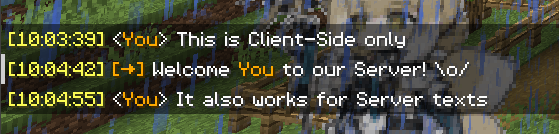
- Show Timestamp \
Adds a timestamp to each message.\

- Restore Messages \
Recovers messages from previous sessions. - Nickname Hider \
Conceals your real nickname from your view.\
- Translator
Press Shift + Tab in the chat bar to start translating. - Enable Chat History Navigator
Use Ctrl + F to start navigating in chat!
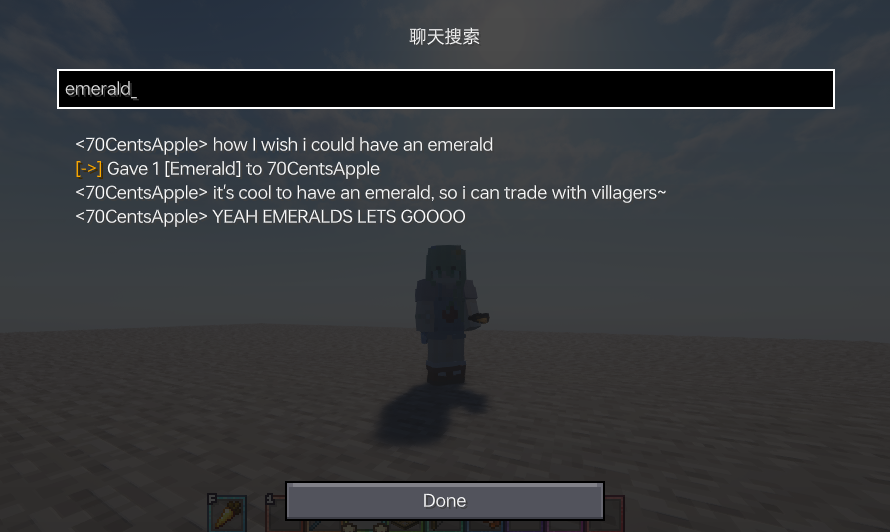
- Max History Length\
Sets the maximum number of chat messages stored.\

Notifier Settings
Various chat alert features:
- Toast Notification\

- Sound\
Supports custom sound effects. - Actionbar\
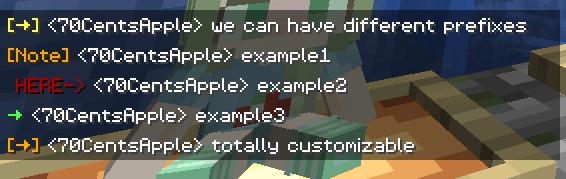
Displays alerts in the action bar. - Highlight\
Supports custom highlighting prefixes.\
- Allow List\
Messages matching this list are allowed. - Ban List\
Messages matching this list are blocked (higher priority than Allow List).
Formatter Settings
Customize your messages using specified patterns. Apply different rules for different servers. See Bubble Rules.
- Pattern\
Automatically formats messages based on the specified style.\
For example: \
&e{text}makes your message gold on servers supporting the color prefix ‘&’.\
&e{text} ~(ovo)~adds a personalized suffix.\
My coordinates are: {pos}replaces{pos}with your current coordinates. - Auto-Disable for Matching…\
In some cases, you don’t want your text to be formatted. \
This includes (but isn’t limited to):\
Item counts orallwhen selling items to the Chest Shop; \
Commands starting with special characters. \
The default RegEx pattern^\d+$|^[.#%$/].*|\ball\bcovers most cases.\
You can modify or add more as needed.
Chat Keybindings
Use hotkeys for frequently used commands:
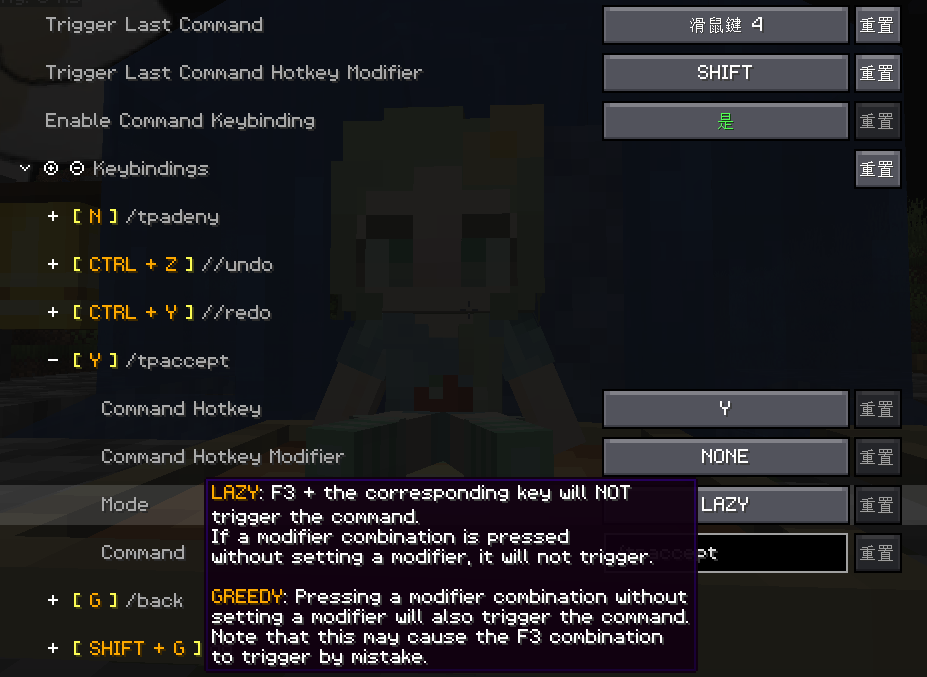
- Trigger Last Command Hotkey\
Press a set hotkey to repeat the previous command.\
For example: \
While playing a Parkour map, do F3+C and activate it for a time, then you can quickly go back to the recorded point location every time you press the hotkey. - Command Keybindings\
Assign hotkeys to frequently used commands.\
Bubble Settings
- Enable Chat Bubbles\
Displays a chat bubble over your head.\

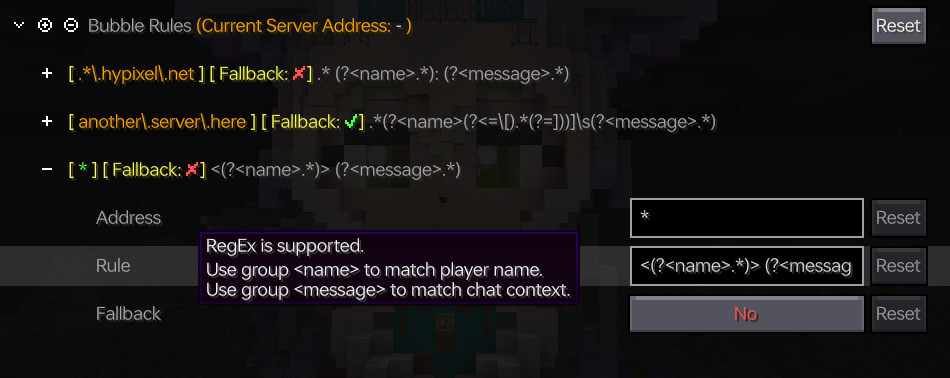
- Bubble Rules\
Apply different bubble rules on different servers.\
Responder Settings
> Warning: Before using this feature on a server, please check with other players and admins first!
- Enable Responder\
Automatically responds to others’ messages. - Responder Rules\
Apply different responder rules on different servers.
Chat Filter Settings
- Enable Chat Filter\
Filter chat messages based on specific rules. - Filter Rules\
If any of the patterns in this list matches an incoming message, the message will be filtered.
常见问题
Chat Tools 支持哪些 Minecraft 版本?
Chat Tools 支持 Minecraft Java 版 1.16–26.3,共 40 个版本,可用的加载器:Fabric / NeoForge。下载时注意选择和你游戏版本一致的文件。
Chat Tools 怎么安装?
先用 PCL2 或 HMCL 启动器安装对应版本的 Fabric / NeoForge,再把下载的 .jar 文件放进游戏目录的 mods 文件夹,重新启动游戏即可。开启了版本隔离的,mods 文件夹在 versions/版本名 下面。
70CentsApple 的其他作品
查看全部 →
Chat Tools
时间戳、翻译器、通知器、宏、聊天气泡、聊天过滤器;你需要的一切尽在其中!

Modify Camera Collision
更改第三人称视角下的摄像机碰撞方式!

ProfileCached
Cache online player profiles to reduce requests to the authentication server.

Profile Cached
Cache online player profiles to reduce requests to the authentication server.
评论
登录后评论和评分