截图

介绍






Codex: Title Scrolls
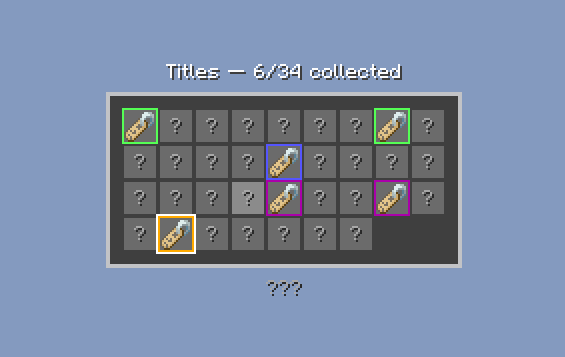
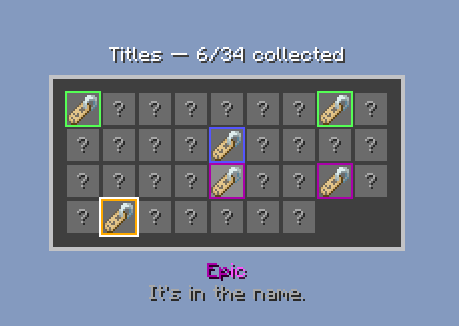
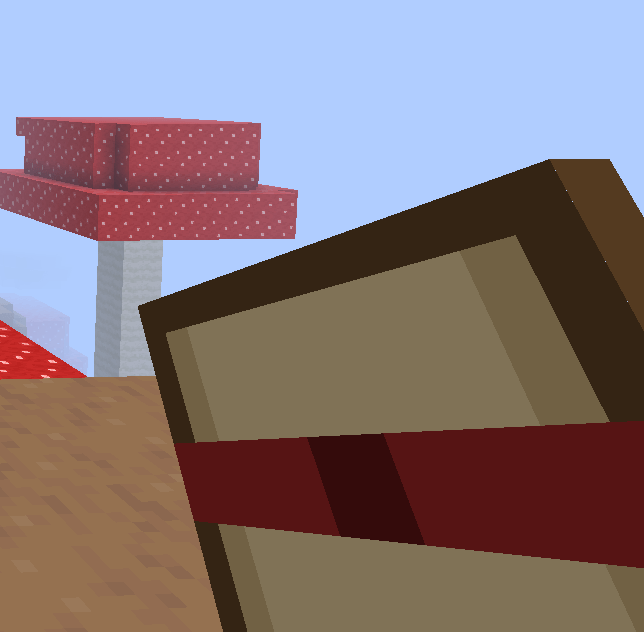
Players find a Title Scroll in loot, right-click it to unlock a title, then open /title to see their collection and pick the title they want to wear. Titles they haven’t found yet show as “?” with no name, rarity or flavor text. Install it on both the server and the client.
No titles are built in. Every title is a small JSON file in config/titlescrolls/titles/, so each server writes its own.
Features
- One item for every title. Which title a scroll gives is stored on the stack, set by loot, a loot table entry or a command.
- Unlocked titles and the active title are saved per player and survive relogs and deaths.
/titleopens a grid menu, 54 titles per page. Click a title to wear it, click it again to take it off./title wear <title>and/title offdo the same from chat.- Rarity shows as the slot border, and titles are sorted by rarity.
- Locked titles are never sent to the client, so nothing can be read ahead of time.
- A scroll for a title you already own is not used up, so it can be traded.
- Hovering a scroll shows its title and rarity.
Titles on players
A player’s active title shows on them in multiplayer: on its own line above the name tag, or beside the name. It hides whenever the name tag does (sneaking, invisible, spectator, too far away). The name tag itself isn’t changed, so rank prefixes from other mods still show.
Set in settings.toml: position (above or beside), the text around the title (& colors work, e.g. &7✦ {title} &7✦) and its size. Each player can hide other players’ titles in their own titlescrolls-client.toml.
Adding titles
One file per title, e.g. config/titlescrolls/titles/kitsune.json, then /titlescroll reload:
{
  "display": "&6Kitsune",
  "rarity": "unique",
  "flavor_text": "Outfoxed the impossible.",
  "chat_color": "&6"
}display(required): the title text.&color codes work.rarity(optional, defaultcommon): any rarity fromsettings.toml.flavor_text(optional): a line shown in the menu once unlocked.chat_color(optional): the color of the player’s chat messages while they wear the title. Needs a chat mod that reads it.
The title’s id is its file name (kitsune).
Rarities
Built in: common (green), rare (blue), epic (purple), legendary (gold) and unique (red). Add your own rarity with its own border color in settings.toml, e.g. "mythic=#00FFFF", then use it in a title’s rarity. Built-in colors can be changed too, and the order of the list is the order titles are sorted in the menu.
Scrolls in loot
Off by default. Turn on scroll_loot in features.toml, then set it up in settings.toml:
- Which loot tables can hold a scroll (
*matches anything, e.g.minecraft:chests/*), and which never do - The chance a matching table gets one scroll
- How often each rarity drops (
common=50,rare=25, …) - Titles that never drop
Your own loot tables with scroll entries work either way.
Moving from another title mod
/titlescroll migrate scan reads the other mod’s title files and saved player titles and writes what it found to config/titlescrolls/migration/migrate.json. Check it (or fill it in by hand), then run /titlescroll migrate apply. Titles are written to the titles folder, online players get their titles right away, everyone else at their next login.
Updating from 1.0.2
Titles used to live in datapacks. The first time the server starts with 1.0.3, every datapack title is copied into config/titlescrolls/titles/ with the same id, so unlocked titles and scrolls already handed out keep working. After that the datapack can be removed.
Install
Put the jar in the mods folder of the server and every client. Both must run 1.0.3.
Commands
| Command | Permission | Default |
|---|---|---|
/title |
titlescrolls.menu |
everyone |
/title wear <title> / /title off |
titlescrolls.menu |
everyone |
/titlescroll give <player> <title> [amount] |
titlescrolls.give |
OP 2 |
/titlescroll reload |
titlescrolls.reload |
OP 3 |
/titlescroll import datapacks |
titlescrolls.import |
OP 3 |
/titlescroll migrate scan / apply |
titlescrolls.import |
OP 3 |
Permissions go through the NeoForge permission API, so they work with any permission mod or plain OP levels.
Config
Files are in config/titlescrolls/.
features.toml: one switch per feature, plus the overlap guard (titles on players turn off by themselves when another installed mod already shows them). Needs a restart.settings.toml: titles on players, rarities, scrolls in loot, removed titles. Reloads with/titlescroll reload.titles/: one file per title. Reloads with/titlescroll reload.migration/:migrate.jsonfor moving from another title mod.titlescrolls-client.toml(each player’s own): show or hide other players’ titles.
Full details are on GitHub.
License
Free to use in any modpack. Credit Telmarine. No resale.
常见问题
Codex: Title Scrolls 支持哪些 Minecraft 版本?
Codex: Title Scrolls 支持 Minecraft Java 版 1.21.1,可用的加载器:NeoForge。下载时注意选择和你游戏版本一致的文件。
Codex: Title Scrolls 怎么安装?
先用 PCL2 或 HMCL 启动器安装对应版本的 NeoForge,再把下载的 .jar 文件放进游戏目录的 mods 文件夹,重新启动游戏即可。开启了版本隔离的,mods 文件夹在 versions/版本名 下面。
Telmarine 的其他作品
查看全部 →
Elements: Economy
A server-side economy for NeoForge 1.21.1 that links your currency to player shops, server shops and an auction house.
Elements: Vault
A free economy API for NeoForge 1.21.1 so mods can share one currency for balances, shops and auction houses.
Elements: Nexus
This is a server management mod that couples Tab, NeoEssentials, plus the ability to migrate data from other server management mods into it's system smoothly.
Codex: Armor Stands
Server-side armor stand editor for NeoForge 1.21.1. Pose, rotate, move, scale and style armor stands with a tool and chest menus. Includes 40 preset poses, copy and paste, and claim-aware protection.
评论
登录后评论和评分