介绍
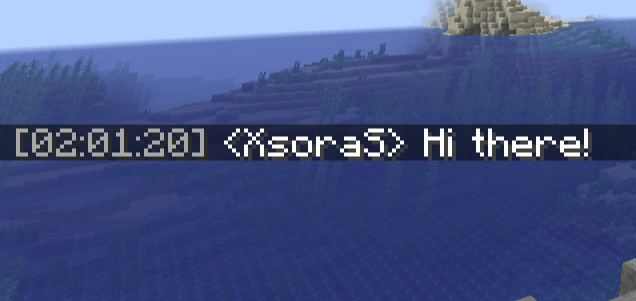
Ever scrolled up in chat and wondered when that message was actually sent?
Chat Timestamps puts the answer right where you need it — a tidy little clock
in front of every chat and system message.
Lightweight, 100% client-side, and works on any server (vanilla, modded,
minigames, or your favorite SMP). No server install, no permissions, no fuss.
✨ Features
- 🕒 Timestamps on everything — player chat and system messages
- 🎨 Fully customizable — pick your own time format & color
- 🌍 12h or 24h —
HH:mm:ss,HH:mm,hh:mm a, whatever you like - 🧩 Custom template — wrap the time however you want:
[%s],%s »,(%s) - 🎯 Client-side only — join any server, it just works
- ⚡ Featherweight — zero performance impact, no clutter
⚙️ Configuration
Tweak everything in a simple config file:
| Option | Example | Description |
|---|---|---|
time-pattern |
HH:mm:ss |
Java DateTimeFormatter syntax |
template |
[%s] |
Text wrapped around the time |
color |
GRAY |
Any Minecraft chat color |
enabled |
true |
Master on/off switch |
📦 Versions
Supports Minecraft 1.20.1 – 1.21.8 on Fabric.
Requires Fabric API.
Made with ☕ by xsoras • Client-side • MIT License
常见问题
Chat Timestamps Please! 支持哪些 Minecraft 版本?
Chat Timestamps Please! 支持 Minecraft Java 版 1.21.1,可用的加载器:Fabric。下载时注意选择和你游戏版本一致的文件。
Chat Timestamps Please! 怎么安装?
先用 PCL2 或 HMCL 启动器安装对应版本的 Fabric,再把下载的 .jar 文件放进游戏目录的 mods 文件夹,重新启动游戏即可。开启了版本隔离的,mods 文件夹在 versions/版本名 下面。
xsoras 的其他作品
查看全部 →
Vanilla Enhanced
一款轻量级光影,带来更真实的光照与更出色的视觉效果。
i hate shadows
全亮光影,阴影统统退散。👋 不用谢。

Cartoony
一款让3D画面看起来像喝了咖啡因的老派卡通的着色器。

Blind
通过噪点、脉冲和光线扭曲效果模拟失明。
评论
登录后评论和评分