
Chat Positioner
A simple client-side mod that allows you to move the chat anywhere using your mouse
介绍
Chat Positioner



A simple client-side mod that allows you to move the chat anywhere.
📖 What is this mod?
This is a client-side mod that allows users to move the chat box around on their screen simply by using their mouse.
Here’s a little showcase!
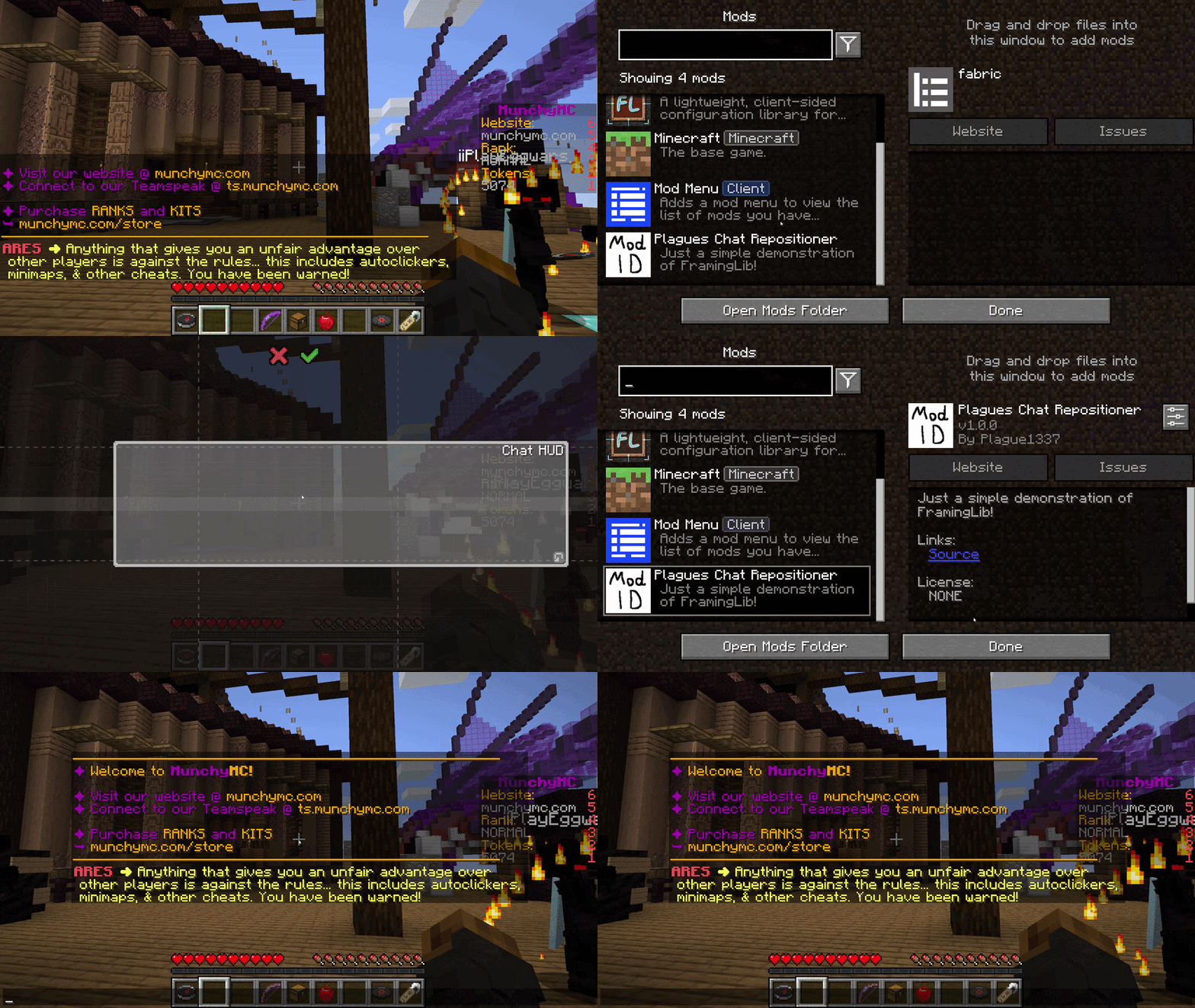
✅ Features
- Multi-Loader Support: Fully compatible with Fabric, Quilt and Forge
- Easy to Use: Simply move the chat around using your mouse
📖 Usage
Using this mod is very simple!
Put the jar file in your mods folder alongside with [FramingLib], and you’re good to go!
For [Fabric] and [Quilt] version, if you wish to be able to access the settings of the mod within the game; you will also need to put [ModMenu] in your mods folder.
📖 Compatibility
This mod should be compatible with every mod unless that mod also modifies chat HUDs placement or size.
🚀 Supported Versions
| Minecraft | Fabric | Quilt | Forge | NeoForge |
|:———:|:———:|:———:|:———:|:——–:|
| 1.16.5 | ✅(1.0.0) | ✅(1.0.2) | ✅(1.0.2) | ❌ |
✅ – Supported ⏳ – Planned ❌ – Not supported
Notes:
- Latest mod version is written in parentheses
常见问题
Chat Positioner 支持哪些 Minecraft 版本?
Chat Positioner 支持 Minecraft Java 版 1.16.5,可用的加载器:Fabric / Forge / Quilt。下载时注意选择和你游戏版本一致的文件。
Chat Positioner 怎么安装?
先用 PCL2 或 HMCL 启动器安装对应版本的 Fabric / Forge / Quilt,再把下载的 .jar 文件放进游戏目录的 mods 文件夹,重新启动游戏即可。开启了版本隔离的,mods 文件夹在 versions/版本名 下面。运行环境:仅客户端。
PlagueTR 的其他作品
查看全部 →
Plague’s Chat Timestamps
A Minecraft mod that adds customizable timestamps to chat!

Plague’s Chat Timestamps
A Minecraft mod that adds customizable timestamps to chat!
Retouch Brush
A Minecraft mod that lets you cycle through paintings using the brush!

Plague’s Noisy Creepers
A client-side Fabric mod that adds footstep and idle sounds to creepers!
评论
登录后评论和评分