
Chat Helper
Searchable chat history you can select, copy and download. Get alerted when someone says your name, with your own sound. Client side, works on any server.
截图
介绍
ChatUtils
Chat in Minecraft scrolls away and it’s gone. ChatUtils keeps it, lets you search it, and lets you
get it back out again.
Client side only. Nothing is needed on the server, so it works anywhere you can connect: vanilla,
Paper, or a big network.
Chat history you can actually search
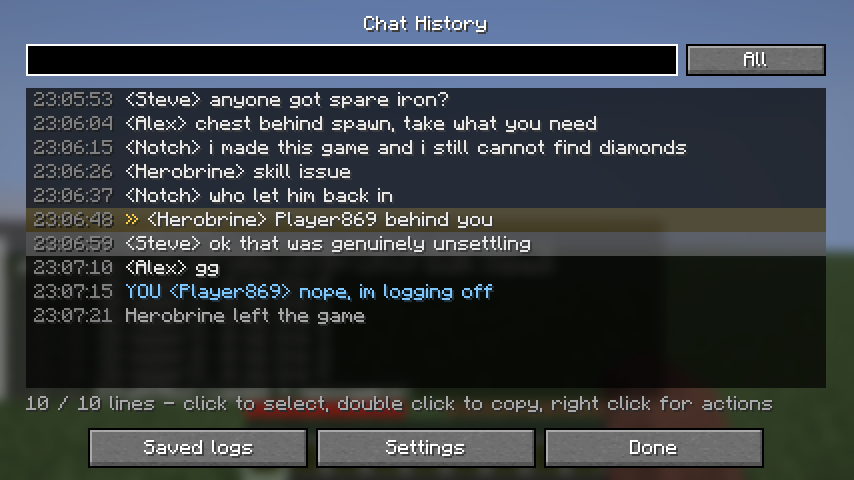
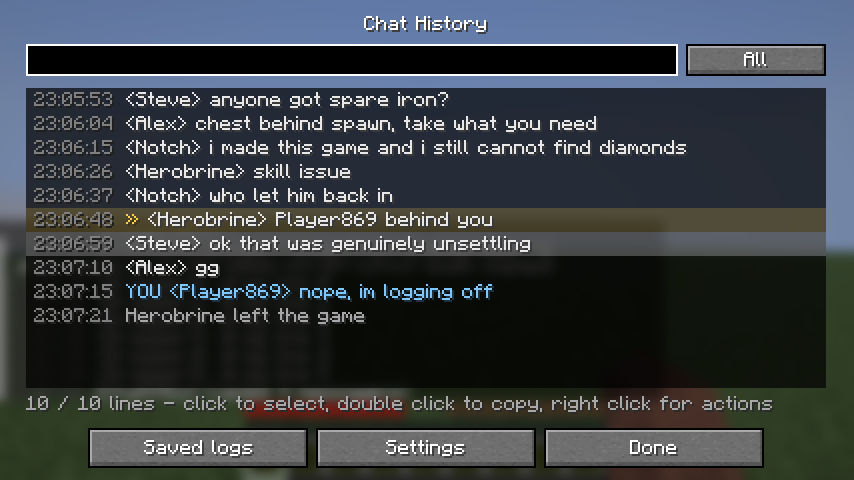
Press H and you get every line from this session with a timestamp on it. Type in the box to filter
as you go. It searches message text and player names, so you can pull up everything one person said
without scrolling.
Toggle between all lines, player chat only, or system messages only.
Your own messages are marked YOU and tinted, so they’re easy to pick out.
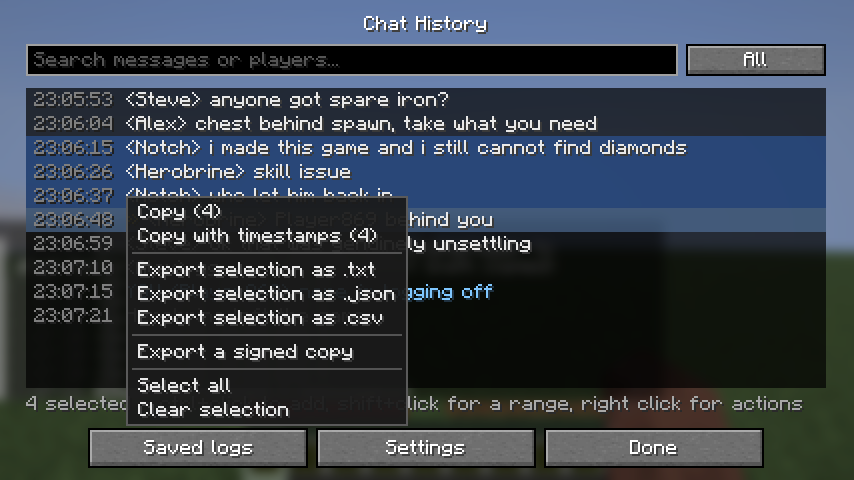
Select lines like files
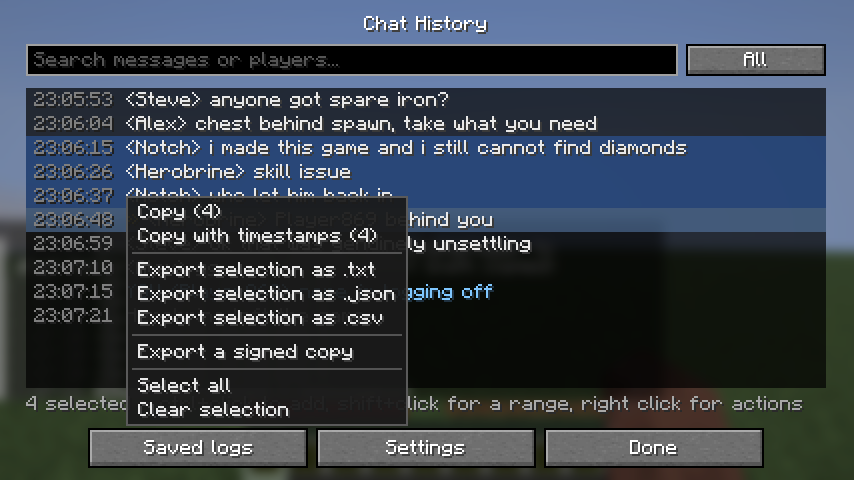
Click a line to select it. Ctrl+click adds more. Shift+click grabs a range. You can also hold the
left button and drag over the lines you want.
Right click opens a menu that works on whatever you selected:
- Copy, or copy with timestamps
- Save as
.txt,.jsonor.csv - Export a signed copy
Double click copies a single line. Ctrl+A selects everything, Ctrl+C copies the selection.
Select straight out of the chat
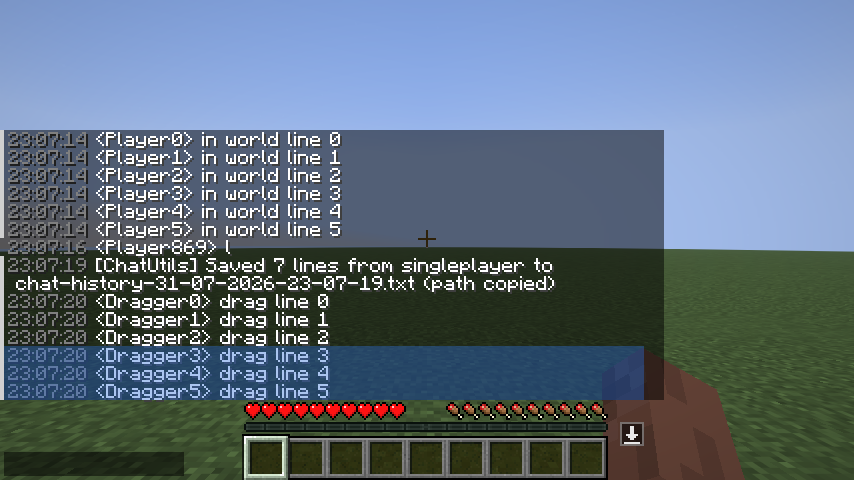
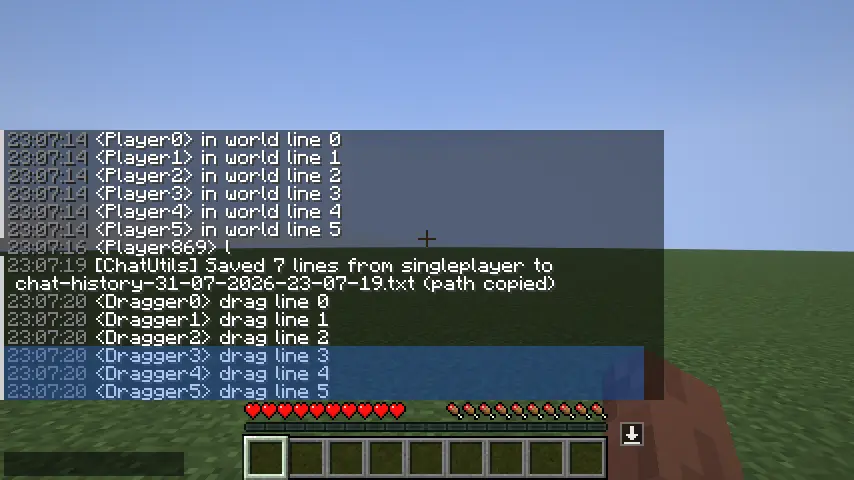
You don’t even have to open the history. Open chat, drag down the lines you want, and they highlight
as you go. Ctrl+click adds a line without clearing what you already picked.
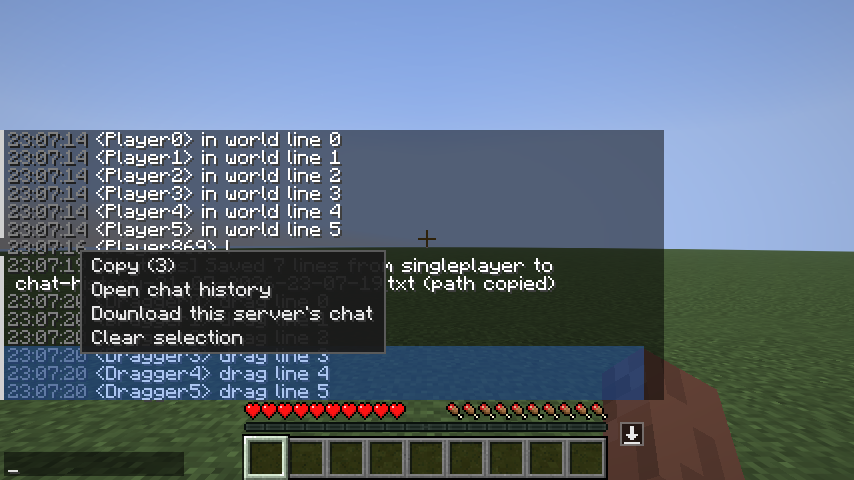
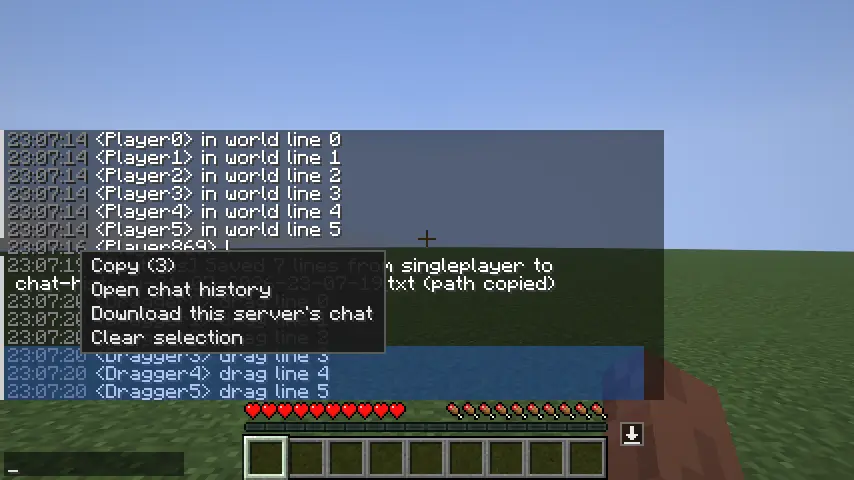
Right click on the selection and you get a menu: copy it, open the full history, or download this
server’s chat. Just grab the three lines someone said and paste them.
One-click download, per server
There’s a small download button on the right edge of the chat box. One click writes **just that
server’s chat** to a text file and copies the path to your clipboard. Useful when you only care
about what happened on the server you’re actually playing on.
Alerts when someone says your name
You get a sound and the line gets marked in chat.
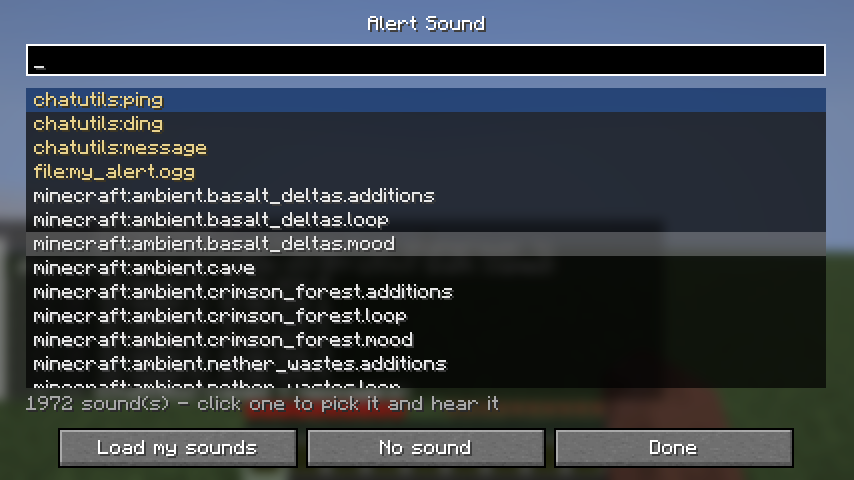
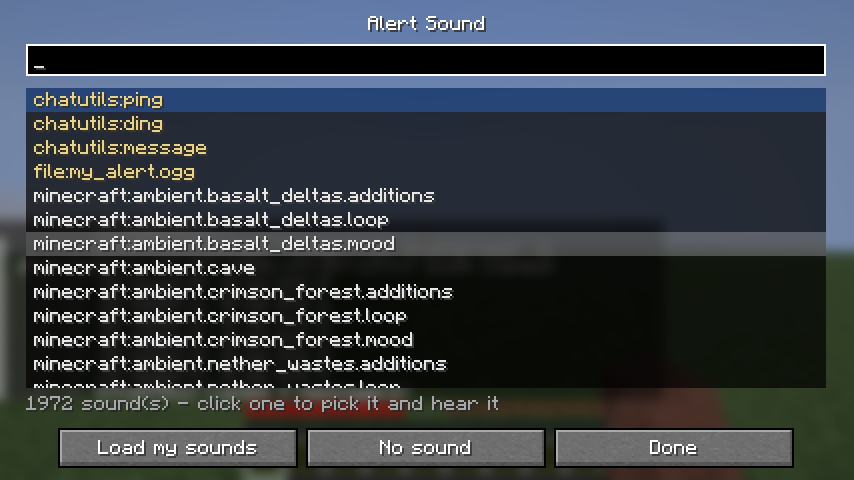
Three sounds ship with the mod, or pick any of the ~2000 sounds the game already has from a
searchable list, with a preview when you click.
Want your own sound? Drop .ogg files into .minecraft/chatutils/sounds/ and press “Load my
sounds”. No resource pack needed, and ChatUtils never touches your pack list. Minecraft only plays
Ogg Vorbis, so mp3 needs converting first.
You can add your own keywords on top of your account name. Everything matches on word boundaries, so
Bob fires on “hey Bob” and stays quiet on “Bobcat”. Your own messages never alert you, no matter
how the server formats chat, and a cooldown stops someone spamming your name from machine-gunning
you.
Works on servers that send chat as system messages, which is most big networks.
Read your old logs in game
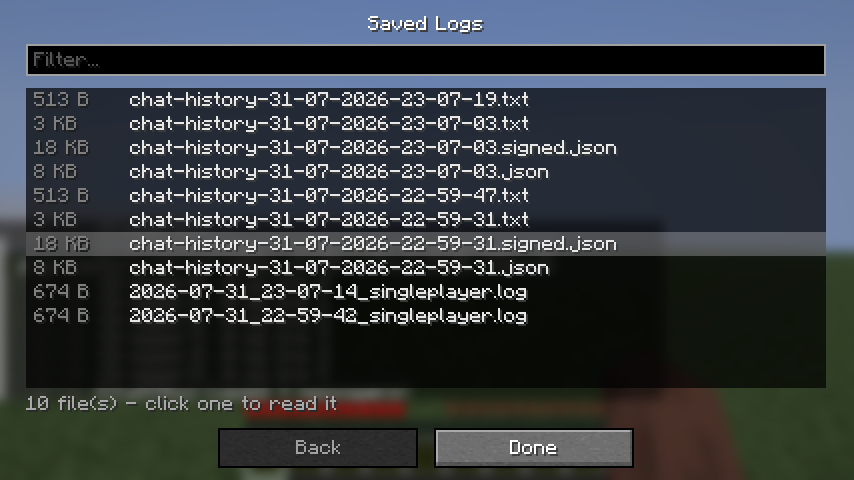
You don’t have to open a text editor to look at an old session. “Saved logs” lists every file
ChatUtils has written and you can read any of them without leaving Minecraft. It reads the running
logs and all export formats.
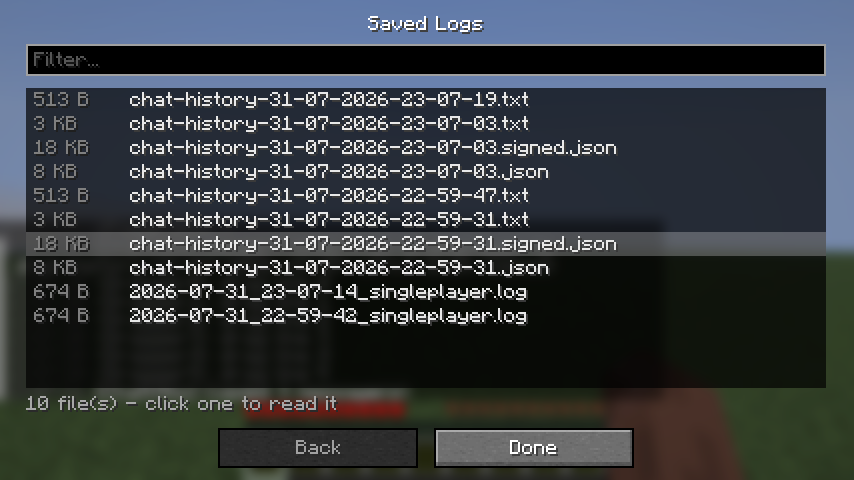
Click any line in a log and you get **every message that player ever sent, pulled from all of your
saved files at once**, sorted by time and labelled with the file each one came from. Useful when you
want to see everything one person said over a week rather than hunting through files.
Hide the junk
Regex rules drop matching lines from chat. Join and leave spam, shop adverts, whatever. You can also
keep a list of players to ignore, which works even on servers that send chat as system messages.
Hidden lines are still written to your history and log file, so you don’t lose anything, and they
never make a sound.
Signed history files
Sometimes you need to show someone what was said. ChatUtils can write a history file that shows
whether it has been edited afterwards.
Each message is hashed together with the hash of the one before it, so changing, deleting or
reordering anything in the middle breaks the chain. The whole thing is then signed with a key that
belongs to your install.
Checking a file is built into the mod: Settings → Verify a file. It lists everything in your
history folder and marks each one OK or EDITED.
Be clear about what this is. It proves the file has not been touched since your client wrote
it, and that several files came from the same client. It does not prove the messages were
really said, because you’re the one running the mod. It makes a report harder to fake casually and
easier to cross-check against the server’s own logs. It is not a magic trust button.
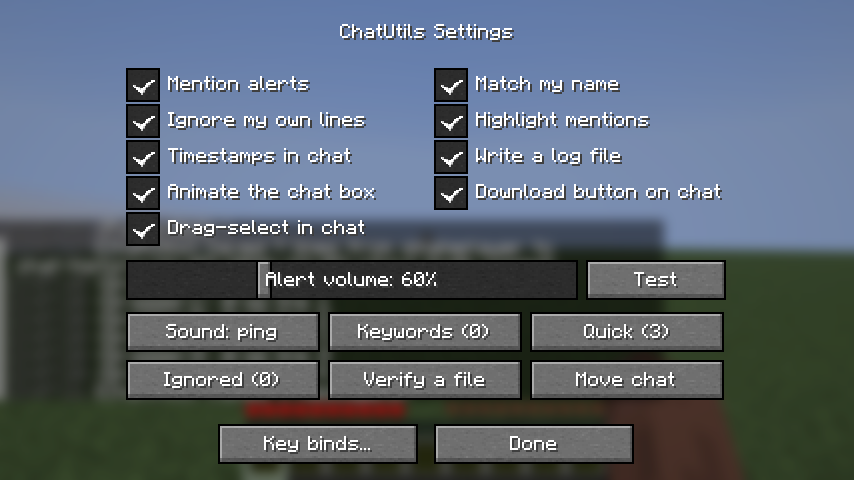
Everything is configurable in game
No JSON editing. Mention alerts, the alert sound and volume, keywords, ignored players, timestamps,
the download button, chat position, quick messages and key binds are all on one screen.
Open it from the Settings button on the history screen, or from Mod Menu if you have it installed.
Odds and ends
- Timestamps in chat — optional, off by default.
- Move the chat — drag the chat box anywhere on screen.
- Quick messages — save lines you type a lot and fire them with a click or the number keys. A leading
/sends it as a command.
Languages
English, Türkçe, Deutsch, Русский.
Files
Everything lands under .minecraft/chatutils/:
history/for exports, namedchat-history-31-07-2026-18-04-11.txtlogs/for the running log written while you playsounds/for your own alert sounds
Controls
| Action | Default |
| — | — |
| Chat history | H |
| Quick messages | Z |
| Copy last message | unbound |
Rebind them in Options → Controls → Multiplayer, or from the ChatUtils settings screen.
Requires
Minecraft 26.2, Fabric Loader 0.19.3+, Fabric API. Mod Menu is optional.
常见问题
Chat Helper 支持哪些 Minecraft 版本?
Chat Helper 支持 Minecraft Java 版 26.2,可用的加载器:Fabric。下载时注意选择和你游戏版本一致的文件。
Chat Helper 怎么安装?
先用 PCL2 或 HMCL 启动器安装对应版本的 Fabric,再把下载的 .jar 文件放进游戏目录的 mods 文件夹,重新启动游戏即可。开启了版本隔离的,mods 文件夹在 versions/版本名 下面。运行环境:仅客户端。
3yw_ 的其他作品
查看全部 →
InGameWeb
InGameWeb adds a Chromium-powered in-game web browser overlay to Minecraft Fabric. Open it with Shift + Tab, browse normal websites, use multiple tabs, keep sessions persistent, and control downloads safely without leaving the game.

Ai Helper
Chat with AI directly in your Minecraft world! Transform your Minecraft experience by bringing the power of artificial intelligence right into your game. No more alt-tabbing to ask questions or get help
评论
登录后评论和评分