Chat Colours Modified
This is a modified Version of chat Colours with no anvil limits and the removal of around players names
截图

介绍
Chat Colours – Modified
Overhauls the game’s 13-year-old text formatting syntax.
Markdown-like syntax
This mod allows you to use markdown-like syntax to format your text in Minecraft:
*italic text*→ italic text**bold text**→ bold text***bold + italic***→ bold + italic__underline__→ underline~~strikethrough~~→ strikethrough
Examples:
this **is** bold→ this is boldthis __underline *is* multiple things__→ this is multiple things
The terminating set of symbols is optional, e.g. **hello will still be bold.
If you put a star at the start of the name of an item in an anvil, it will cancel out the italics.
Hex codes / custom colours
This mod allows you to colour your text with custom colours:
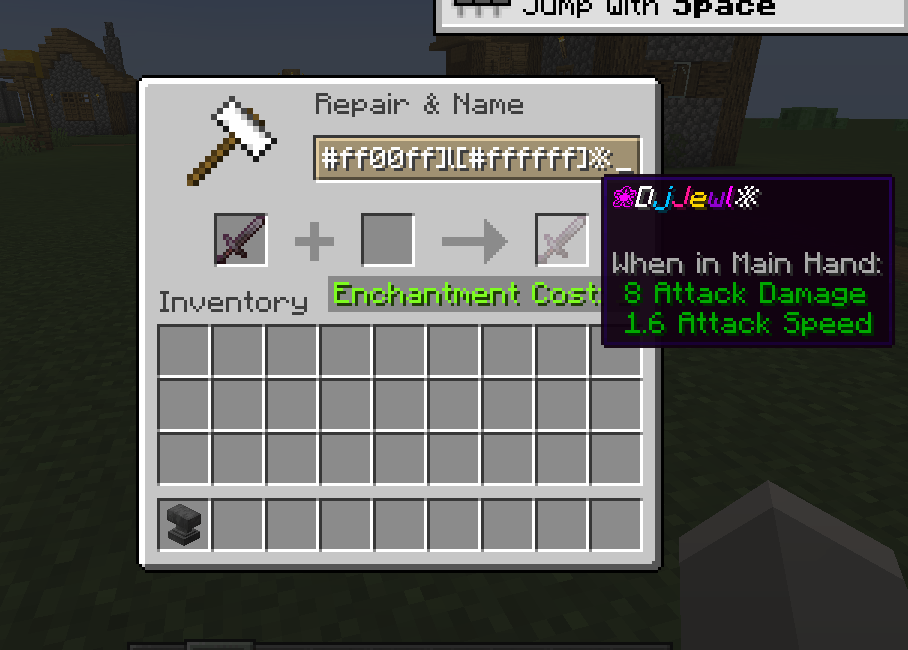
[#ff0000]red text→ red text[#ff00FF]pink text→ pink text**[#00ff00]bold green text**or[#00ff00]**bold green text**→ bold green text
The codes are case-insensitive.
Gradient text
You can create smooth gradients between two colours using this syntax:
[gradient:#RRGGBB:#RRGGBB:text]
Examples:
[gradient:#FF0000:#0000FF:This is a gradient!]→ text transitions from red to blue***[gradient:#FFAA00:#00AAFF:Bold Italic Gradient!]***→ gradient text with bold + italic styles
Gradient text works with markdown-like formatting, so you can combine bold, italic, underline, etc.
Extended format syntax
This feature has been replaced by new syntax but still works.
You can use named colours instead of the normal single letters:
- white, black, blue, green, aqua (or cyan), red, purple, gray, yellow
The names are case-insensitive.
To use the dark version of the colour (except white and black), put d, dark or deep before or after the name. You can optionally use a space or underscore between the name and the prefix/suffix.
Examples:
§[dark_blue],§[deepblue],§[blue d],§[dblue]→ dark blue text§[gold]→ gold text (dark yellow also supported)
Bold, underline, italics, etc.
You can also use:
§[s]→ strikeout text§[b]→ bold text§[o]→ obfuscated text§[u]→ underlined text§[r]→ reset
Multiple style options
Format options can be chained without needing multiple §s.
Example:§[red][u][i]text → red, underlined, italic text
Note: Colours should always come first. Minecraft resets some styles when a colour code is applied.
Chat Enhancements
- Removes
< >around player names for a clean, modern chat look, regardless of texture or language packs. - Removes anvil rename limits on both clients and servers (unless other mods interfere).
- Known incompatibility: mods that completely replace the Anvil GUI and hard-set the limit.
Server Usage
To use on servers:
- Install the mod on the server, or
- Ensure the server allows
§codes in chat.
Otherwise, the server may kick you when using formatting.
常见问题
Chat Colours Modified 支持哪些 Minecraft 版本?
Chat Colours Modified 支持 Minecraft Java 版 1.20.1–1.21.5,共 10 个版本,可用的加载器:Forge / NeoForge。下载时注意选择和你游戏版本一致的文件。
Chat Colours Modified 怎么安装?
先用 PCL2 或 HMCL 启动器安装对应版本的 Forge / NeoForge,再把下载的 .jar 文件放进游戏目录的 mods 文件夹,重新启动游戏即可。开启了版本隔离的,mods 文件夹在 versions/版本名 下面。
djjewl10 的其他作品
查看全部 →
Kanna Comes Alive
This is a modpack made for People who Like playing MInecraft with simple mods

Gotta Play With Trains of old
This is a 1.6.4 modpack with trains and decorations, Come Join on the semi modded adventure

FoxyCraft Colonies
A modpack around minecolonies with some magic.

onyx Reforged Community pack
This modpack offers a vast selection of over 290 mods, including Oh The Biomes You'll Go & Biome's O' Plenty World Generation, Create & Tetra, furniture mods, and tons of QOL features, all designed to enhance the Better Minecraft Server experience.
评论
登录后评论和评分