Chat Calc
The *fastest* calculator around; built right into your chat; just type in and you'll see your answer!
截图


介绍
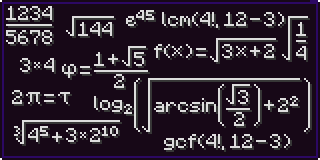
Note: This is a complete revamp of the mod ChatCalc by Kokeria, which is most likely abandoned. This mod features almost everything you’d need in a calculator, and if you want something to be added, just ask!
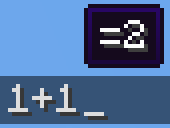
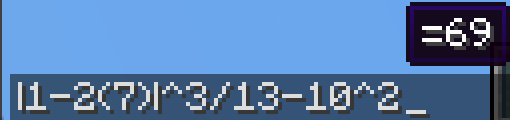
Firstly, I should clarify how you use ChatCalc, simply type an expression into chat, and it’ll show the answer above. If you need to get the answer in text, just press tab. If you need the answer and the expression, type an equals sign and press tab.
1+2 (will make a tooltip showing =3 above)\
1+2 → TAB → 3\
1+2= → TAB → 1+2=3
(Do note that ChatCalc evaluates the block of text that your cursor is in [separated by spaces], this means that you can type one thing beside another and ChatCalc will work completely fine [as long as there are some spaces in between])
ChatCalc also lets you define your own functions and constants, for example:\
f(z)=2z-1 → TAB → (empty to give feedback that it’s defined that function)\
f(4) → TAB → 7
c=sqrt(2)/2 → TAB → (empty to give feedback that it’s defined that constant)\
arcsin(c) → TAB → 45
You can also remove functions and constants like this:\
f(z)= → TAB → (empty to give feedback that it’s removed that function)\
c= → TAB → (empty to give feedback that it’s removed that constant)\
Functions can support as many parameters as you want, each separated by a semicolon (they cannot use a comma due to commas being permitted in constants, i.e. 1,000*2 → TAB → 2,000)
Here’s an example function that can do some very complex behavior:\
angle(a;b)=round((((arctan((b-(z-0.5))/(a-(x-0.5)))+90+(min(1;cmp(a;(x-0.5))+1)*180)+180)%360)-180)*10)/10 (credit to thecolonel63)\
This function takes in the x and y coordinates of a block and tells you the yaw to put your camera at to walk toward that block.
You can view the list of defined functions and constants by typing functions? or constants? into chat and pressing TAB.
ChatCalc features several config settings, each configurable by typing in the chat window; for example:\
radians → TAB → false (by default)\
radians= → TAB → radians=false (by default)\
radians=true → TAB (empty to give feedback that the value is set)\
To change the format that values are outputted in, you can change the decimal_format; for example:\
decimal_format → TAB → #,##0.## (by default)\
decimal_format=#0.## → TAB → (to remove commas)\
decimal_format=#,###.## → TAB → (to remove the leading 0 on values like 0.23)\
decimal_format=#,##0.#### → TAB → (to get 4 decimal places of accuracy)\
By default, ChatCalc stores previously evaluated expressions in the chat history (chat_history). You can set copy_type to none or clipboard to change this to the respective values.
If you (for whatever reason) want to disable the tooltip showing expressions above, you can change display_above to false.
Appendix A (function list)
sqrtcbrtsincostancscseccotarcsinasinarccosacosarctanatanarccscacscarcsecasecarccotacotfloorceilroundabsloglnexpsgnminmaxgcflcmclampcmp
Appendix B (constant list)
randomrandraddegyawpitchpitauephixyz
常见问题
Chat Calc 支持哪些 Minecraft 版本?
Chat Calc 支持 Minecraft Java 版 1.19–1.20.4,共 10 个版本,可用的加载器:Fabric / Quilt。下载时注意选择和你游戏版本一致的文件。
Chat Calc 怎么安装?
先用 PCL2 或 HMCL 启动器安装对应版本的 Fabric / Quilt,再把下载的 .jar 文件放进游戏目录的 mods 文件夹,重新启动游戏即可。开启了版本隔离的,mods 文件夹在 versions/版本名 下面。运行环境:仅客户端。
realrttv 的其他作品
查看全部 →
Malum (Quilt)
A Quilt port of the mod Malum - A minecraft mod about dark magic.

Item Suggestions Not Require Mod Name
When using tab completion on a command you don't have to prefix with the mods id

Mini Region
A mod aiming to reduce chunk size drastically (currently ~45%) [ALPHA]
评论
登录后评论和评分