
Censor Chat
Create your own blacklist of words to be removed from all chat messages on a server. (It will replace the word with a single space)
截图
介绍
Censor Chat
- Create a blacklist of an infinite number of words to be removed from the chat!
- Any blacklisted word will be replaced with a single space, allowing you to read the rest of the message without the clutter of a bunch of ****
- DO NOT add this to your server mods folder, it is a client-sided mod ONLY!
HOW-TO
- Drag and drop into the mods folder
- Launch the game
- Close the game
- Go into the config folder (should be somewhere above the mods folder)
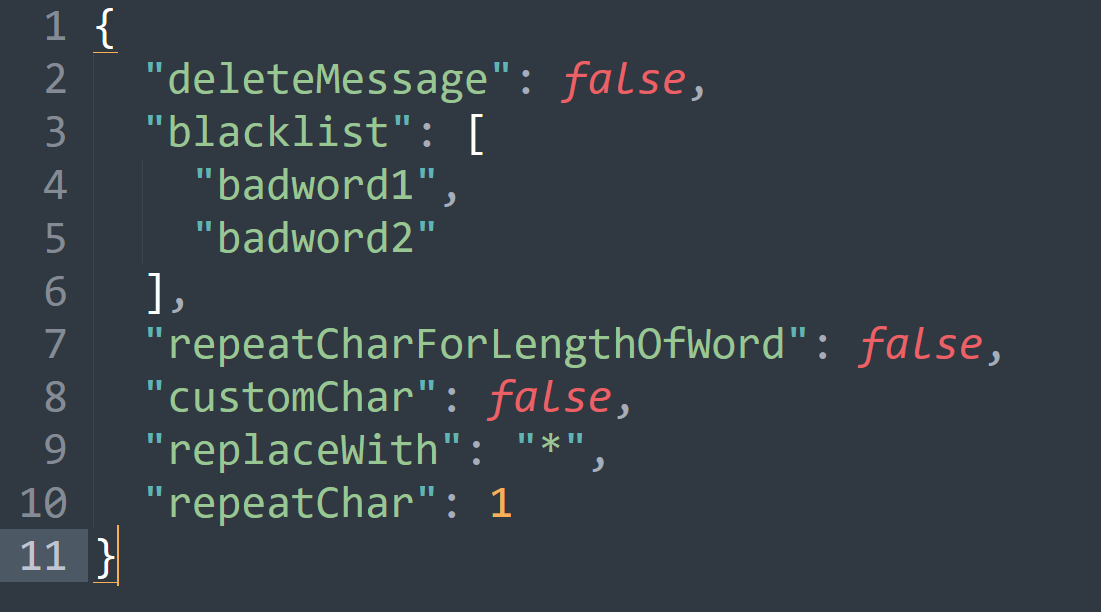
- Open the censor_chat.json with notepad or whatever program you use to edit .json files.
{
  "deleteMessage": false,   // Delete the entire message if a blacklisted word is found
  "blacklist": [    // add your own words here (replace badword1 etc)
    "badword1",
    "badword2",     // make sure you add commas at the end of every entry to the list
    "badword3"      // DON'T add a comma at the end of the final entry in the list
  ],
  "repeatCharForLengthOfWord": false,  // will replace the blacklisted word for the entire length of the word
  "customChar": false,  // if you want to use your own character instead of the default space
  "replaceWith": "*",   // if customChar is set to true, will use this character instead of default space
  "repeatChar": 1       // if this number (integer) is higher than 1, and repeatCharForLengthOfWord is set to false, this will replace the blacklisted word for the length of this number
}
COMING SOON:
Version Support:
- Forge 1.20.X support. (I _might_ do 1.12.2-1.20.4 if people want it on multiple versions I can swiss cheese the version builds since this is such a simple mod it probably wouldn’t be too difficult)
Fabric 1.20.X support._DONE_- Quilt 1.20.X support.
- Neoforge might be getting 1.20.X support, however, I’m not entirely sure how neoforge works yet so that might have to be placed on hold lmao.
New features:
Adding a new config option to choose what character to replace the blacklisted word, and how many (repeat the character X amount of times; for example, if you set the character to “x” and set it to repeat 4 times, then “badword1” would be replaced with “xxxx”_CONFIG OVERHAULED_
常见问题
Censor Chat 支持哪些 Minecraft 版本?
Censor Chat 支持 Minecraft Java 版 1.20–1.21,共 8 个版本,可用的加载器:Fabric / Forge / Quilt。下载时注意选择和你游戏版本一致的文件。
Censor Chat 怎么安装?
先用 PCL2 或 HMCL 启动器安装对应版本的 Fabric / Forge / Quilt,再把下载的 .jar 文件放进游戏目录的 mods 文件夹,重新启动游戏即可。开启了版本隔离的,mods 文件夹在 versions/版本名 下面。运行环境:仅客户端。
confusingfool93 的其他作品
查看全部 →
Camera Overhaul Reforged
Makes gameplay more satisfying through the use of various camera tilting. Configurable.

Omnidirectional Movement
Omnidirectional Movement based on games like Call of Duty Black Ops 6 and The Finals.

Molten Obsidian Tools
Adds obsidian modifications to diamond tools and Reinforcements to Netherite tools

Craft++
CraftPlusPlus is a Minecraft mod which aims to enhance many things about the game. Adding loads of new things to make Minecraft feel great again!
评论
登录后评论和评分