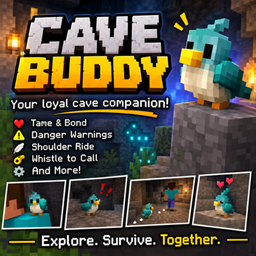
Cave Buddy
A tiny tameable cave companion for Minecraft Java! Feed it glow berries, let it follow you on adventures, get warnings about nearby dangers, and use the Cave Buddy Whistle to call it back. Your underground adventures just got a little less lonely! 🐾💎
介绍
Cave Buddy
Your little companion for underground adventures.
Exploring caves can get dangerous, but you don’t have to do it alone. Cave Buddy adds a small, tameable companion to Minecraft Java Edition that can follow you underground and help you keep an eye on your surroundings.
Feed it glow berries, bring it along on your mining trips, and use its warnings to stay aware of nearby dangers. When you get separated, use the Cave Buddy Whistle to call your companion back!
Features
- A new cave companion: A custom creature with its own model and texture.
- Tame your buddy: Feed a wild Cave Buddy glow berries to make it your companion.
- Follow and sit: Right-click your tamed buddy to switch between following you and sitting.
- Danger warnings: Your companion can alert you to nearby hostile mobs, lava, and very dark surroundings.
- Whistle recall: Use the Cave Buddy Whistle to call your tamed companion back to you.
- Spawn egg: Find and spawn Cave Buddies using their creative inventory spawn egg.
- Custom crafting: Craft the Cave Buddy Whistle using its included recipe.
How to Use
🐾 Taming
Find a wild Cave Buddy and feed it glow berries to tame it.
🚶 Following and Sitting
Right-click your tamed Cave Buddy with an empty hand to switch between follow and sit modes.
📯 Calling Your Buddy
Hold the Cave Buddy Whistle and right-click to call your tamed companion nearby.
⚠️ Danger Warnings
Keep your buddy nearby while exploring. It can warn you about hostile mobs, lava, and very dark areas.
Items
- Cave Buddy: Your tameable underground companion.
- Cave Buddy Spawn Egg: Used to spawn a Cave Buddy.
- Cave Buddy Whistle: Calls your tamed buddy back to you.
Installation
- Install Minecraft Java Edition 26.3.
- Install the matching NeoForge 26.3 loader.
- Download the Cave Buddy mod JAR.
- Place the JAR into your Minecraft
modsfolder. - Launch Minecraft using your NeoForge profile.
Requirements: Minecraft Java Edition 26.3, NeoForge 26.3, and Java 25.
Compatibility
- Edition: Minecraft Java Edition
- Mod loader: NeoForge
- Game version: 26.3
- Environment: Client and server source support
Community & Feedback
Found a bug or have an idea for a future Cave Buddy feature? Leave a comment on the project page!
Explore deeper. Stay alert. Bring a buddy. 💎🐾
常见问题
Cave Buddy 支持哪些 Minecraft 版本?
Cave Buddy 支持 Minecraft Java 版 26.3,可用的加载器:NeoForge。下载时注意选择和你游戏版本一致的文件。
Cave Buddy 怎么安装?
先用 PCL2 或 HMCL 启动器安装对应版本的 NeoForge,再把下载的 .jar 文件放进游戏目录的 mods 文件夹,重新启动游戏即可。开启了版本隔离的,mods 文件夹在 versions/版本名 下面。

评论
登录后评论和评分