
Camera Snapper
A Fabric mod for Minecraft that lets you press a keybind to instantly snap your camera to a predefined yaw/pitch.
截图
介绍
Camera Snapper
Instantly snap your camera to a predefined view — perfect for cinematic shots, screenshot setups, builds you want to check from the exact same angle every time, or just quickly glancing at a fixed spot without fiddling with your mouse.
Features
- Two switchable presets — save two different yaw/pitch camera directions and flip between them whenever you like.
- One-key snap — press a single key to instantly turn your camera to whichever preset is currently active.
- On-screen confirmation — switching presets briefly shows which one is now active, so you always know what you’ll snap to.
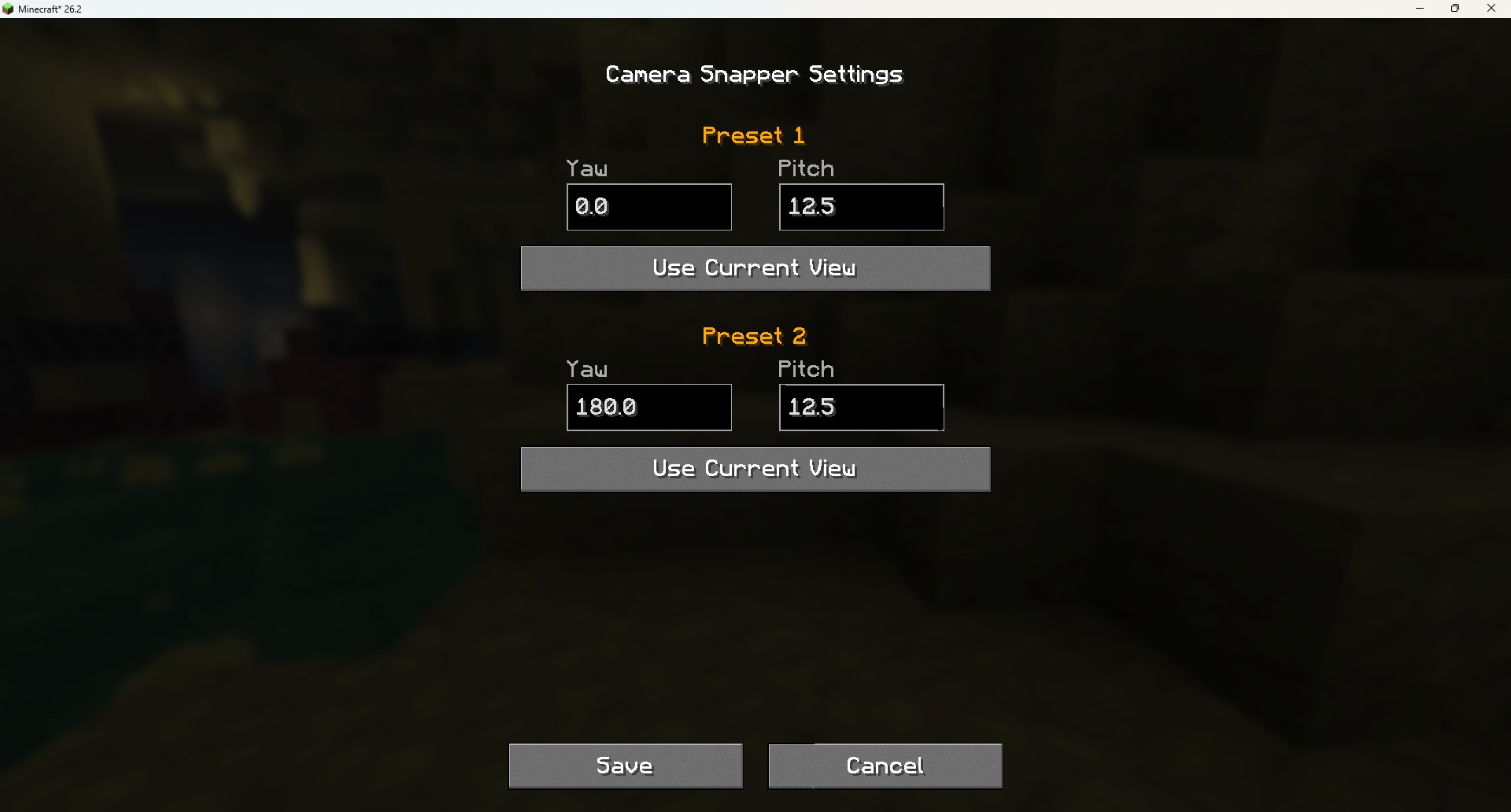
- Built-in settings screen — no commands or config file editing required. Type in exact yaw/pitch values, or just look where you want and click Use Current View to capture it instantly.
- Fully rebindable controls — every key works through the standard Controls menu like any vanilla keybind.
- Persistent presets — your two presets are saved automatically and survive between sessions.
- ModMenu support — if you have ModMenu installed, Camera Snapper shows up in your mod list with a config button, no extra setup needed. It works perfectly fine without ModMenu too.
- Lightweight — client-side only, no mixins, no server requirement, no gameplay changes.
Controls
| Action | Default Key |
|—|—|
| Snap camera to active preset | V |
| Switch active preset (1 ↔ 2) | B |
| Open settings screen | N |
All keybinds can be changed in Options > Controls > Key Binds > Camera Snap.
You can also open the settings screen with the /camerasnap chat command if you’d rather not use a keybind.
How it works
- Open the settings screen (
Nby default, or/camerasnap). - Set up Preset 1 and Preset 2 — either type the yaw/pitch values directly, or look in the direction you want and click Use Current View.
- Click Save.
- In-game, press
Bto choose which preset is active (you’ll see a short on-screen notice confirming the switch). - Press
Vany time to snap your view to that preset.
Notes
- This is a client-side mod — install it just on your own client, no server-side installation needed.
- Snapping your view is a genuine rotation change (not a purely visual trick), so it behaves exactly like moving your mouse to look in a direction — servers see the same rotation update they normally would.
- Config is stored in
config/camerasnap.jsonand persists across game sessions.
常见问题
Camera Snapper 支持哪些 Minecraft 版本?
Camera Snapper 支持 Minecraft Java 版 26.2–26.3,共 2 个版本,可用的加载器:Fabric。下载时注意选择和你游戏版本一致的文件。
Camera Snapper 怎么安装?
先用 PCL2 或 HMCL 启动器安装对应版本的 Fabric,再把下载的 .jar 文件放进游戏目录的 mods 文件夹,重新启动游戏即可。开启了版本隔离的,mods 文件夹在 versions/版本名 下面。运行环境:仅客户端。
评论
登录后评论和评分