[BTW Addon] Schematica
作者:TheWinABagel
Allows for schematics to be created of your builds, so its easier to build again or share!
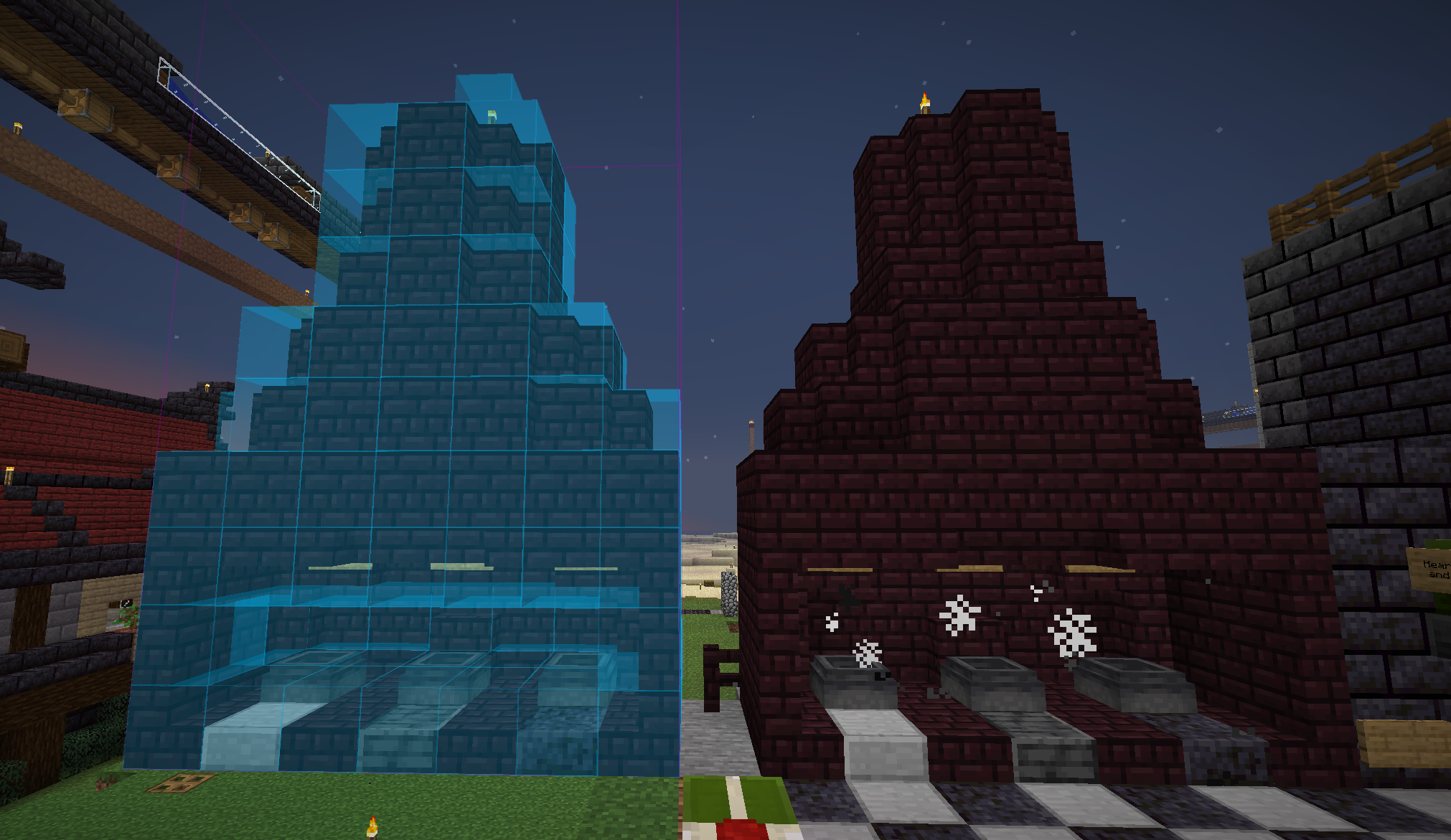
截图
介绍
中文介绍正在准备中,下面暂时显示原文。
Schematica (Better than Wolves Edition)
Save your builds and build them again later, or share them with others without having to mess with sending an entire world!
Note that this is a port to Better Than Wolves: CE of the original schematica by Lunatrius, they have nothing to do with this! Do not bug them about it!
Features:
- Saving of builds into schematic files
- An auto placer for your builds
- Note that this is not fully implemented, you may place the blocks wrong (especially mouldings/corners)
- A list of materials you need for the build
- An ghost version of the build
- Blue means not placed yet
- Red means wrong block
- Orange means wrong state (could be facing the wrong direction, have the wrong redstone power, etc)
How to use:
- First off, make a gear. It’s technically optional (you can use the GUI too), but very handy for making a schematic selection.
- Right click your starting location with the gear, and shift right click the end location
- If nothing shows up when you do this, it’s ok! Click
,(by default), and press theOFFbutton at the bottom of the screen to turn it toON. You can also make tweaks to the coordinates while you’re here. - Once you have your build selected how you like it, type in a name in the box to the right of the ON/OFF button in the
,menu, then click save. - Presto, schematic!
- To load the schematic later, press
mand move it with.. More intuitive controls to come!
常见问题
[BTW Addon] Schematica 支持哪些 Minecraft 版本?
[BTW Addon] Schematica 支持 Minecraft Java 版 1.6.4。下载时注意选择和你游戏版本一致的文件。
[BTW Addon] Schematica 怎么安装?
先用 PCL2 或 HMCL 启动器安装对应版本的 模组加载器,再把下载的 .jar 文件放进游戏目录的 mods 文件夹,重新启动游戏即可。开启了版本隔离的,mods 文件夹在 versions/版本名 下面。运行环境:客户端 / 服务端。
TheWinABagel 的其他作品
查看全部 →
Decorative Blocks (Fork)
by TheWinABagel
一个添加了一些新装饰方块的小模组
132万
2 年前
CurseForge

Estrogen
by TheWinABagel, encode42 等
一个围绕自我表达、流体处理和探索的模组。这个模组添加了大量新物品、方块、机制等内容!
1229万
8 天前
Modrinth · CurseForge

FakerLib
by TheWinABagel, Stalemated
(某个模组的 Fabric 移植版)前置库模组,本身不提供任何功能
1133万
1 年前
Modrinth · CurseForge

Zenith
by TheWinABagel, Stalemated
Fabric Apotheosis 移植版,改动并扩展了许多系统
1032万
1 年前
Modrinth · CurseForge
评论
登录后评论和评分