
Brewing UI
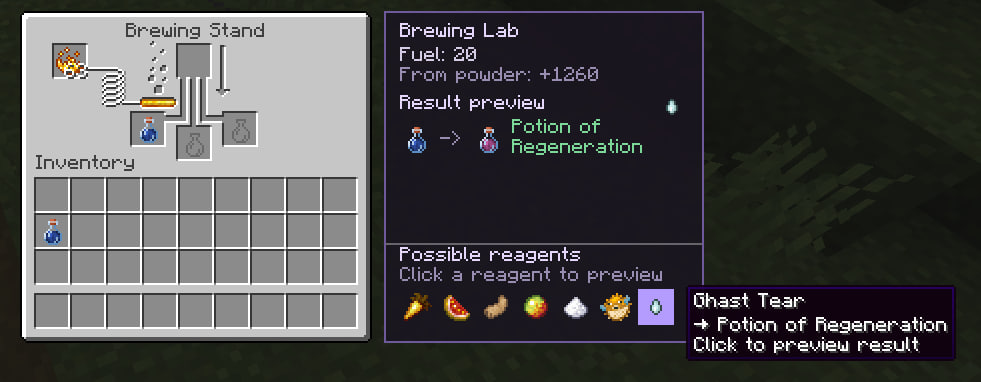
Side panel on the brewing stand: fuel, brew timer, result preview, and useful next reagents (buffs/debuffs, not mundane dead-ends).
截图

介绍
Brewing Lab UI
Adds an information panel to the brewing stand.
The panel displays fuel, brewing progress, potion previews, and suggested brewing paths.
Features
- Fuel level and remaining blaze powder uses
- Brewing progress timer
- Potion result preview
- Suggested brewing ingredients
- Click an ingredient to preview the result
Requirements
- Minecraft Forge 1.20.1
- Client-side only
常见问题
Brewing UI 支持哪些 Minecraft 版本?
Brewing UI 支持 Minecraft Java 版 1.20.1–1.20.6,共 6 个版本,可用的加载器:Forge。下载时注意选择和你游戏版本一致的文件。
Brewing UI 怎么安装?
先用 PCL2 或 HMCL 启动器安装对应版本的 Forge,再把下载的 .jar 文件放进游戏目录的 mods 文件夹,重新启动游戏即可。开启了版本隔离的,mods 文件夹在 versions/版本名 下面。运行环境:仅客户端。
ha4zyk 的其他作品
查看全部 →
Chest Preview
Peek chest boat and chested animal inventories under the crosshair.

Death Compass
On respawn after death, get a compass that points to your death location, with coordinates and cause in the tooltip.

Instant Sleep Mod
Lie in a bed - night skips instantly. Singleplayer & open LAN only.

Jukebox Now Playing
Shows the playing disc and remaining time when looking at a jukebox.
评论
登录后评论和评分