Breakable Blocks
Breakable blocks is a configurable, high-performance server-side Fabric mod for Minecraft that lets server owners make normally unbreakable or restricted blocks mineable, assign exact break durations, etc.
截图
介绍
Breakableblocks
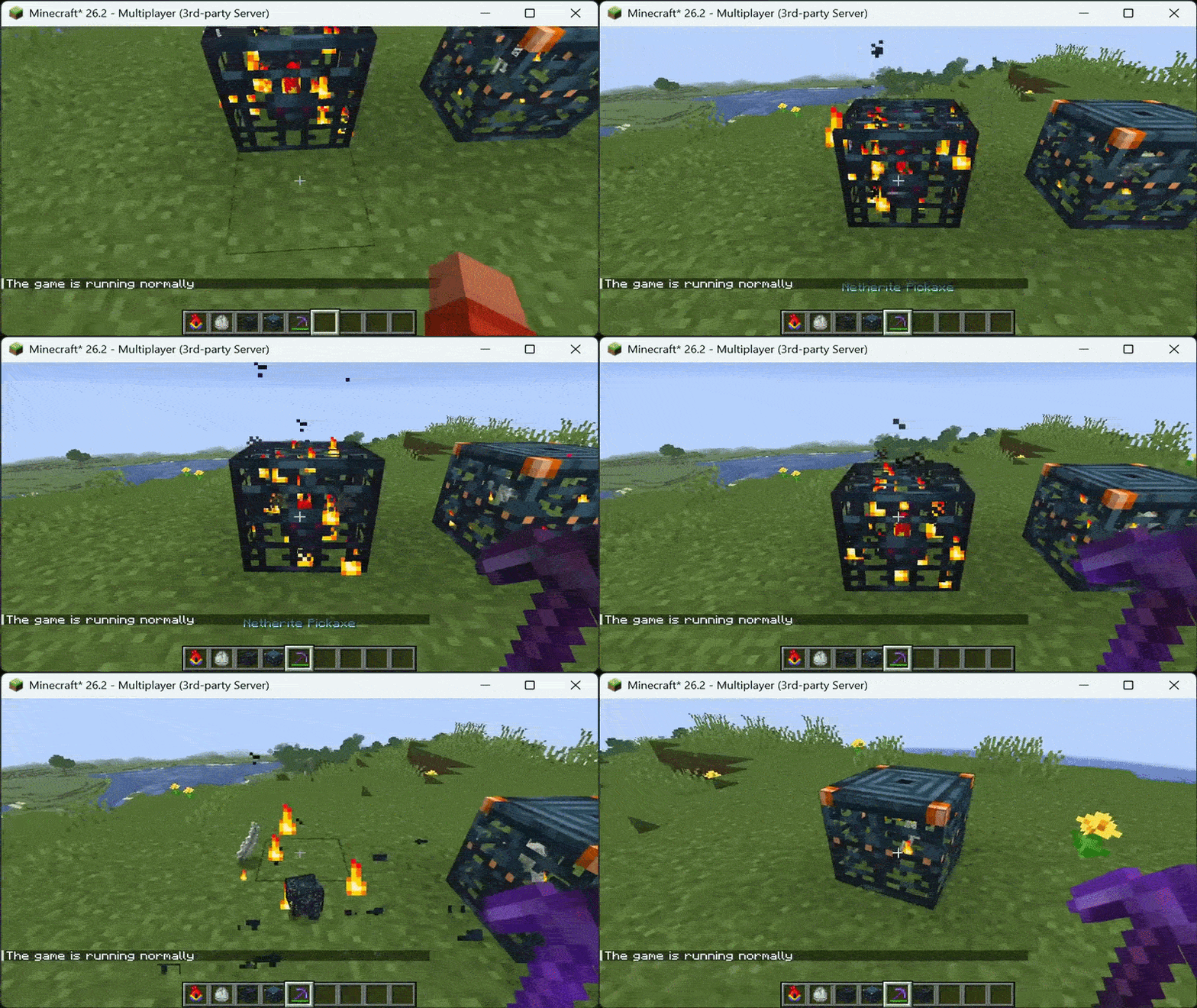
Breakableblocks is a server-side Fabric mod that makes normally unbreakable or restricted blocks mineable with exact timings, tool requirements, custom drops, and explosion protection. It is configured through a single JSON5 file on the server. Vanilla clients can join without installing anything.
Server owners use it to open up progression on bedrock, barriers, command blocks, portal blocks, spawners, trial spawners, vaults, end gateways, reinforced deepslate, and any other registered block ID, while keeping full control over how long each block takes and what it drops.
What the mod does
- Makes configured blocks breakable with server-authoritative mining sessions.
- Tracks mining progress every server tick and shows the normal block-cracking animation.
- Shows an action-bar progress bar with percent, a text bar, and seconds remaining.
- Requires specific tools, material tiers, and Silk Touch before mining can start.
- Replaces vanilla drops with a configured item and count after the timer completes.
- Optionally preserves supported block entity data on the dropped item.
- Protects configured blocks from explosions by filtering them before destruction.
- Optionally restricts sensitive blocks to server operators.
- Cancels safely when the player stops mining, disconnects, changes dimension, moves too far away, or the block changes.
- Reloads configuration without restarting the server.
Custom mining only applies to blocks listed in the config. All other blocks use normal vanilla behavior.
Installation
- Install Fabric Loader 0.19.3 or newer for Minecraft 1.21.11, or 0.19.3+ for 26.1 and 26.2, or 0.19.5+ for 26.3.
- Install the matching Fabric API version.
- Download the Breakableblocks file that matches your Minecraft version:
- 1.21.11: Java 21 required
- 26.1, 26.1.1, 26.1.2: Java 25 required
- 26.2: Java 25 required
- 26.3: Java 25 required
- Place the JAR in the server
modsfolder. The mod is only required on the server. - Start the server once to generate
config/block-configuration.json5. - Edit the file, then run
/blockconfiguration reloadin game or restart the server.
No client mod, resource pack, or extra setup is needed for players.
Configuration
The config file is created at:
config/block-configuration.json5Each top-level key is a namespaced block ID. The file supports comments and trailing commas.
Simple example:
{
  "minecraft:bedrock": {
    "breakSeconds": 30,
    "tool": "netherite_pickaxe",
    "drop": "minecraft:bedrock x1",
    "blastResistant": true
  },
  "minecraft:spawner": {
    "breakSeconds": 15,
    "tool": "netherite_pickaxe",
    "drop": "minecraft:spawner x1",
    "preserveBlockEntity": true,
    "blastResistant": true
  },
  "minecraft:command_block": {
    "breakSeconds": 5,
    "tool": "netherite_pickaxe",
    "drop": "minecraft:command_block x1",
    "blastResistant": true,
    "operatorOnly": true
  }
}
Simple fields
| Field | Type | Description |
| — | — | — |
| breakSeconds | Number | Mining time in seconds. 20 ticks equals 1 second. Sets FIXED_TICKS mode automatically. |
| tool | String | Tool requirement in one value, for example netherite_pickaxe, diamond_pickaxe, iron_axe, or any for no requirement. |
| drop | String | Drop in one value, for example minecraft:bedrock x1 or minecraft:torch x4. Use count 0 or an empty value for no drop. |
| blastResistant | Boolean | If true, explosions do not destroy the block. Simple alias for explosionResistant. |
| operatorOnly | Boolean | If true, only server operators can mine the block. Simple alias for protectionBehavior: OPERATOR_ONLY. |
| requireSilkTouch | Boolean | If true, the held tool must have Silk Touch. |
| preserveBlockEntity | Boolean | If true, supported block entity data is copied to the dropped item. Test data-bearing blocks before production use. |
| enabled | Boolean | If false, the entry is ignored. Default is true. |
Advanced fields
Advanced fields are still supported for backwards compatibility and fine control.
| Field | Type | Description |
| — | — | — |
| miningMode | String | VANILLA for normal breaking, FIXED_TICKS for configured duration, CUSTOM_HARDNESS for hardness-derived duration. |
| fixedTicks | Integer | Exact duration in server ticks for FIXED_TICKS. Must be greater than zero. breakSeconds fills this automatically when empty. |
| customHardness | Number | Hardness value used only with CUSTOM_HARDNESS mode. |
| requiredTool | String | Tool family: pickaxe, axe, shovel, or hoe. Empty means any tool. |
| requiredTier | String | Minimum tier: wood, stone, gold, iron, diamond, or netherite. Empty means no tier requirement. |
| dropItem | String | Namespaced item ID for the configured drop. Empty means no configured drop. |
| dropCount | Integer | Drop amount from 0 to 2304. Large counts are split into multiple stacks. |
| explosionResistant | Boolean | If true, explosions do not destroy the block. Default is true when the field is omitted in older configs. |
| protectionBehavior | String | NORMAL for everyone, OPERATOR_ONLY for operators only. |
| failureFeedback | String | ACTION_BAR for action-bar messages, CHAT for chat messages, NONE to hide requirement messages and mining progress. |
| placementBehavior | String | Reserved for protection integrations. Normal gameplay uses NORMAL. |
Notes:
dropItem,dropCount, and block entity preservation apply to custom mining sessions. Blocks left onVANILLAkeep normal loot behavior.- Invalid entries are skipped and logged. If the file cannot be parsed, the previous valid configuration stays active.
- Block and item IDs must use the full
namespace:pathformat. - Timers use server ticks. Heavy lag can make real-world completion time longer.
Commands
All commands use the base /blockconfiguration.
| Command | Description |
| — | — |
| /blockconfiguration | Shows help with all subcommands. |
| /blockconfiguration help | Shows help with all subcommands. |
| /blockconfiguration list | Lists every active block rule with time, tool requirement, and drop summary. |
| /blockconfiguration inspect <block> | Shows the active settings for one exact block ID, for example /blockconfiguration inspect minecraft:bedrock. |
| /blockconfiguration reload | Reloads and validates config/block-configuration.json5 without restarting. Reports how many blocks are active. |
| /blockconfiguration validate | Reports how many valid and enabled entries are currently active. |
Block IDs in commands must include the namespace, for example minecraft:bedrock.
Server behavior
- The target block must still match the block that started the session.
- The player must stay alive, connected, in the same dimension, and within 8 blocks.
- Releasing or aborting the mining action cancels the session.
- Switching targets clears the previous cracking animation.
- Drops spawn on the server only after the full duration completes.
- Explosion-protected positions are removed before the explosion destroys blocks.
- Operator-only blocks are checked before tool checks begin.
Version support
| Mod file | Minecraft | Java | Loader | Fabric API |
| — | — | — | — | — |
| 1.0.0+1.21.11 | 1.21.11 | 21 | 0.19.3+ | 0.141.5+1.21.11 |
| 1.0.0+26.1 | 26.1, 26.1.1, 26.1.2 | 25 | 0.19.3+ | 0.145.1+26.1 |
| 1.0.0+26.2 | 26.2 | 25 | 0.19.3+ | 0.155.2+26.2 |
| 1.0.0+26.3 | 26.3 | 25 | 0.19.5+ | 0.161.0+26.3 |
Fabric API is required on the server. Clients do not need the mod.
License
All Rights Reserved.
常见问题
Breakable Blocks 支持哪些 Minecraft 版本?
Breakable Blocks 支持 Minecraft Java 版 1.21–26.3,共 17 个版本,可用的加载器:Fabric。下载时注意选择和你游戏版本一致的文件。
Breakable Blocks 怎么安装?
先用 PCL2 或 HMCL 启动器安装对应版本的 Fabric,再把下载的 .jar 文件放进游戏目录的 mods 文件夹,重新启动游戏即可。开启了版本隔离的,mods 文件夹在 versions/版本名 下面。运行环境:仅服务端。
Fabric Server Essentials 的其他作品
查看全部 →
Vein Miner
Viper Vein Miner is a lightweight, Server-Side vein-mining mod. Break one ore or log and mine its connected vein in a single action

Viper AntiXray
ViperAntiXray is an ultra-high-performance, 100% server-side Fabric utility engineered to secure server economies by completely blinding client-side X-Ray radars.

Custom Dimensions
Server-side Fabric mod for persistent custom dimensions and two-way portals.
Custom Dimensions
Server-side Fabric mod for persistent custom dimensions and two-way portals.
评论
登录后评论和评分