
Bossbar
Create health bars for bosses or entities: easy, performance-friendly, feature-rich.
截图
介绍
Bossbar
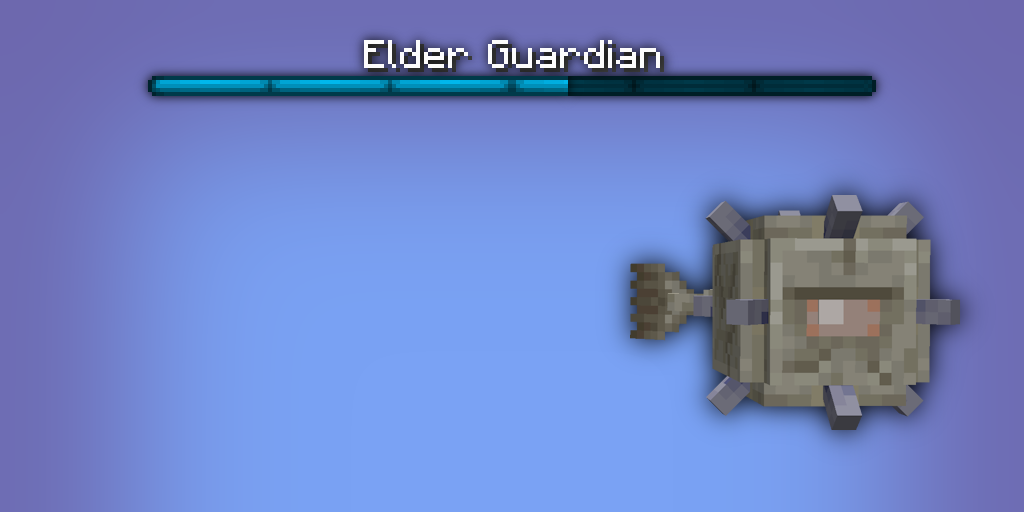
Enhancing Minecraft’s bossbar functionality by properly extending it to entities. No more complicated command block setup, lag-inducing detection logic, and cheap attempts at recreating the real deal. This is the real deal now.
✅ Features
- Entity bossbars take the name, health and max health of its entity.
- Range can be specified for entity bossbars, meaning it’s only visible to local players.
- Default bossbars can be configured (see Configuration)
- Thicken fog & darken skies with the extended functionality given to entity bossbars.
- Server-side, meaning clients don’t need to download it to connect.
- Easy to use with the “
/bossbar“ command, swap out a bossbar id with a target selector, and done! - Optimized to a lagless extend, compared to Minecraft’s bulky command code.
⚙️ Configuration
Configuration can be found in “config\bossbar.json“.
- “
default“: - “
<entity_type>“: resource_location - “
range“: integer\
Set the entity bossbar’s range. Defaults to “64“. Any player outside of this range won’t see the entity bossbar.
- “
darken_sky“: bool\
Set if entity bossbar darkens the sky. Defaults to “false“.
- “
thicken_fog“: bool\
Set if entity bossbar thickens the fog. Defaults to “false“.
- “
color`:`(blue|green|pink|purple|red|white|yellow)“\
Set the entity bossbar’s bar color. Defaults to “purple“.
- “
style`:`(notched_6|notched_10|notched_12|notched_20|progress)“\
Set the entity bossbar’s visual amount of segments. Defaults to “progress“.
- “
register_before_vanilla“: bool\
Register the command extension before vanilla, attempting to parse the bossbar argument as an entity before a server bossbar id. Defaults to “false“.
📖 Syntax
- “
bossbar set <target> (visible|range|darken_sky|thicken_fog|color|style)“ - “
... visible <visible>“\
Set the entity bossbar’s visibility. Defaults to “false“ for every entity, disabling their bossbar.
- “
... range <range>“\
Set the entity bossbar’s range. Defaults to “64“. Any player outside of this range won’t see the entity bossbar.
- “
... darken_sky <darken_sky>“\
Set if entity bossbar darkens the sky. Defaults to “false“.
- “
... thicken_fog <thicken_fog>“\
Set if entity bossbar thickens the fog. Defaults to “false“.
- “
... color (blue|green|pink|purple|red|white|yellow)“\
Set the entity bossbar’s bar color. Defaults to “purple“.
- “
... style (notched_6|notched_10|notched_12|notched_20|progress)“\
Set the entity bossbar’s visual amount of segments. Defaults to “progress“.
📦 Arguments
- “
<target>“: entity - Specifies the entity whose bossbar is to change.\
Must be a player name, a target selector or a UUID.
- “
<visible>“: bool - Specifies the bossbar’s visibility.\
Must be either “true` or `false“.
- “
<range>“: integer - Specifies the bossbar’s range.\
Must be a 32-bit integer number between “0` and `2147483647“ (inclusive).
- “
<darken_sky>“: bool - Specifies if the bossbar darkens the sky.\
Must be either “true` or `false“.
- “
<thicken_fog>“: bool - Specifies if the bossbar thickens the fog.\
Must be either “true` or `false“.
常见问题
Bossbar 支持哪些 Minecraft 版本?
Bossbar 支持 Minecraft Java 版 1.20.4–26.1.2,共 15 个版本,可用的加载器:Fabric。下载时注意选择和你游戏版本一致的文件。
Bossbar 怎么安装?
先用 PCL2 或 HMCL 启动器安装对应版本的 Fabric,再把下载的 .jar 文件放进游戏目录的 mods 文件夹,重新启动游戏即可。开启了版本隔离的,mods 文件夹在 versions/版本名 下面。运行环境:仅服务端。
boyonk 的其他作品
查看全部 →
Music Sync
Sync music with everyone online!

Enchanted Bookshelves
Enchanted Books will glint when put in Chiseled Bookshelves! Give your enchanting room a cosmetic shine!

Persistent Parrots
Parrots have been 'trained' to remain perched on your shoulders!

REPO Heads
Client-sided voice chat integration for R.E.P.O.-styled eye & mouth animations.
评论
登录后评论和评分