
Boss Checklist Additions
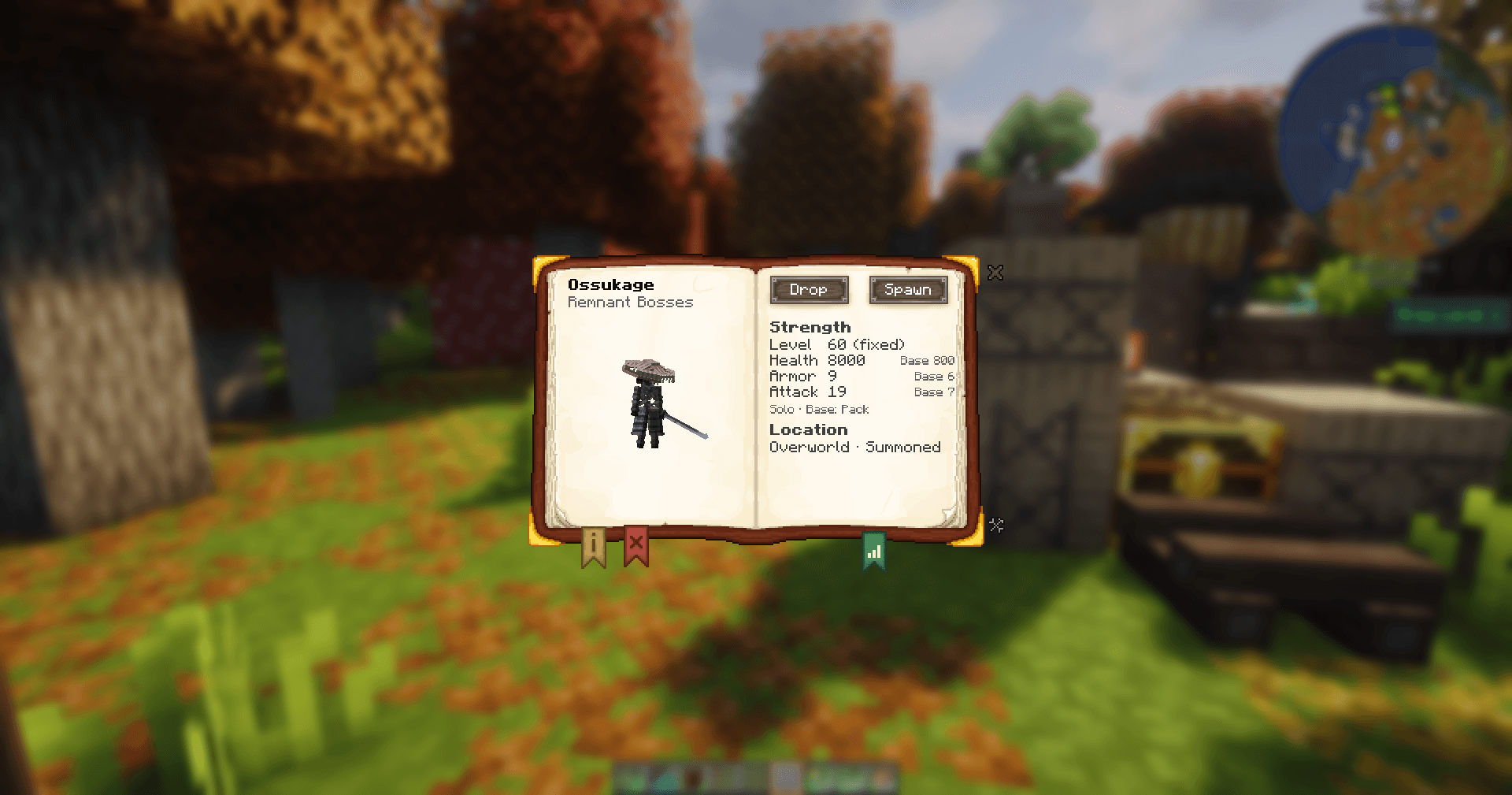
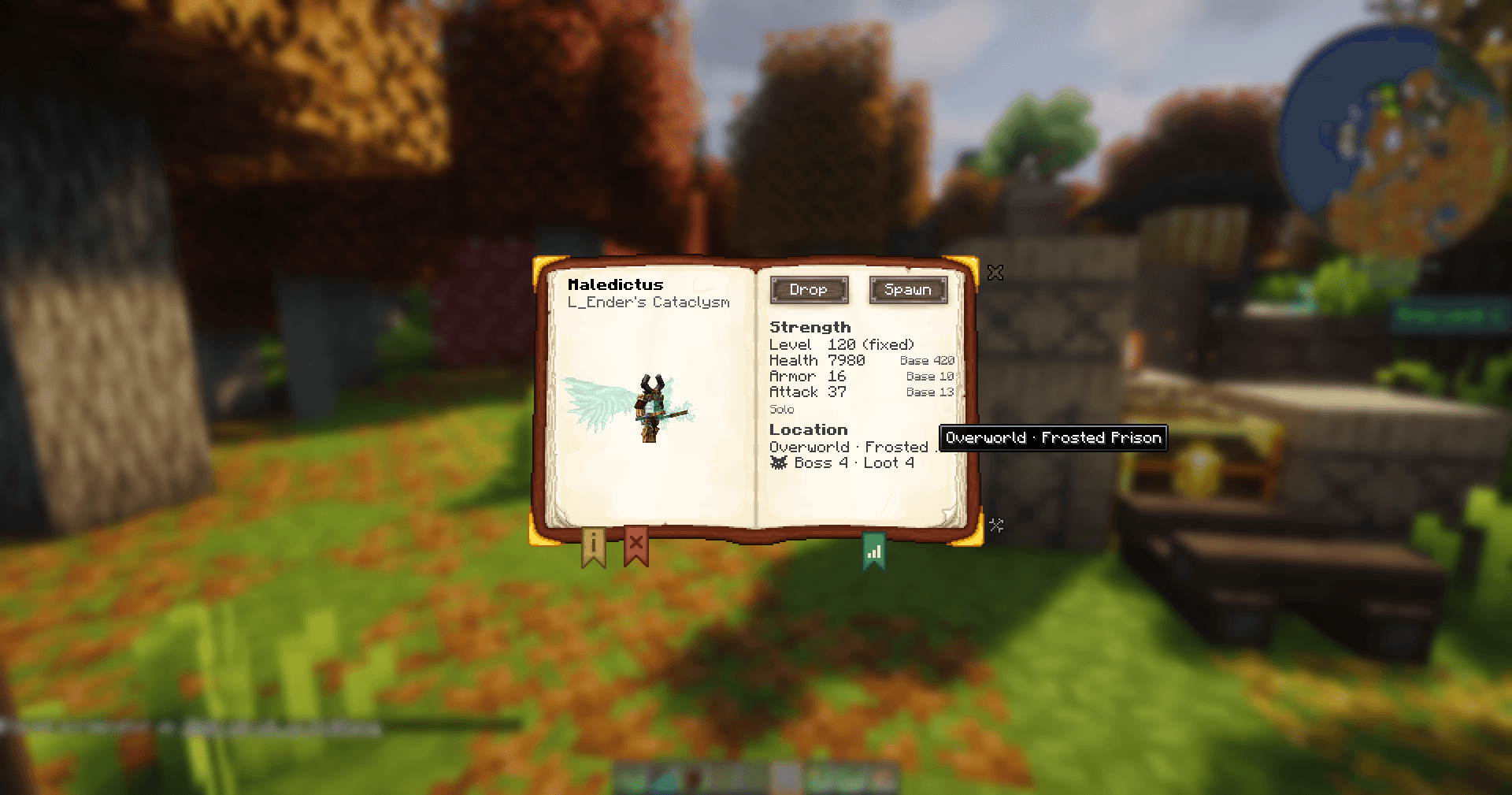
Shows the real boss stats of your modpack in Boss Checklist (Dynamic Difficulty, Dungeon Difficulty), plus location, zone, loot level and missing bosses.
截图
介绍
Boss Checklist Additions
📖 See how strong a boss really is in your modpack, and what it actually drops. Boss Checklist shows the base stats and a hand-written drop list for every boss, but in a modpack with Dynamic Difficulty or Dungeon Difficulty those stats can be far off: Ignis is listed with 450 health and ends up with 8,550. Boss Checklist Additions replaces them with the stats the boss actually has in your pack, shows where it’s found and how dangerous that place is, replaces the drop list with the boss’s real, simulated loot, and brings back bosses that Boss Checklist leaves out.
🔎 Overview
| Parameter | Specification |
|---|---|
| 🎮 Minecraft | 1.21.1 |
| ⚙️ Modloader | NeoForge |
| 🖥️ Side | Client & Server (required on both for the real stats) |
| 📚 Requires | Boss Checklist 5.3.x |
| 🤝 Works with | Dynamic Difficulty and/or Dungeon Difficulty (both optional) |
⚔️ Real Boss Stats
- The Health and Armor tooltip in the boss info screen shows the real values instead of the base values, for example
Health: 8550 (Base 450). - Bosses that have a level range in Dynamic Difficulty show the full range, for example
Health: 2975–5600 (Base 350)andLvl 50–100. - All values are solo values, the way you’ll meet the boss when playing alone.
- The numbers aren’t typed in by hand: the server calculates them live from the configs that are actually active. Change your balancing, run
/reload, and the checklist is up to date.
📑 Pack Info Tab
A new green bookmark in the boss book opens the Pack Info page:
- Strength — level, health, armor and attack, each next to its base value.
- Location — dimension and structure (or biome, or summoned / roams freely).
- Zone — the Dungeon Difficulty zone of that place and its loot level, so you know whether the trip is worth it.
🏰 Dungeon Difficulty
If Dungeon Difficulty is installed, the zone of the boss is resolved from your Dungeon Difficulty config using the dimension and the location of its pack file, and the attribute bonuses of that zone are included in the stats. Random bonuses are shown as their average and marked with ≈. Like everything else, this is the solo value.
🎁 Real Drops
- The Drops tab of the boss book shows the boss’s real loot instead of Boss Checklist’s static, hand-maintained list: every item with the chance it showed up in a simulated solo kill without Looting, for example
73%or100% x2. - This picks up loot from datapacks, KubeJS and Global Loot Modifiers, and — if Dynamic Difficulty gives the boss a level range — its level-gated drops too, instead of them never showing up at all.
- No items are ever created and the world’s own randomness is never touched; the simulation uses its own, separate random source.
- Results are saved and reused across restarts and
/reload, so a big modpack only pays the simulation cost once; it only runs again when mods, datapacks or the boss’s loot table actually change. - Drops a mod hands out from its own code instead of a loot table (for example the Wither’s Nether Star) can’t be simulated; Boss Checklist’s own entry for them is kept and marked
?instead of being lost. - The tab updates itself live, without needing to be reopened, once a boss’s simulation finishes.
🏷️ Boss Tiers
If your pack groups its bosses into difficulty tiers, give each one a tier field (a whole number, 1 or higher) in its pack file. The addon doesn’t know or care how many tiers you use or what they mean — that grouping is entirely up to your pack, the same as location and base values. The tier shows up at the top of the Pack Info tab, in the stats tooltip, and as a tooltip when hovering a boss in Boss Checklist’s own list.
By default a tier is just named “Tier <n>” and colored automatically: green for the lowest tier, through yellow, orange and red, to a fixed violet for the highest one. Both the name and the color can be overridden per tier with language keys, so “Tier 7” can become “Tier 7 · Endgame” in your own color.
👻 Missing Bosses
Boss Checklist drops every entry whose entity namespace isn’t a loaded mod id — which hides bosses from mods that register their entities under a different name (Remnant Bosses, for example). Boss Checklist Additions keeps those entries as long as the entity exists, and can hide broken entries whose entity doesn’t exist at all.
🛠️ For Modpack Developers
Everything pack-specific comes from data files, so the addon works in any pack. With a datapack or KubeJS you can describe each boss in data/<namespace>/boss_checklist_additions/bosses/<name>.json:
{
  "entity": "cataclysm:ignis",
  "dimension": "minecraft:the_nether",
  "location": { "type": "structure", "id": "cataclysm:burning_arena" }
}location.typecan bestructure,biome,summonedornatural.base_attributesoverrides the base health, armor and attack for bosses that only set their real values when they spawn.loot_tablespoints the Drops simulation at the right table(s) for a boss that fills a reward chest on death instead of dropping items itself (for example Bosses of Mass Destruction’s Obsidilith).tiergives a boss a difficulty tier (a whole number, 1 or higher) — entirely up to your pack, see “Boss Tiers” below.hidden: trueleaves a boss completely untouched.- Structure names use the same
structure.<namespace>.<path>translation keys as Explorer’s Compass, so both show the same name. - New bosses are added through Boss Checklist’s own files (
bosses.json,server_bosses_ids.jsonand its lang file) — the addon makes sure they aren’t filtered out. - Commands for checking your setup:
/bcadditions dumplists all calculated stats,/bcadditions dropslists the simulated drops (refreshdiscards the saved ones and simulates everything again),/bcadditions comparecompares the prediction with the boss you’re looking at,/bcadditions observedandforget <entity>manage the base values learned from spawned bosses.
The full format is documented in the README.
🌐 Multiplayer & Servers
All stats are calculated on the server and sent to the clients when they join and after every /reload — in singleplayer and on dedicated servers alike. If the server doesn’t have the addon, Boss Checklist simply stays as it is and the Pack Info tab tells you why.
📌 Good to Know
- Bosses without their own Dynamic Difficulty settings get their level from wherever they spawn. For those, the addon can’t include the Dynamic Difficulty level of their location and marks them as depends on location.
- Zones need a place. A zone comes from the structure or biome in the pack file. A summoned or free-roaming boss gets no structure or biome zone, only the entity entries (for example Wither or Ender Dragon) and the dimension-wide difficulty of Dungeon Difficulty apply.
- Dungeon Difficulty has no public API. The zone is read through internal classes, so a future Dungeon Difficulty update may temporarily break it. If that happens, the addon switches the zone off and logs it once — your game keeps running.
- Drop chances are an estimate from 100–300 simulated kills, not calculated probabilities, and assume a solo kill without Looting. Very rare drops (below about 0.3%) can occasionally be missing, and drops that depend on the player (for example Apotheosis gems scaling with a world tier) are simulated with a default player.
- Tied to Boss Checklist 5.3.x. The addon hooks into Boss Checklist’s screens. If a new Boss Checklist version changes them, the extra info simply disappears instead of crashing until the addon is updated.
⚙️ Configuration
- Client (
config/boss_checklist_additions-client.toml): replace the stats, show the Pack Info tab, hide broken entries, replace the drop list with the simulated one, show boss tiers. - Server (
<world>/serverconfig/boss_checklist_additions-server.toml): learn base values from spawned bosses, include Dungeon Difficulty, cache the simulated drops, debug logging.
🙏 Credits
- Built for Boss Checklist by Yori3o. Boss Checklist Additions is an unofficial addon and not affiliated with Boss Checklist.
- Works with Dynamic Difficulty by MuonR and Dungeon Difficulty by ZsoltMolnarrr.
- Source code on GitHub under the MIT license. Bug reports and suggestions are welcome in the issue tracker or in the comments.
常见问题
Boss Checklist Additions 支持哪些 Minecraft 版本?
Boss Checklist Additions 支持 Minecraft Java 版 1.21.1,可用的加载器:NeoForge。下载时注意选择和你游戏版本一致的文件。
Boss Checklist Additions 怎么安装?
先用 PCL2 或 HMCL 启动器安装对应版本的 NeoForge,再把下载的 .jar 文件放进游戏目录的 mods 文件夹,重新启动游戏即可。开启了版本隔离的,mods 文件夹在 versions/版本名 下面。
Drehverschluss 的其他作品
查看全部 →
ImmersiveRPG&MineColonies
An immersive, challenging RPG survival with classes, bosses and MineColonies – optimized for long‑term worlds and high render distances.

JourneyMap Extra InfoSlots
Adding some new JourneyMap InfoSlots to display information from other mods.

Fresh Colonists
Gives MineColonies citizens & settlers a Fresh Animations-style walk cycle, bending knees, and blinking eyes.

Modern Enchantments Limiter
Limits how many enchantments an item can carry, with configurable base limits, rarity bonuses, and per-tag overrides.
评论
登录后评论和评分